Da cTrader-Indikatoren und cBots .NET-Anwendungen darstellen, können Sie beim Erstellen alle .NET-Technologien verwenden, einschließlich UI-bezogener Lösungen wie WinForms und WPF. cTrader unterstützt alle von WinForms und WPF angebotenen Funktionen, einschließlich Dialoge, Formulare, den Visual Studio WinForms-Designer, UI-Steuerelemente und -Komponenten von Drittanbietern.
Hinweis
Algorithmen, die WinForms oder WPF verwenden, können nur auf Windows-Rechnern ausgeführt werden.
Um WinForms zu verwenden, ändern Sie Ihren cTrader-Compiler auf den .NET SDK-Compiler.
Wir zeigen, wie WinForms verwendet werden können, indem wir einen benutzerdefinierten WinForms-Dialog erstellen. Diese sind nützlich, um Warnungen anzuzeigen oder Benutzereingaben anzufordern.
Ihr Projekt konfigurieren
Bevor Sie WinForms in Ihren cBots und Indikatoren verwenden können, müssen Sie mehrere Änderungen in Ihrer bzw. Ihren cBot- oder Indikator-Projektdatei(en) vornehmen. Da WinForms nur unter Windows funktioniert, müssen Sie das Ziel Ihres Indikators oder cBots auf die Windows-Variante von .NET ändern.
Öffnen Sie dazu Ihre Projektdatei in Visual Studio und ersetzen Sie deren Inhalt durch Folgendes:
Wir haben das Tag UseWindowsForms hinzugefügt und den Wert von TargetFramework in net6.0-windows geändert.
Ändern Sie anschließend den Wert des Klassenparameters AccessRights in FullAccess. Sofern diese Änderung nicht vorgenommen wird, verfügt Ihre Erweiterung nicht über ausreichende Zugriffsrechte, um ein WinForms-Fenster zu öffnen.
Erstellen Sie Ihr Projekt nach den oben genannten Änderungen neu.
Dialoge verwenden
Glücklicherweise enthält WinForms mehrere gebrauchsfertige Dialoge, die für eine Vielzahl von Fällen nützlich sind, insbesondere zum Anzeigen einer Fehlermeldung, zum Einholen einer Bestätigung vom Benutzer oder zum Auswählen einer Datei oder eines Ordners.
Das folgende Beispiel verwendet die Klasse MessageBox und die Dialoge zum Öffnen und Speichern von Dateien.
MessageBox
Sie können die Klasse System.Windows.Forms.MessageBox auf die gleiche Weise verwenden, wie sie in jeder anderen .NET-Anwendung verwendet wird.
Der folgende Code fügt einem Indikator ein Standard-Bestätigungsfeld hinzu:
usingcAlgo.API;usingSystem.Windows.Forms;namespaceWinFormsTest{[Indicator(IsOverlay = true, AccessRights = AccessRights.FullAccess)]publicclassWinFormsTest:Indicator{protectedoverridevoidInitialize(){varresult=System.Windows.Forms.MessageBox.Show("Are you sure you want confirm?","Confirmation",MessageBoxButtons.OKCancel,MessageBoxIcon.Information);if(result==DialogResult.OK){Print("OK");}else{Print("Cancel");}}publicoverridevoidCalculate(intindex){}}}
Nachdem Sie eine Instanz dieses Indikators ausgeführt haben, sollten Sie sofort ein Bestätigungsfeld mit dem oben angegebenen Text sehen.
Dialoge zum Öffnen oder Speichern von Dateien
Der Dialog zum Öffnen oder Speichern von Dateien kann verwendet werden, um cBots und Indikatoren das Durchsuchen und Auswählen lokal gespeicherter Dateien zu ermöglichen.
In den Beispielen haben wir einen separaten Thread verwendet, um den Code im Zusammenhang mit unseren Dialogen auszuführen. Dies wurde getan, um der Tatsache Rechnung zu tragen, dass der Haupt-cBot- oder Indikator-Thread kein STA-Thread ist. Wir gehen im folgenden Abschnitt näher auf dieses Problem ein.
Verwenden Sie einen dedizierten Thread für die Benutzeroberfläche
Wenn Sie Code ausführen, der auf WinForms verweist, müssen Sie einen STA-markierten Thread verwenden, da es andernfalls während der Ausführung zu Fehlern kommen kann. Weitere Informationen finden Sie in der offiziellen Dokumentation.
Sie können die ApartmentState-Eigenschaft eines bereits laufenden Threads nicht ändern. Da der Haupt-cBot- oder Indikator-Thread nicht STA-markiert ist, müssen Sie einen neuen STA-markierten Thread für WinForms und WPF verwenden.
Der Code im vorherigen Abschnitt ruft auch die Methode thread.Join() auf. Sie blockiert die Ausführung des Haupt-cBot- oder Indikator-Threads, bis der UI-bezogene Thread freigegeben wird (z. B. wenn ein Benutzer in einem Bestätigungsdialog auf OK klickt).
Wann immer Sie ein Windows Form oder ein WPF-Element anzeigen möchten, müssen Sie Ihren Code in einem separaten STA-markierten Thread ausführen.
Erstellen Sie ein neues benutzerdefiniertes Formular
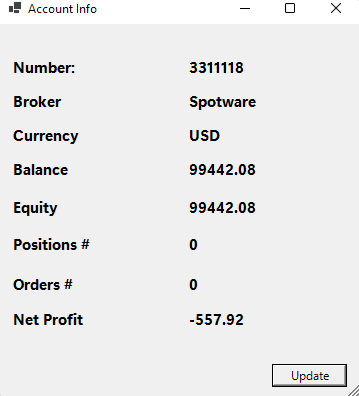
Bisher haben wir integrierte WinForms-Klassen verwendet. Es ist jedoch auch möglich, benutzerdefinierte Klassen zu erstellen. In diesem Abschnitt erstellen wir ein Formular, das Informationen über das aktuell aktive Handelskonto anzeigt, wie z. B. dessen Saldo und Margin.
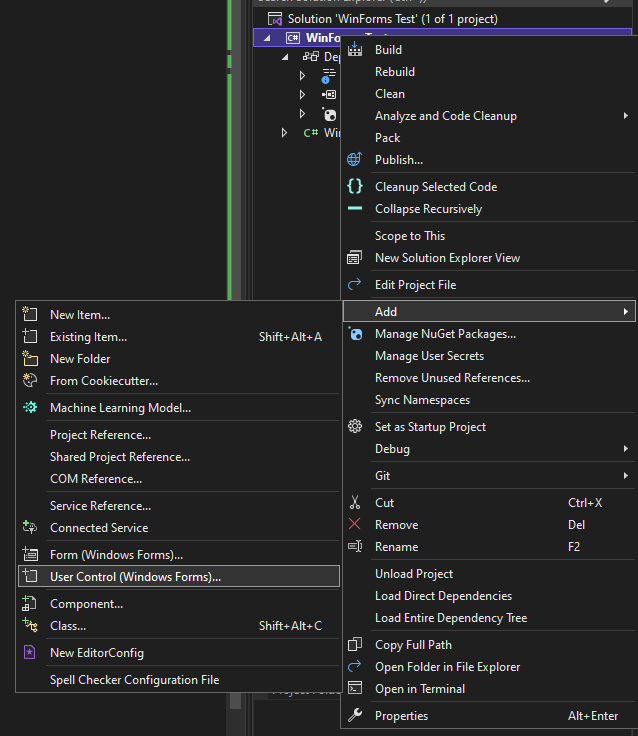
Um ein neues Formular zu erstellen, klicken Sie mit der rechten Maustaste auf Ihren cBot oder Indikator in Visual Studio, klicken Sie auf Hinzufügen und wählen Sie Benutzersteuerelement (Windows Forms) ...
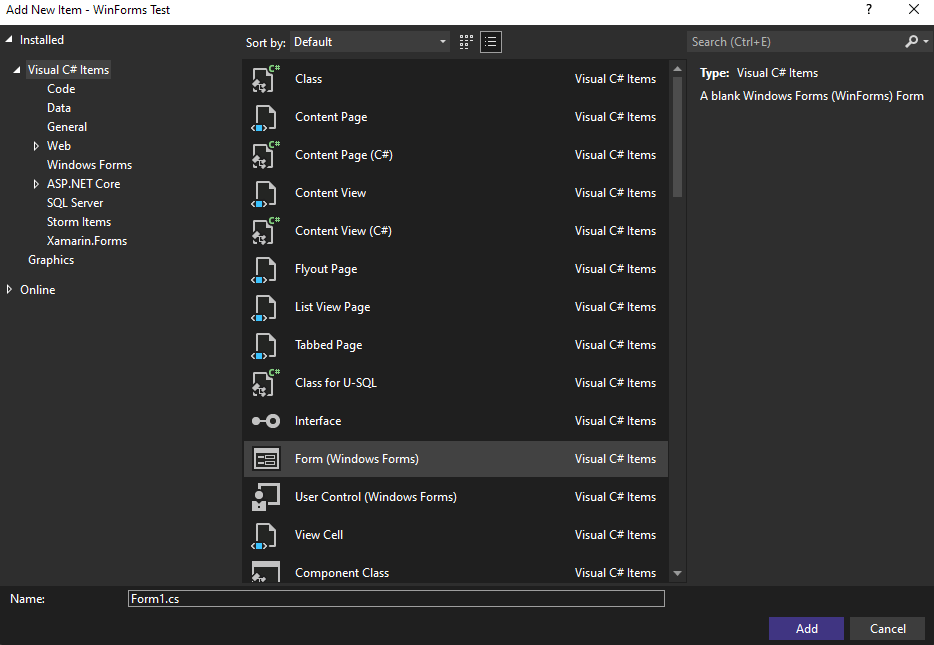
Visual Studio öffnet ein Dialogfenster, in dem Sie den Typ des Elements auswählen können, das Sie Ihrem Projekt hinzufügen möchten. Wählen Sie Formular (Windows Forms) (Visual Studio sollte dies automatisch auswählen).
Ändern Sie anschließend den Formularnamen von Form1.cs in AccountInfoForm.cs. Klicken Sie auf die Schaltfläche Hinzufügen.
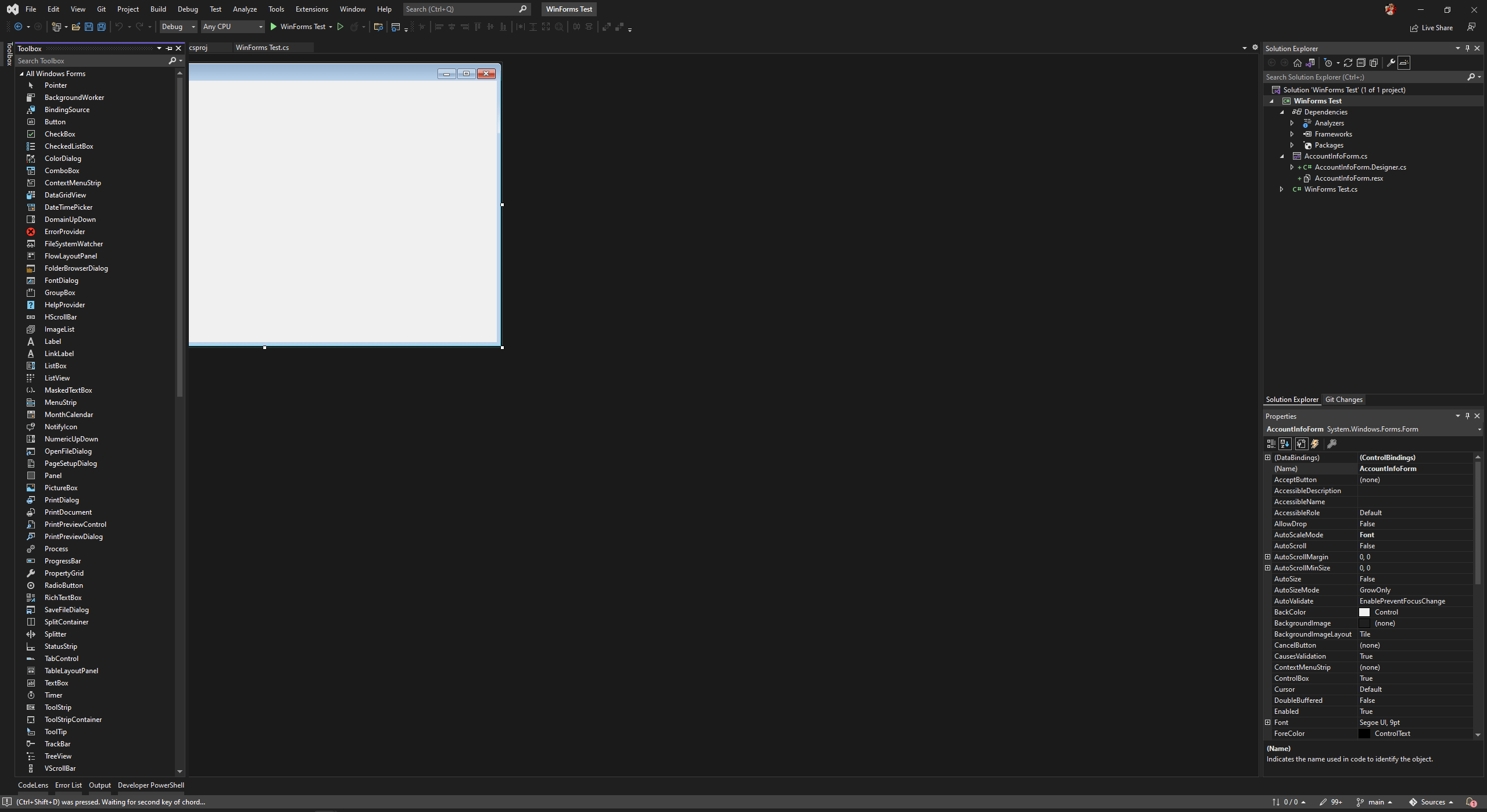
Ein neues Formular wird in Ihrem Projekt erstellt; die IDE zeigt den Visual Studio WinForms-Designer an. Dadurch können Sie alle seine Funktionen nutzen, einschließlich des Hinzufügens von Steuerelementen über eine Toolbox.
In diesem Beispiel haben wir bereits ein Formular erstellt. Kopieren Sie den folgenden Code und fügen Sie ihn in die Datei AccountIntoForm.Designer.cs ein:
namespaceWinForms_Test{partialclassAccountInfoForm{/// <summary>/// Required designer variable./// </summary>privateSystem.ComponentModel.IContainercomponents=null;/// <summary>/// Clean up any resources being used./// </summary>/// <param name="disposing">true if managed resources should be disposed; otherwise, false.</param>protectedoverridevoidDispose(booldisposing){if(disposing&&(components!=null)){components.Dispose();}base.Dispose(disposing);}#region Windows Form Designer generated code/// <summary>/// Required method for Designer support - do not modify/// the contents of this method with the code editor./// </summary>privatevoidInitializeComponent(){this.label1=newSystem.Windows.Forms.Label();this.NumberLabel=newSystem.Windows.Forms.Label();this.BrokerLabel=newSystem.Windows.Forms.Label();this.label3=newSystem.Windows.Forms.Label();this.CurrencyLabel=newSystem.Windows.Forms.Label();this.label5=newSystem.Windows.Forms.Label();this.BalanceLabel=newSystem.Windows.Forms.Label();this.label7=newSystem.Windows.Forms.Label();this.EquityLabel=newSystem.Windows.Forms.Label();this.label9=newSystem.Windows.Forms.Label();this.PositionsNumberLabel=newSystem.Windows.Forms.Label();this.label11=newSystem.Windows.Forms.Label();this.OrdersNumberLabel=newSystem.Windows.Forms.Label();this.label13=newSystem.Windows.Forms.Label();this.NetProfitLabel=newSystem.Windows.Forms.Label();this.label15=newSystem.Windows.Forms.Label();this.UpdateButton=newSystem.Windows.Forms.Button();this.SuspendLayout();// // label1// this.label1.AutoSize=true;this.label1.Font=newSystem.Drawing.Font("Segoe UI Variable Display",11.25F,System.Drawing.FontStyle.Bold,System.Drawing.GraphicsUnit.Point);this.label1.Location=newSystem.Drawing.Point(12,33);this.label1.Name="label1";this.label1.Size=newSystem.Drawing.Size(72,20);this.label1.TabIndex=0;this.label1.Text="Number:";// // NumberLabel// this.NumberLabel.AutoSize=true;this.NumberLabel.Font=newSystem.Drawing.Font("Segoe UI Variable Display",11.25F,System.Drawing.FontStyle.Bold,System.Drawing.GraphicsUnit.Point);this.NumberLabel.Location=newSystem.Drawing.Point(188,33);this.NumberLabel.Name="NumberLabel";this.NumberLabel.Size=newSystem.Drawing.Size(0,20);this.NumberLabel.TabIndex=1;// // BrokerLabel// this.BrokerLabel.AutoSize=true;this.BrokerLabel.Font=newSystem.Drawing.Font("Segoe UI Variable Display",11.25F,System.Drawing.FontStyle.Bold,System.Drawing.GraphicsUnit.Point);this.BrokerLabel.Location=newSystem.Drawing.Point(188,67);this.BrokerLabel.Name="BrokerLabel";this.BrokerLabel.Size=newSystem.Drawing.Size(0,20);this.BrokerLabel.TabIndex=3;// // label3// this.label3.AutoSize=true;this.label3.Font=newSystem.Drawing.Font("Segoe UI Variable Display",11.25F,System.Drawing.FontStyle.Bold,System.Drawing.GraphicsUnit.Point);this.label3.Location=newSystem.Drawing.Point(12,67);this.label3.Name="label3";this.label3.Size=newSystem.Drawing.Size(56,20);this.label3.TabIndex=2;this.label3.Text="Broker";// // CurrencyLabel// this.CurrencyLabel.AutoSize=true;this.CurrencyLabel.Font=newSystem.Drawing.Font("Segoe UI Variable Display",11.25F,System.Drawing.FontStyle.Bold,System.Drawing.GraphicsUnit.Point);this.CurrencyLabel.Location=newSystem.Drawing.Point(188,101);this.CurrencyLabel.Name="CurrencyLabel";this.CurrencyLabel.Size=newSystem.Drawing.Size(0,20);this.CurrencyLabel.TabIndex=5;// // label5// this.label5.AutoSize=true;this.label5.Font=newSystem.Drawing.Font("Segoe UI Variable Display",11.25F,System.Drawing.FontStyle.Bold,System.Drawing.GraphicsUnit.Point);this.label5.Location=newSystem.Drawing.Point(12,101);this.label5.Name="label5";this.label5.Size=newSystem.Drawing.Size(75,20);this.label5.TabIndex=4;this.label5.Text="Currency";// // BalanceLabel// this.BalanceLabel.AutoSize=true;this.BalanceLabel.Font=newSystem.Drawing.Font("Segoe UI Variable Display",11.25F,System.Drawing.FontStyle.Bold,System.Drawing.GraphicsUnit.Point);this.BalanceLabel.Location=newSystem.Drawing.Point(188,135);this.BalanceLabel.Name="BalanceLabel";this.BalanceLabel.Size=newSystem.Drawing.Size(0,20);this.BalanceLabel.TabIndex=7;// // label7// this.label7.AutoSize=true;this.label7.Font=newSystem.Drawing.Font("Segoe UI Variable Display",11.25F,System.Drawing.FontStyle.Bold,System.Drawing.GraphicsUnit.Point);this.label7.Location=newSystem.Drawing.Point(12,135);this.label7.Name="label7";this.label7.Size=newSystem.Drawing.Size(63,20);this.label7.TabIndex=6;this.label7.Text="Balance";// // EquityLabel// this.EquityLabel.AutoSize=true;this.EquityLabel.Font=newSystem.Drawing.Font("Segoe UI Variable Display",11.25F,System.Drawing.FontStyle.Bold,System.Drawing.GraphicsUnit.Point);this.EquityLabel.Location=newSystem.Drawing.Point(188,173);this.EquityLabel.Name="EquityLabel";this.EquityLabel.Size=newSystem.Drawing.Size(0,20);this.EquityLabel.TabIndex=9;// // label9// this.label9.AutoSize=true;this.label9.Font=newSystem.Drawing.Font("Segoe UI Variable Display",11.25F,System.Drawing.FontStyle.Bold,System.Drawing.GraphicsUnit.Point);this.label9.Location=newSystem.Drawing.Point(12,173);this.label9.Name="label9";this.label9.Size=newSystem.Drawing.Size(54,20);this.label9.TabIndex=8;this.label9.Text="Equity";// // PositionsNumberLabel// this.PositionsNumberLabel.AutoSize=true;this.PositionsNumberLabel.Font=newSystem.Drawing.Font("Segoe UI Variable Display",11.25F,System.Drawing.FontStyle.Bold,System.Drawing.GraphicsUnit.Point);this.PositionsNumberLabel.Location=newSystem.Drawing.Point(188,210);this.PositionsNumberLabel.Name="PositionsNumberLabel";this.PositionsNumberLabel.Size=newSystem.Drawing.Size(0,20);this.PositionsNumberLabel.TabIndex=11;// // label11// this.label11.AutoSize=true;this.label11.Font=newSystem.Drawing.Font("Segoe UI Variable Display",11.25F,System.Drawing.FontStyle.Bold,System.Drawing.GraphicsUnit.Point);this.label11.Location=newSystem.Drawing.Point(12,210);this.label11.Name="label11";this.label11.Size=newSystem.Drawing.Size(85,20);this.label11.TabIndex=10;this.label11.Text="Positions #";// // OrdersNumberLabel// this.OrdersNumberLabel.AutoSize=true;this.OrdersNumberLabel.Font=newSystem.Drawing.Font("Segoe UI Variable Display",11.25F,System.Drawing.FontStyle.Bold,System.Drawing.GraphicsUnit.Point);this.OrdersNumberLabel.Location=newSystem.Drawing.Point(188,250);this.OrdersNumberLabel.Name="OrdersNumberLabel";this.OrdersNumberLabel.Size=newSystem.Drawing.Size(0,20);this.OrdersNumberLabel.TabIndex=13;// // label13// this.label13.AutoSize=true;this.label13.Font=newSystem.Drawing.Font("Segoe UI Variable Display",11.25F,System.Drawing.FontStyle.Bold,System.Drawing.GraphicsUnit.Point);this.label13.Location=newSystem.Drawing.Point(12,250);this.label13.Name="label13";this.label13.Size=newSystem.Drawing.Size(69,20);this.label13.TabIndex=12;this.label13.Text="Orders #";// // NetProfitLabel// this.NetProfitLabel.AutoSize=true;this.NetProfitLabel.Font=newSystem.Drawing.Font("Segoe UI Variable Display",11.25F,System.Drawing.FontStyle.Bold,System.Drawing.GraphicsUnit.Point);this.NetProfitLabel.Location=newSystem.Drawing.Point(188,285);this.NetProfitLabel.Name="NetProfitLabel";this.NetProfitLabel.Size=newSystem.Drawing.Size(0,20);this.NetProfitLabel.TabIndex=15;// // label15// this.label15.AutoSize=true;this.label15.Font=newSystem.Drawing.Font("Segoe UI Variable Display",11.25F,System.Drawing.FontStyle.Bold,System.Drawing.GraphicsUnit.Point);this.label15.Location=newSystem.Drawing.Point(12,285);this.label15.Name="label15";this.label15.Size=newSystem.Drawing.Size(79,20);this.label15.TabIndex=14;this.label15.Text="Net Profit";// // UpdateButton// this.UpdateButton.Location=newSystem.Drawing.Point(273,340);this.UpdateButton.Name="UpdateButton";this.UpdateButton.Size=newSystem.Drawing.Size(75,23);this.UpdateButton.TabIndex=16;this.UpdateButton.Text="Update";this.UpdateButton.UseVisualStyleBackColor=true;this.UpdateButton.Click+=newSystem.EventHandler(this.UpdateButton_Click);// // AccountInfoForm// this.AutoScaleDimensions=newSystem.Drawing.SizeF(7F,15F);this.AutoScaleMode=System.Windows.Forms.AutoScaleMode.Font;this.ClientSize=newSystem.Drawing.Size(360,375);this.Controls.Add(this.UpdateButton);this.Controls.Add(this.NetProfitLabel);this.Controls.Add(this.label15);this.Controls.Add(this.OrdersNumberLabel);this.Controls.Add(this.label13);this.Controls.Add(this.PositionsNumberLabel);this.Controls.Add(this.label11);this.Controls.Add(this.EquityLabel);this.Controls.Add(this.label9);this.Controls.Add(this.BalanceLabel);this.Controls.Add(this.label7);this.Controls.Add(this.CurrencyLabel);this.Controls.Add(this.label5);this.Controls.Add(this.BrokerLabel);this.Controls.Add(this.label3);this.Controls.Add(this.NumberLabel);this.Controls.Add(this.label1);this.Name="AccountInfoForm";this.Text="Account Info";this.Load+=newSystem.EventHandler(this.AccountInfoForm_Load);this.ResumeLayout(false);this.PerformLayout();}#endregionprivateSystem.Windows.Forms.Labellabel1;privateSystem.Windows.Forms.LabelNumberLabel;privateSystem.Windows.Forms.LabelBrokerLabel;privateSystem.Windows.Forms.Labellabel3;privateSystem.Windows.Forms.LabelCurrencyLabel;privateSystem.Windows.Forms.Labellabel5;privateSystem.Windows.Forms.LabelBalanceLabel;privateSystem.Windows.Forms.Labellabel7;privateSystem.Windows.Forms.LabelEquityLabel;privateSystem.Windows.Forms.Labellabel9;privateSystem.Windows.Forms.LabelPositionsNumberLabel;privateSystem.Windows.Forms.Labellabel11;privateSystem.Windows.Forms.LabelOrdersNumberLabel;privateSystem.Windows.Forms.Labellabel13;privateSystem.Windows.Forms.LabelNetProfitLabel;privateSystem.Windows.Forms.Labellabel15;privateSystem.Windows.Forms.ButtonUpdateButton;}}
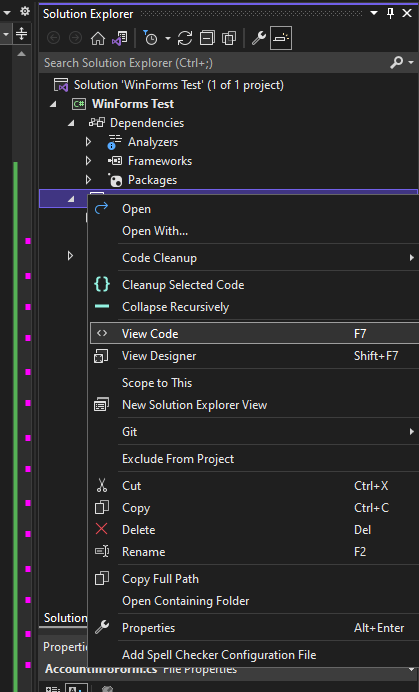
Der obige Code wird vom WinForms-Designer generiert. Wir werden nun den Backend-Code für das neue Formular schreiben. Klicken Sie dazu mit der rechten Maustaste auf das Formular und wählen Sie Code anzeigen.
Kopieren Sie das folgende Beispiel und fügen Sie es ein:
Bemerkenswerterweise verwendet unser Code die Methoden BeginInvokeOnMainThread() und BeginInvoke(). Wir erklären unsere Begründung dafür im folgenden Abschnitt.
Vorerst werden wir unser benutzerdefiniertes Formular verwenden, indem wir seine Methode ShowDialog() von unserem Indikator aus aufrufen. Kopieren Sie den folgenden Code und fügen Sie ihn in Ihren Indikator-Quellcode ein:
Wenn Sie ein neues Formular hinzufügen, verwendet es automatisch Ihren Indikator- oder cBot-Namespace (cAlgo). Um Fehler zu vermeiden, ändern Sie den Namespace Ihres hinzugefügten Formulars und fügen Sie es dann Ihrer Indikator- oder cBot-Quellcodedatei hinzu. In unserem Fall ist WinForms_Test die Namespace-Bezeichnung.
Nach dem Erstellen des Indikators und dem Erstellen einer Instanz sollte das folgende Formular erscheinen.
Zugriff auf API-Mitglieder von einem UI-dedizierten Thread
Wie wir bereits erklärt haben, müssen Sie einen separaten dedizierten Thread verwenden, um Ihre WinForms auszuführen. Nur der Code, der auf diesem Thread ausgeführt wird, kann auf die Formularsteuerelemente und -eigenschaften zugreifen.
Dasselbe gilt für alle Algo-API-Mitglieder. Da die API nicht threadsicher ist, können Sie nicht von dem Form-Thread aus auf API-Mitglieder zugreifen. Stattdessen müssen Sie diese Aufgabe delegieren, indem Sie die Methode BeginInvokeOnMainThread() in Ihrem Indikator- oder cBot-Code verwenden.
Dies kann zu Komplikationen führen, wenn Sie Daten zwischen Ihrem Indikator oder cBot und einem WinForm austauschen möchten. Um dieses Problem zu lösen, können Sie eine Proxy-Klasse erstellen, um die Interaktionen zwischen Ihrem cBot- oder Indikator- und Form-Thread zu verwalten.