Skip to content

How to create plugins for Active Symbol Panel

Plugins make it easy to create new sections containing website pages or other WebView components, calculators, analytics or data boards, AI tools, etc. in Active Symbol Panel (ASP).

In this article and its corresponding video, we will show you how to add a new section in Active Symbol Panel using a plugin.

Create a plugin

Create a WebView section

Go to the Algo app and navigate to the Plugins tab. Click the New button to create a new plugin. Tick the From the list option and select ASP Section Example. Give your plugin a name, such as "My ASP Example".

Click the Create button.

When the code editor appears, replace the "My title" part of the code with the name you chose for the plugin.

1
var block = Asp.SymbolTab.AddBlock("My ASP Example");

You can copy the full code below:

 1
 2
 3
 4
 5
 6
 7
 8
 9
10
11
12
13
14
15
16
17
18
19
20
21
using cAlgo.API;

namespace cAlgo.Plugins
{
    [Plugin(AccessRights = AccessRights.None)]
    public class MyASPExample : Plugin
    {
        protected override void OnStart()
        {
            var block = Asp.SymbolTab.AddBlock("My ASP Example");
            block.Index = 2;
            block.Height = 500;
            block.IsExpanded = true;

            var webView = new WebView();                        
            block.Child = webView;

            webView.NavigateAsync("https://ctrader.com/");
        }
    }  
}

Click the Build button or press Ctrl+B to build the plugin.

Navigate to the Trade app again to see what the plugin is showing in Active Symbol Panel. In our case, we now have a WebView component displaying the cTrader forum.

Create a VWAP box

For this example, we will replace the WebView with a box that displays the Volume-Weighted Average Price (VWAP) of the currently open positions.

Return to the plugin code and delete the WebView section.

Set the block height to 100.

1
block.Height = 100;

Define two text blocks that will display the relevant information.

1
2
TextBlock _txtBuyVWAP;
TextBlock _txtSellVWAP;

Add a panel for the text boxes.

1
2
3
4
var panel = new StackPanel
{
    Orientation = Orientation.Vertical
};

Initialise the two text blocks.

1
2
3
4
5
6
7
8
9
_txtBuyVWAP = new TextBlock
{
    Text = "Buy Text Box"
};

_txtSellVWAP = new TextBlock
{
    Text = "Sell Text Box"
};

Add the text boxes to the panel and make the panel a child control of the plugin block.

1
2
3
4
panel.AddChild(_txtBuyVWAP);
panel.AddChild(_txtSellVWAP);

block.Child = panel;

You can copy the full code below:

 1
 2
 3
 4
 5
 6
 7
 8
 9
10
11
12
13
14
15
16
17
18
19
20
21
22
23
24
25
26
27
28
29
30
31
32
33
34
35
36
37
38
using cAlgo.API;

namespace cAlgo.Plugins
{
    [Plugin(AccessRights = AccessRights.None)]
    public class MyASPExample : Plugin
    {
        TextBlock _txtBuyVWAP;
        TextBlock _txtSellVWAP;

        protected override void OnStart()
        {
            var block = Asp.SymbolTab.AddBlock("ASP Section Example");
            block.Index = 2;
            block.Height = 100;
            block.IsExpanded = true;

            var panel = new StackPanel
            {
                Orientation = Orientation.Vertical
            };

            _txtBuyVWAP = new TextBlock
            {
                Text = "Buy Text Box"
            };
            _txtSellVWAP = new TextBlock
            {
                Text = "Sell Text Box"
            };

            panel.AddChild(_txtBuyVWAP);
            panel.AddChild(_txtSellVWAP);

            block.Child = panel;
        }
    }  
}

Build the plugin and then go to the Trade app.

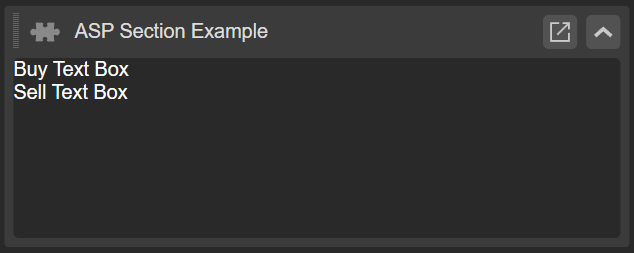
You should see two text boxes in place of the WebView component.

Refine the plugin

Add logic for the plugin

Go to the plugin code and add the following namespaces:

1
2
using System;
using System.Linq;

Implement the logic that calculates the VWAP for buy and sell directions.

1
2
3
4
5
var buyPositions = Positions.Where(p => p.TradeType == TradeType.Buy);
_txtBuyVWAP.Text = "Buy Positions VWAF: " + Math.Round((buyPositions.Sum(p => p.EntryPrice * p.VolumeInUnits) /  buyPositions.Sum(p => p.VolumeInUnits)),5);

var sellPositions = Positions.Where(p => p.TradeType == TradeType.Sell);
_txtSellVWAP.Text = "Sell Positions VWAF: " + Math.Round((sellPositions.Sum(p => p.EntryPrice * p.VolumeInUnits) /  sellPositions.Sum(p => p.VolumeInUnits)),5);

Add an event to handle opening positions, ensuring VWAP figures update automatically when a new position is added.

 1
 2
 3
 4
 5
 6
 7
 8
 9
10
Positions.Opened += Positions_Opened;

private void Positions_Opened(PositionOpenedEventArgs obj)
{
    var buyPositions = Positions.Where(p => p.TradeType == TradeType.Buy);
    _txtBuyVWAP.Text = "Buy Positions VWAP: " + (buyPositions.Sum(p => p.EntryPrice * p.VolumeInUnits) /  buyPositions.Sum(p => p.VolumeInUnits));

    var sellPositions = Positions.Where(p => p.TradeType == TradeType.Sell);
    _txtSellVWAP.Text = "Sell Positions VWAP: " + (sellPositions.Sum(p => p.EntryPrice * p.VolumeInUnits) /  sellPositions.Sum(p => p.VolumeInUnits));        
}

You can copy the full code below:

 1
 2
 3
 4
 5
 6
 7
 8
 9
10
11
12
13
14
15
16
17
18
19
20
21
22
23
24
25
26
27
28
29
30
31
32
33
34
35
36
37
38
39
40
41
42
43
44
45
46
47
48
49
50
51
52
53
54
55
56
57
58
59
using System;
using System.Linq;
using cAlgo.API;

namespace cAlgo.Plugins
{
    [Plugin(AccessRights = AccessRights.None)]
    public class MyASPExample : Plugin
    {
        TextBlock _txtBuyVWAP;
        TextBlock _txtSellVWAP;

        protected override void OnStart()
        {
            var block = Asp.SymbolTab.AddBlock("ASP Section Example");
            block.Index = 2;
            block.Height = 100;
            block.IsExpanded = true;

            var panel = new StackPanel
            {
                Orientation = Orientation.Vertical
            };

            _txtBuyVWAP = new TextBlock
            {
                Text = "Buy Text Box"
            };

            _txtSellVWAP = new TextBlock
            {
                Text = "Sell Text Box"
            };

            panel.AddChild(_txtBuyVWAP);
            panel.AddChild(_txtSellVWAP);

            block.Child = panel;

            var buyPositions = Positions.Where(p => p.TradeType == TradeType.Buy);
            _txtBuyVWAP.Text = "Buy Positions VWAF: " + Math.Round((buyPositions.Sum(p => p.EntryPrice * p.VolumeInUnits) /  buyPositions.Sum(p => p.VolumeInUnits)),5);

            var sellPositions = Positions.Where(p => p.TradeType == TradeType.Sell);
            _txtSellVWAP.Text = "Sell Positions VWAF: " + Math.Round((sellPositions.Sum(p => p.EntryPrice * p.VolumeInUnits) /  sellPositions.Sum(p => p.VolumeInUnits)),5);

            Positions.Opened += Positions_Opened;
        }


         private void Positions_Opened(PositionOpenedEventArgs obj)
        {             
            var buyPositions = Positions.Where(p => p.TradeType == TradeType.Buy);
            _txtBuyVWAP.Text = "Buy Positions VWAP: " + (buyPositions.Sum(p => p.EntryPrice * p.VolumeInUnits) /  buyPositions.Sum(p => p.VolumeInUnits));

            var sellPositions = Positions.Where(p => p.TradeType == TradeType.Sell);
            _txtSellVWAP.Text = "Sell Positions VWAP: " + (sellPositions.Sum(p => p.EntryPrice * p.VolumeInUnits) /  sellPositions.Sum(p => p.VolumeInUnits));        
        }
    }  
}

Build the plugin again and go to the Trade app. Now, as you add new buy and sell positions, you should see the VWAP update itself automatically.

Add styles for the plugin

We can add some style to the VWAP box.

 1
 2
 3
 4
 5
 6
 7
 8
 9
10
11
12
13
14
15
16
17
18
19
20
21
var textBoxStyle = new Style();

textBoxStyle.Set(ControlProperty.Margin, 5);
textBoxStyle.Set(ControlProperty.FontFamily, "Cambria");
textBoxStyle.Set(ControlProperty.FontSize, 16);
textBoxStyle.Set(ControlProperty.Width, 200);
textBoxStyle.Set(ControlProperty.ForegroundColor, Color.Yellow, ControlState.Hover);

_txtBuyVWAP = new TextBlock
{
    ForegroundColor = Color.Green,
    Text = "Buy Text Box ",
    Style = textBoxStyle
};

_txtSellVWAP = new TextBlock
{
    ForegroundColor = Color.Red,
    Text = "Sell Text Box",
    Style = textBoxStyle
};

You can copy the full code below:

 1
 2
 3
 4
 5
 6
 7
 8
 9
10
11
12
13
14
15
16
17
18
19
20
21
22
23
24
25
26
27
28
29
30
31
32
33
34
35
36
37
38
39
40
41
42
43
44
45
46
47
48
49
50
51
52
53
54
55
56
57
58
59
60
61
62
63
64
65
66
67
68
69
70
using System;
using System.Linq;
using cAlgo.API;

namespace cAlgo.Plugins
{
    [Plugin(AccessRights = AccessRights.None)]
    public class MyASPExample : Plugin
    {
        TextBlock _txtBuyVWAP;
        TextBlock _txtSellVWAP;

        protected override void OnStart()
        {
            var block = Asp.SymbolTab.AddBlock("ASP Section Example");
            block.Index = 2;
            block.Height = 100;
            block.IsExpanded = true;

            var panel = new StackPanel
            {
                Orientation = Orientation.Vertical
            };

            var textBoxStyle = new Style();

            textBoxStyle.Set(ControlProperty.Margin, 5);
            textBoxStyle.Set(ControlProperty.FontFamily, "Cambria");
            textBoxStyle.Set(ControlProperty.FontSize, 16);
            textBoxStyle.Set(ControlProperty.Width, 200);
            textBoxStyle.Set(ControlProperty.ForegroundColor, Color.Yellow, ControlState.Hover);

            _txtBuyVWAP = new TextBlock
            {
                ForegroundColor = Color.Green,
                Text = "Buy Text Box ",
                Style = textBoxStyle
            };

            _txtSellVWAP = new TextBlock
            {
                ForegroundColor = Color.Red,
                Text = "Sell Text Box",
                Style = textBoxStyle
            };

            panel.AddChild(_txtBuyVWAP);
            panel.AddChild(_txtSellVWAP);

            block.Child = panel;

            var buyPositions = Positions.Where(p => p.TradeType == TradeType.Buy);
            _txtBuyVWAP.Text = "Buy Positions VWAF: " + Math.Round((buyPositions.Sum(p => p.EntryPrice * p.VolumeInUnits) /  buyPositions.Sum(p => p.VolumeInUnits)),5);

            var sellPositions = Positions.Where(p => p.TradeType == TradeType.Sell);
            _txtSellVWAP.Text = "Sell Positions VWAF: " + Math.Round((sellPositions.Sum(p => p.EntryPrice * p.VolumeInUnits) /  sellPositions.Sum(p => p.VolumeInUnits)),5);

            Positions.Opened += Positions_Opened;
        }

         private void Positions_Opened(PositionOpenedEventArgs obj)
        {             
            var buyPositions = Positions.Where(p => p.TradeType == TradeType.Buy);
            _txtBuyVWAP.Text = "Buy Positions VWAP: " + (buyPositions.Sum(p => p.EntryPrice * p.VolumeInUnits) /  buyPositions.Sum(p => p.VolumeInUnits));

            var sellPositions = Positions.Where(p => p.TradeType == TradeType.Sell);
            _txtSellVWAP.Text = "Sell Positions VWAP: " + (sellPositions.Sum(p => p.EntryPrice * p.VolumeInUnits) /  sellPositions.Sum(p => p.VolumeInUnits));        
        }
    }  
}

Build the plugin again.

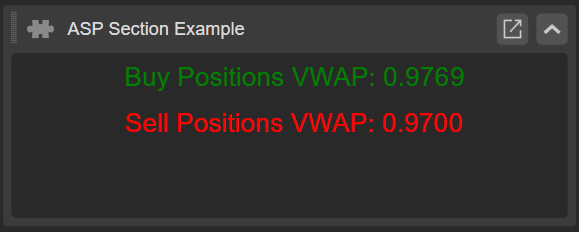
Lastly, go to the Trade app to see how styles have changed the VWAP box.

Summary

We hope this article has been helpful in showing you how to add webpages and WebView components, text blocks, and other useful objects to the Active Symbol Panel.
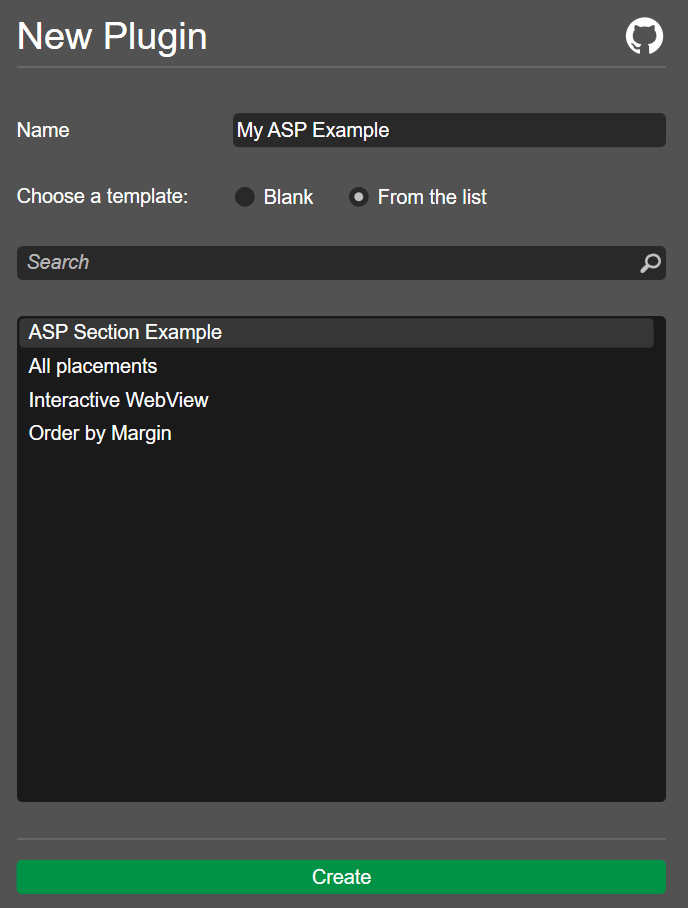

Image title