Access rights
The AccessRights class property
To protect users from malware code, we run every cBot or indicator in a sandboxed environment. As a result, cBots and indicators must declare their required access rights via the AccessRights class property as shown below.
1 2 | |
1 2 | |
The two possible values for the AccessRights property are as follows:
None- the extension only has access to the platform-provided API data. It will not be able to access anything outside the platform.FullAccess- the extension has unlimited access rights. It can access the Internet, read and write files, run other executables, import WinApi functions, use .NET reflection and create windows.
Note
There are several API features that still allow algos to perform various actions even when AccessRights.None is declared.
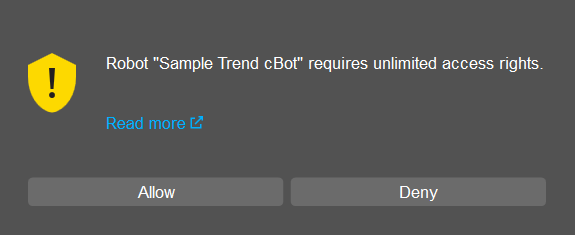
If AccessRights.FullAccess is declared, the following window will be shown when running an instance of the cBot or indicator in question.
Security exception
If your cBot or indicator attempts to perform a restricted action, the code will throw a security exception.
For example, if a cBot with AccessRights.None tries to read from a text file (without using the file access feature), it will be stopped and the following message will appear in the log.
Crashed in OnStart with SecurityException: Request for the permission of type 'System.Security.Permissions.FileIOPermission, mscorlib, Version=4.0.0.0, Culture=neutral, PublicKeyToken=b77a5c561934e089' failed.
The surest way to avoid this exception is to declare AccessRights.None for all your extensions unless you plan on distributing them to other traders.