Skip to content

Customisable parameter types

As C# is a strongly typed language, it is necessary to specify data types when declaring variables and class properties in cBots, indicators, and plugins. In contrast, Python is dynamically typed, so variable types are inferred automatically. However, when developing cBots using the cTrader API, the same conceptual types are preserved for consistency between both languages.

cTrader Algo API does not allow all data types to be used as customisable parameters, and this is why it is essential for algorithm developers to understand and navigate across the supported types carefully.

Note

Python cBots, indicators and plugins use customisable parameters declared in their .cs files.

Parameter use cases and UI

cTrader supports only these parameter types with the key use cases and related UI elements reflected in the table below.

C# Python Use cases UI element
int int Order volume, number of bars, number of periods, etc. Number input field (with stepper)
double float Price value, order volume, etc. Number input field (with stepper)
string str Custom message, position label, etc. Text input field
bool bool Protection mechanisms, allow trading, allow email, etc. Dropdown yes/no
DataSeries api.DataSeries Source of market prices, etc. Dropdown list
TimeFrame api.TimeFrame Chosen time frame, etc. Period selector
enum Enum Chart drawings alignment, individual risk levels, etc. Dropdown list
Color Color Chart drawings, colour of technical analysis means, custom elements, etc. Colour picker
DateTime DateTime Getting strongly typed date and time in the algo time zone Date and time picker
DateOnly DateOnly Getting strongly typed date Date picker
TimeSpan TimeSpan Getting strongly typed time interval or time of the day Time picker
Symbol Symbol Getting strongly typed single symbol Symbol picker
Symbol[] Symbol[] Getting strongly typed multiple symbols in an array Multi-symbol picker
Enum[] Enum[] Getting strongly typed multiple values of an Enum type in an array Multi-enum value picker
TimeFrame[] TimeFrame[] Getting strongly typed multiple TimeFrame values in an array Multi-period picker

Warning

You may not be able to use some of the parameter types above if you are using an older version of cTrader or Algo API.

For example, the cTrader UI reflects C#'s bool, double, int and Python's bool, float, int types as follows.

Image title

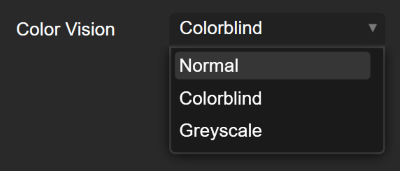
The next three examples show C#'s DataSeries, custom enum, string and Python's api.DataSeries, Enum, str data types (for which we also provide the full code in this guide).

DataSeries

Enum

String

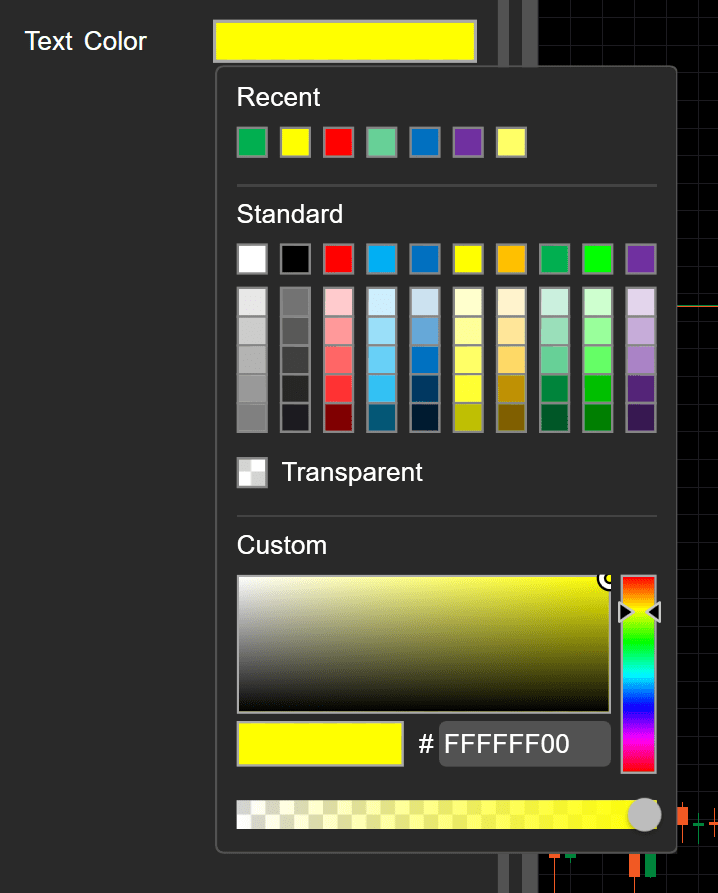
As shown below, C#'s Color and Python's Color parameter type is represented by a colour picker.

Image title

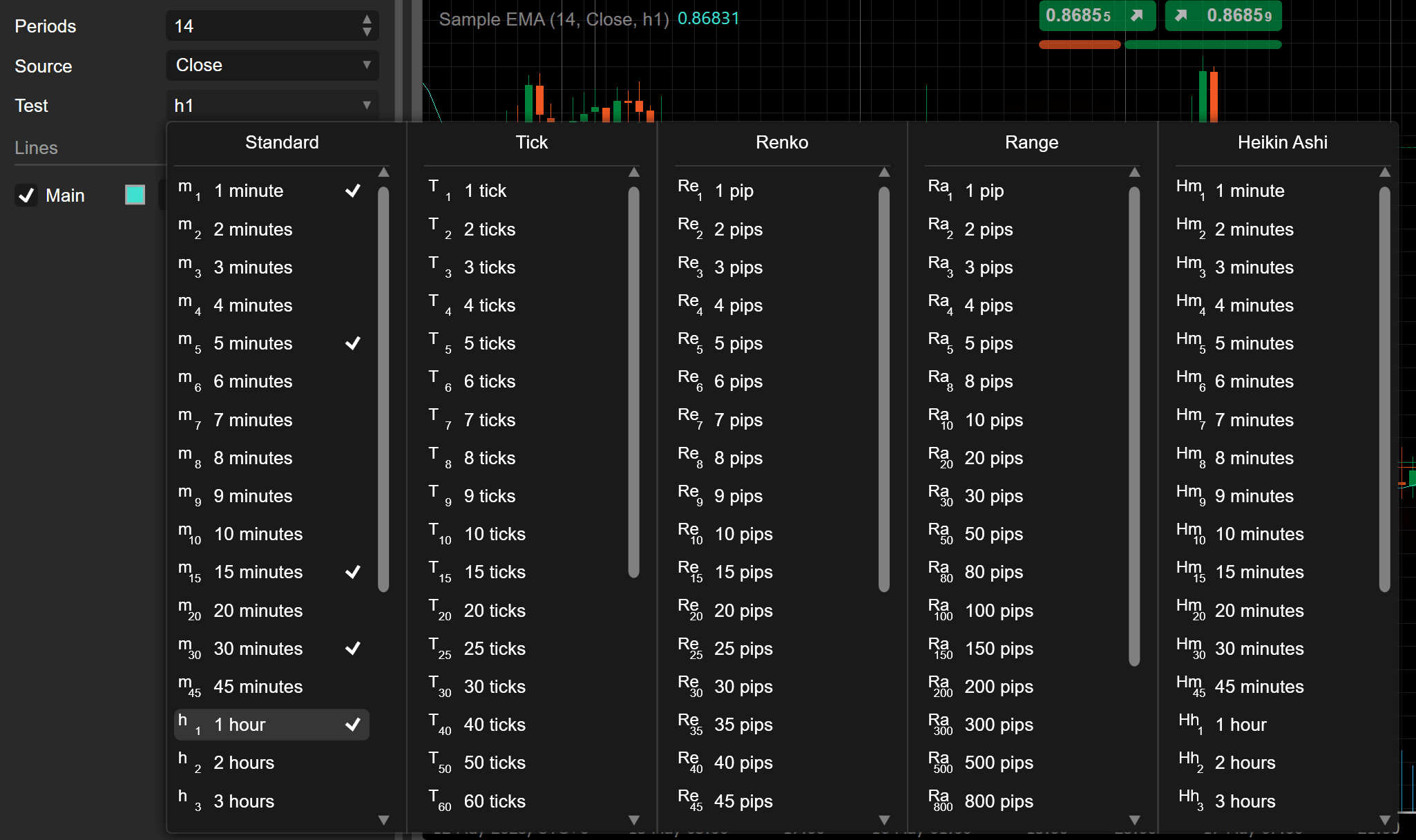
Finally, the UI of C#'s TimeFrame and Python's api.TimeFrame data mirrors the period options available in trading charts within the Trade application.

Image title

cBot examples

The position label is a C#'s string and Python's str parameter in the following cBot.

 1
 2
 3
 4
 5
 6
 7
 8
 9
10
11
12
13
14
15
16
17
18
19
20
21
22
23
24
25
26
27
28
29
using System;
using System.Collections.Generic;
using System.Linq;
using System.Text;
using cAlgo.API;
using cAlgo.API.Collections;
using cAlgo.API.Indicators;
using cAlgo.API.Internals;

namespace cAlgo.Robots
{
    [Robot(AccessRights = AccessRights.None)]
    public class NewcBot2 : Robot
    {
        [Parameter(DefaultValue = "my label")]
        public string PositionLabel { get; set; }

        protected override void OnStart()
        {
            ExecuteMarketOrder(TradeType.Buy, "XAGUSD", 1000, PositionLabel);
        }

        protected override void OnStop()
        {
            var positionToFind = Positions.Find(PositionLabel);
            positionToFind.Close();
        }
    }
}

Note

Python cBots use customisable parameters declared in their .cs files.

 1
 2
 3
 4
 5
 6
 7
 8
 9
10
11
12
13
14
15
16
import clr

clr.AddReference("cAlgo.API")

from cAlgo.API import *
from robot_wrapper import *


class NewcBot2():
    def on_start(self):
        api.ExecuteMarketOrder(TradeType.Buy, "XAGUSD", 1000, api.PositionLabel)

    def on_stop(self):
        position_to_find = api.Positions.Find(api.PositionLabel)
        if position_to_find is not None:
            position_to_find.Close()

C#'s DataSeries, int, bool and Python's api.DataSeries, int, bool data types are exemplified in the algorithm below.

 1
 2
 3
 4
 5
 6
 7
 8
 9
10
11
12
13
14
15
16
17
18
19
20
21
22
23
24
25
26
27
28
29
30
31
32
33
34
35
36
37
38
39
40
41
42
43
44
45
46
47
48
49
50
51
using System;
using System.Collections.Generic;
using System.Linq;
using System.Text;
using cAlgo.API;
using cAlgo.API.Collections;
using cAlgo.API.Indicators;
using cAlgo.API.Internals;

namespace cAlgo
{
    [Robot(TimeZone = TimeZones.UTC, AccessRights = AccessRights.None)]
    public class SamplecBotReferenceSMA : Robot
    {
        [Parameter("Source")]
        public DataSeries Source { get; set; }

        [Parameter("SMA Period", DefaultValue = 14)]
        public int SmaPeriod { get; set; }

        [Parameter("Enable Trade", DefaultValue = true)]
        public bool EnableTrade { get; set; }

        private SimpleMovingAverage sma;

        protected override void OnStart()
        {
            sma = Indicators.SimpleMovingAverage(Source, SmaPeriod);
        }

        protected override void OnTick()
        {
            double currentSMA = sma.Result.LastValue;
            double currentPrice = Symbol.Bid;

            if (EnableTrade)
            {
                if (currentPrice > currentSMA)
                {
                    ExecuteMarketOrder(TradeType.Buy, Symbol, 1000, "Buy Order");
                }
                else if (currentPrice < currentSMA)
                {
                    ExecuteMarketOrder(TradeType.Sell, Symbol, 1000, "Sell Order");
                }
            }

            Print("Current Price: {0}, Current SMA: {1}", currentPrice, currentSMA);
        }
    }
}

Note

Python cBots use customisable parameters declared in their .cs files.

 1
 2
 3
 4
 5
 6
 7
 8
 9
10
11
12
13
14
15
16
17
18
19
20
21
22
23
import clr

clr.AddReference("cAlgo.API")

from cAlgo.API import *
from robot_wrapper import *


class SamplecBotReferenceSMA():
    def on_start(self):
        self.sma = api.Indicators.SimpleMovingAverage(api.Source, api.SmaPeriod)

    def on_tick(self):
        currentSMA = self.sma.Result.LastValue
        currentPrice = api.Symbol.Bid

        if api.EnableTrade:
            if currentPrice > currentSMA:
                api.ExecuteMarketOrder(TradeType.Buy, api.Symbol, 1000, "Buy Order")
            elif currentPrice < currentSMA:
                api.ExecuteMarketOrder(TradeType.Sell, api.Symbol, 1000, "Sell Order")

        api.Print("Current Price: {0}, Current SMA: {1}".format(currentPrice, currentSMA))

This cBot uses Color as a parameter to define the text visualisation in the chart area:

 1
 2
 3
 4
 5
 6
 7
 8
 9
10
11
12
13
14
15
16
17
18
19
20
21
22
23
using System;
using System.Collections.Generic;
using System.Linq;
using System.Text;
using cAlgo.API;
using cAlgo.API.Collections;
using cAlgo.API.Indicators;
using cAlgo.API.Internals;

namespace cAlgo.Robots
{
    [Robot(AccessRights = AccessRights.None)]
    public class NewcBot : Robot
    {
        [Parameter(DefaultValue = "Yellow")]
        public Color TextColor { get; set; }

        protected override void OnBar() 
        {
            Chart.DrawStaticText("static", "cBot running!", VerticalAlignment.Center, HorizontalAlignment.Left, TextColor);
        }
    }
}

In the example below, C#'s double and Python's float data type serves as a parameter to input the order volume in lots. The cBot executes a buy market order after three consecutive red bars.

 1
 2
 3
 4
 5
 6
 7
 8
 9
10
11
12
13
14
15
16
17
18
19
20
21
22
23
24
25
26
27
28
29
30
31
32
33
34
35
36
37
38
39
40
41
42
43
44
45
46
47
48
49
50
51
52
53
using System;
using System.Collections.Generic;
using System.Linq;
using System.Text;
using cAlgo.API;
using cAlgo.API.Collections;
using cAlgo.API.Indicators;
using cAlgo.API.Internals;

namespace cAlgo
{
    [Robot(TimeZone = TimeZones.UTC, AccessRights = AccessRights.None)]
    public class RedBarsBot : Robot
    {
        [Parameter("Order Volume (Lots)", DefaultValue = 0.1)]
        public double OrderVolume { get; set; }

        private int redBarsCount = 0;

        protected override void OnBar()
        {
            if (IsRedBar())
            {
                redBarsCount++;
                if (redBarsCount == 3)
                {
                    PlaceMarketOrder(TradeType.Buy);
                    redBarsCount = 0;
                }
            }
            else
            {
                redBarsCount = 0;
            }
        }

        private bool IsRedBar()
        {
            var currentBar = MarketSeries.Close.Last(1);
            var previousBar = MarketSeries.Close.Last(2);

            return currentBar < previousBar;
        }

        private void PlaceMarketOrder(TradeType tradeType)
        {
            var symbol = Symbol;
            var volume = Symbol.QuantityToVolume(OrderVolume);

            ExecuteMarketOrder(tradeType, symbol, volume);
        }
    }
}

Note

Python cBots use customisable parameters declared in their .cs files.

 1
 2
 3
 4
 5
 6
 7
 8
 9
10
11
12
13
14
15
16
17
18
19
20
21
22
23
24
25
26
27
28
29
import clr

clr.AddReference("cAlgo.API")

from cAlgo.API import *
from robot_wrapper import *

class RedBarsBot():
    def __init__(self):
        self.redBarsCount = 0

    def on_bar(self):
        if self.is_red_bar():
            self.redBarsCount += 1
            if self.redBarsCount == 3:
                self.place_market_order(TradeType.Buy)
                self.redBarsCount = 0
        else:
            self.redBarsCount = 0

    def is_red_bar(self):
        currentBar = api.MarketSeries.Close.Last(1)
        previousBar = api.MarketSeries.Close.Last(2)
        return currentBar < previousBar

    def place_market_order(self, tradeType):
        symbol = api.Symbol
        volume = api.Symbol.QuantityToVolume(api.OrderVolume)
        api.ExecuteMarketOrder(tradeType, symbol, volume)

In the example below, the DateTime, DateOnly and TimeSpan data types serve as parameters.

 1
 2
 3
 4
 5
 6
 7
 8
 9
10
11
12
13
14
15
16
17
18
19
20
21
22
23
24
using System;
using cAlgo.API;

namespace cAlgo.Robots;

[Robot(AccessRights = AccessRights.None)]
public class TimeParameters : Robot
{
    [Parameter("DateTime Parameter", MinValue = "1970-01-01T00:00:00", MaxValue = "2025-11-01T00:00:00", DefaultValue = "2025-01-01T10:00:00")]
    public DateTime DateTimeParameter { get; set; }

    [Parameter("DateOnly Parameter", MinValue = "1970-01-01", MaxValue = "2025-11-01", DefaultValue = "2025-01-01")]
    public DateOnly DateOnlyParameter { get; set; }

    [Parameter("TimeSpan Parameter", MinValue = "00:00:00", MaxValue = "23:59:59", DefaultValue = "04:10:20")]
    public TimeSpan TimeSpanParameter { get; set; }

    protected override void OnStart()
    {
        Print($"DateTimeParameter: {DateTimeParameter:o}");
        Print($"DateOnlyParameter: {DateOnlyParameter:o}");
        Print($"TimeSpanParameter: {TimeSpanParameter}");
    }
}

Note

Python cBots use customisable parameters declared in their .cs files.

 1
 2
 3
 4
 5
 6
 7
 8
 9
10
11
12
13
14
15
16
17
using System;
using cAlgo.API;

namespace cAlgo.Robots;

[Robot(AccessRights = AccessRights.None)]
public class TimeParameters : Robot
{
    [Parameter("DateTime Parameter", MinValue = "1970-01-01T00:00:00", MaxValue = "2025-11-01T00:00:00", DefaultValue = "2025-01-01T10:00:00")]
    public DateTime DateTimeParameter { get; set; }

    [Parameter("DateOnly Parameter", MinValue = "1970-01-01", MaxValue = "2025-11-01", DefaultValue = "2025-01-01")]
    public DateOnly DateOnlyParameter { get; set; }

    [Parameter("TimeSpan Parameter", MinValue = "00:00:00", MaxValue = "23:59:59", DefaultValue = "04:10:20")]
    public TimeSpan TimeSpanParameter { get; set; }
}
Use the parameters in a Python cBot:

 1
 2
 3
 4
 5
 6
 7
 8
 9
10
11
12
13
14
15
import clr

clr.AddReference("cAlgo.API")

# Import cAlgo API types
from cAlgo.API import *

# Import trading wrapper functions
from robot_wrapper import *

class TimeParameters():
    def on_start(self):
        print(f"DateTimeParameter: {api.DateTimeParameter}")
        print(f"DateOnlyParameter: {api.DateOnlyParameter}")
        print(f"TimeSpanParameter: {api.TimeSpanParameter}")

Note

DateTime parameter value is automatically converted from the user's platform time zone to the algo time zone, removing the need for manual conversion.

In the example below, the Symbol data type serves as parameter.

 1
 2
 3
 4
 5
 6
 7
 8
 9
10
11
12
13
14
15
16
17
using System;
using cAlgo.API;
using cAlgo.API.Internals;

namespace cAlgo.Robots;

[Robot(AccessRights = AccessRights.None)]
public class SymbolParameterTest : Robot
{
    [Parameter("Symbol Parameter", DefaultValue = "EURUSD")]
    public Symbol SymbolParameter { get; set; }

    protected override void OnStart()
    {
        Print($"Symbol Bid Price is: {SymbolParameter.Bid}");
    }
}

Note

Python cBots use customisable parameters declared in their .cs files.

 1
 2
 3
 4
 5
 6
 7
 8
 9
10
11
12
using System;
using cAlgo.API;
using cAlgo.API.Internals;

namespace cAlgo.Robots;

[Robot(AccessRights = AccessRights.None)]
public class SymbolParameterTest : Robot
{
    [Parameter("Symbol Parameter", DefaultValue = "EURUSD")]
    public Symbol SymbolParameter { get; set; }
}
Use the parameters in a Python cBot:

 1
 2
 3
 4
 5
 6
 7
 8
 9
10
11
12
13
import clr

clr.AddReference("cAlgo.API")

# Import cAlgo API types
from cAlgo.API import *

# Import trading wrapper functions
from robot_wrapper import *

class SymbolParameterTest():
    def on_start(self):
        print(f"Symbol Bid Price is: {api.SymbolParameter.Bid}")

In the example below, we use the multi Enum, Symbol and TimeFrame parameter types, which are represented by a C# array type.

 1
 2
 3
 4
 5
 6
 7
 8
 9
10
11
12
13
14
15
16
17
18
19
20
21
22
23
24
25
26
using System;
    using cAlgo.API;
using cAlgo.API.Internals;
using System.Linq;

namespace cAlgo.Robots;

[Robot(AccessRights = AccessRights.None)]
public class MultiValueParametersTest : Robot
{
    [Parameter(DefaultValue = "EURUSD,GBPUSD")]
    public Symbol[] SymbolsParameter { get; set; }

    [Parameter(DefaultValue = "Sell")]
    public TradeType[] TradeTypesParameter { get; set; }

    [Parameter(DefaultValue = "Daily,Hour")]
    public TimeFrame[] TimeFramesParameter { get; set; }

    protected override void OnStart()
    {
        Print($"Selected symbols are: {string.Join(", ", SymbolsParameter.Select(symbol => symbol.Name))}");
        Print($"Selected trade types are: {string.Join(", ", TradeTypesParameter.Select(tradeType => tradeType.ToString()))}");
        Print($"Selected time frames are: {string.Join(", ", TimeFramesParameter.Select(timeFrame => timeFrame.ToString()))}");
    }
}

Note

Python cBots use customisable parameters declared in their .cs files.

 1
 2
 3
 4
 5
 6
 7
 8
 9
10
11
12
13
14
15
16
17
18
using System;
using cAlgo.API;
using cAlgo.API.Internals;

namespace cAlgo.Robots;

[Robot(AccessRights = AccessRights.None)]
public class MultiValueParametersTest : Robot
{
    [Parameter(DefaultValue = "EURUSD,GBPUSD")]
    public Symbol[] SymbolsParameter { get; set; }

    [Parameter(DefaultValue = "Sell")]
    public TradeType[] TradeTypesParameter { get; set; }

    [Parameter(DefaultValue = "Daily,Hour")]
    public TimeFrame[] TimeFramesParameter { get; set; }
}
Use parameters in a Python cBot:

 1
 2
 3
 4
 5
 6
 7
 8
 9
10
11
12
13
14
15
import clr

clr.AddReference("cAlgo.API")

# Import cAlgo API types
from cAlgo.API import *

# Import trading wrapper functions
from robot_wrapper import *

class MultiValueParametersTest():
    def on_start(self):
        print(f"Selected symbols are: {[symbol.Name for symbol in api.SymbolsParameter]}")
        print(f"Selected trade types are: {[str(tradeType) for tradeType in api.TradeTypesParameter]}")
        print(f"Selected time frames are: {[str(timeFrame) for timeFrame in api.TimeFramesParameter]}")

Indicator examples

The following indicator code illustrates how TimeFrame parameters are used:

 1
 2
 3
 4
 5
 6
 7
 8
 9
10
11
12
13
14
15
16
17
18
19
20
21
22
23
24
25
26
27
28
29
30
31
32
33
34
35
using System;
using System.Collections.Generic;
using System.Linq;
using System.Text;
using cAlgo.API;
using cAlgo.API.Collections;
using cAlgo.API.Indicators;
using cAlgo.API.Internals;

namespace cAlgo
{
    [Indicator(AccessRights = AccessRights.None)]
    public class NewIndicator4 : Indicator
    {
        private Bars _hourlyTimeFrameBars;
        private Bars _targetTimeFrameBars;

        [Parameter("Chosen Time Frame")]
        public TimeFrame TargetTimeFrame { get; set; }

        [Output("Main")]
        public IndicatorDataSeries Result { get; set; }

        protected override void Initialize()
        {
            _hourlyTimeFrameBars = MarketData.GetBars(TimeFrame.Hour);
            _targetTimeFrameBars = MarketData.GetBars(TargetTimeFrame);
        }

        public override void Calculate(int index)
        {
            Result[index] = _hourlyTimeFrameBars.HighPrices[index] - _targetTimeFrameBars.HighPrices[index];
        }
    }
}

There is a playful (colour-blind test) indicator that offers enum colour vision options (for example, normal, colour-blind, and greyscale) for users to determine the colour of a horizontal line drawn on the chart.

 1
 2
 3
 4
 5
 6
 7
 8
 9
10
11
12
13
14
15
16
17
18
19
20
21
22
23
24
25
26
27
28
29
30
31
32
33
34
35
36
37
38
39
40
41
42
43
44
45
46
47
48
49
50
51
52
53
using System;
using System.Collections.Generic;
using System.Linq;
using System.Text;
using cAlgo.API;
using cAlgo.API.Collections;
using cAlgo.API.Indicators;
using cAlgo.API.Internals;

namespace cAlgo
{

    public enum ColorVision
    {
        Normal,
        Colorblind,
        Greyscale
    }

    [Indicator(AccessRights = AccessRights.None)]
    public class ColorblindTest : Indicator
    {

        [Parameter("Color Vision", DefaultValue = ColorVision.Normal)]
        public ColorVision ColorVision { get; set; }

        public override void Calculate(int index) {}

        protected override void Initialize()
        {

            Color lineColor = Color.Green;

            switch (ColorVision) 
            {
                case ColorVision.Normal:
                    lineColor = Color.Red;
                    break;
                case ColorVision.Colorblind:
                    lineColor = Color.Yellow;
                    break;
                case ColorVision.Greyscale:
                    lineColor = Color.White;
                    break;

            }

            var trendLine = Chart.DrawHorizontalLine("line", Bars.HighPrices.Maximum(10), lineColor);
        }

    }

}

To summarise, by choosing the correct data type for the declared variables and class properties, you will be able to create cBots and indicators that can handle even non-standard tasks.
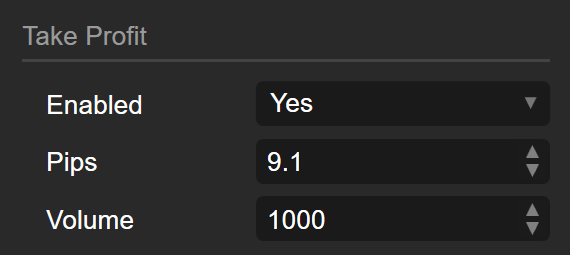
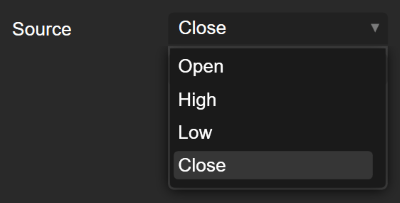
Image title