Przejdź do treści

Konfigurowalne typy parametrów

Ponieważ C# jest językiem silnie typowanym, konieczne jest określenie typów danych podczas deklarowania zmiennych i właściwości klas w cBotach, wskaźnikach i wtyczkach. W przeciwieństwie do tego Python jest językiem dynamicznie typowanym, więc typy zmiennych są wnioskowane automatycznie. Jednak podczas tworzenia cBotów przy użyciu cTrader API te same koncepcyjne typy są zachowywane dla spójności między obydwoma językami.

cTrader Algo API nie pozwala na użycie wszystkich typów danych jako parametrów konfigurowalnych i dlatego deweloperzy algorytmów muszą dokładnie rozumieć i poruszać się po obsługiwanych typach.

Uwaga

cBoty, wskaźniki i wtyczki w Pythonie używają parametrów konfigurowalnych zadeklarowanych w swoich plikach .cs.

Przypadki użycia parametrów i interfejs użytkownika

cTrader obsługuje tylko te typy parametrów z kluczowymi przypadkami użycia i powiązanymi elementami interfejsu użytkownika przedstawionymi w poniższej tabeli.

C# Python Przypadki użycia Element interfejsu użytkownika
int int Wolumen zlecenia, liczba słupków, liczba okresów itp. Pole wprowadzania liczby (z przyciskami zmiany wartości)
double float Wartość ceny, wolumen zlecenia itp. Pole wprowadzania liczby (z przyciskami zmiany wartości)
string str Niestandardowa wiadomość, etykieta pozycji itp. Pole wprowadzania tekstu
bool bool Mechanizmy ochrony, zezwolenie na handel, zezwolenie na e-mail itp. Lista rozwijana tak/nie
DataSeries api.DataSeries Źródło cen rynkowych itp. Lista rozwijana
TimeFrame api.TimeFrame Wybrane ramy czasowe itp. Selektor okresu
enum Enum Wyrównanie rysunków na wykresie, indywidualne poziomy ryzyka itp. Lista rozwijana
Color Color Rysunki na wykresie, kolor środków analizy technicznej, elementy niestandardowe itp. Wybór koloru
DateTime DateTime Uzyskiwanie silnie typowanej daty i czasu w strefie czasowej algorytmu Wybór daty i czasu
DateOnly DateOnly Uzyskiwanie silnie typowanej daty Wybór daty
TimeSpan TimeSpan Uzyskiwanie silnie typowanego przedziału czasu lub pory dnia Wybór czasu
Symbol Symbol Uzyskiwanie silnie typowanego pojedynczego symbolu Wybór symbolu
Symbol[] Symbol[] Uzyskiwanie silnie typowanych wielu symboli w tablicy Wybór wielu symboli
Enum[] Enum[] Uzyskiwanie silnie typowanych wielu wartości typu Enum w tablicy Wybór wielu wartości enum
TimeFrame[] TimeFrame[] Uzyskiwanie silnie typowanych wielu wartości TimeFrame w tablicy Wybór wielu okresów

Ostrzeżenie

Możesz nie być w stanie użyć niektórych z powyższych typów parametrów, jeśli używasz starszej wersji cTrader lub Algo API.

Na przykład interfejs użytkownika cTrader odzwierciedla typy bool, double, int w C# i bool, float, int w Pythonie w następujący sposób.

Image title

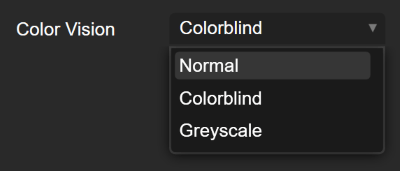
Kolejne trzy przykłady pokazują typy danych DataSeries, niestandardowy enum, string w C# oraz api.DataSeries, Enum, str w Pythonie (dla których również udostępniamy pełny kod w tym przewodniku).

DataSeries

Enum

String

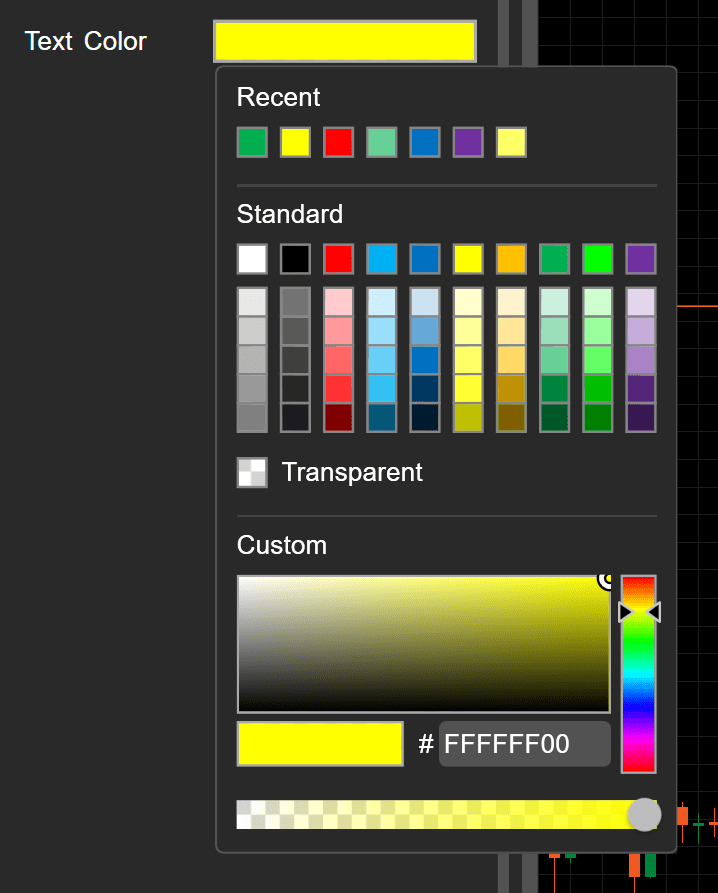
Jak pokazano poniżej, typ parametru Color w C# i Color w Pythonie jest reprezentowany przez wybór koloru.

Image title

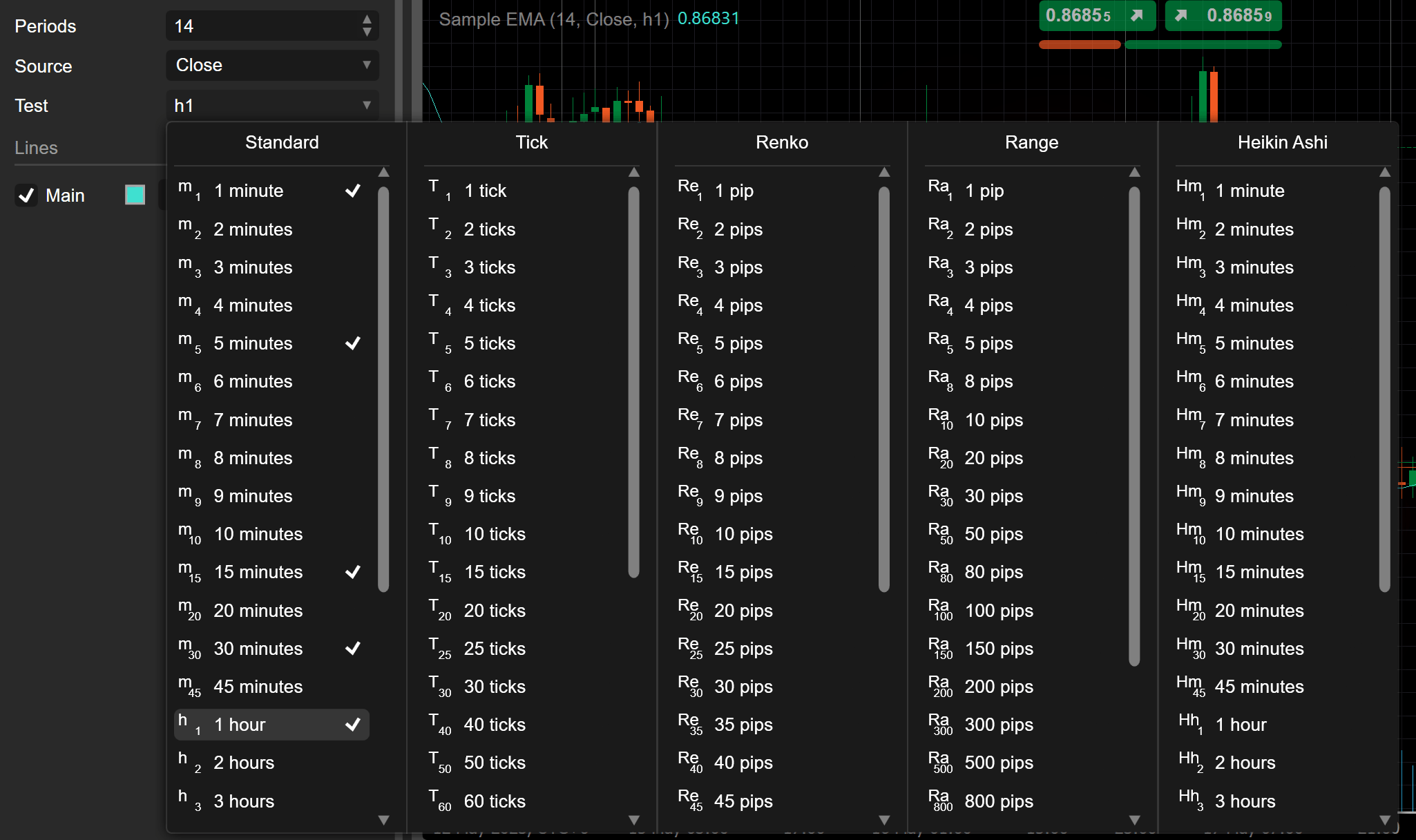
Na koniec interfejs użytkownika typu danych TimeFrame w C# i api.TimeFrame w Pythonie odzwierciedla opcje okresu dostępne na wykresach handlowych w aplikacji Trade.

Image title

Przykłady cBotów

Etykieta pozycji jest parametrem typu string w C# i str w Pythonie w poniższym cBocie.

 1
 2
 3
 4
 5
 6
 7
 8
 9
10
11
12
13
14
15
16
17
18
19
20
21
22
23
24
25
26
27
28
29
using System;
using System.Collections.Generic;
using System.Linq;
using System.Text;
using cAlgo.API;
using cAlgo.API.Collections;
using cAlgo.API.Indicators;
using cAlgo.API.Internals;

namespace cAlgo.Robots
{
    [Robot(AccessRights = AccessRights.None)]
    public class NewcBot2 : Robot
    {
        [Parameter(DefaultValue = "my label")]
        public string PositionLabel { get; set; }

        protected override void OnStart()
        {
            ExecuteMarketOrder(TradeType.Buy, "XAGUSD", 1000, PositionLabel);
        }

        protected override void OnStop()
        {
            var positionToFind = Positions.Find(PositionLabel);
            positionToFind.Close();
        }
    }
}

Uwaga

cBoty w Pythonie używają parametrów konfigurowalnych zadeklarowanych w swoich plikach .cs.

 1
 2
 3
 4
 5
 6
 7
 8
 9
10
11
12
13
14
15
16
import clr

clr.AddReference("cAlgo.API")

from cAlgo.API import *
from robot_wrapper import *


class NewcBot2():
    def on_start(self):
        api.ExecuteMarketOrder(TradeType.Buy, "XAGUSD", 1000, api.PositionLabel)

    def on_stop(self):
        position_to_find = api.Positions.Find(api.PositionLabel)
        if position_to_find is not None:
            position_to_find.Close()

Typy danych DataSeries, int, bool w C# oraz api.DataSeries, int, bool w Pythonie są zilustrowane w poniższym algorytmie.

 1
 2
 3
 4
 5
 6
 7
 8
 9
10
11
12
13
14
15
16
17
18
19
20
21
22
23
24
25
26
27
28
29
30
31
32
33
34
35
36
37
38
39
40
41
42
43
44
45
46
47
48
49
50
51
using System;
using System.Collections.Generic;
using System.Linq;
using System.Text;
using cAlgo.API;
using cAlgo.API.Collections;
using cAlgo.API.Indicators;
using cAlgo.API.Internals;

namespace cAlgo
{
    [Robot(TimeZone = TimeZones.UTC, AccessRights = AccessRights.None)]
    public class SamplecBotReferenceSMA : Robot
    {
        [Parameter("Source")]
        public DataSeries Source { get; set; }

        [Parameter("SMA Period", DefaultValue = 14)]
        public int SmaPeriod { get; set; }

        [Parameter("Enable Trade", DefaultValue = true)]
        public bool EnableTrade { get; set; }

        private SimpleMovingAverage sma;

        protected override void OnStart()
        {
            sma = Indicators.SimpleMovingAverage(Source, SmaPeriod);
        }

        protected override void OnTick()
        {
            double currentSMA = sma.Result.LastValue;
            double currentPrice = Symbol.Bid;

            if (EnableTrade)
            {
                if (currentPrice > currentSMA)
                {
                    ExecuteMarketOrder(TradeType.Buy, Symbol, 1000, "Buy Order");
                }
                else if (currentPrice < currentSMA)
                {
                    ExecuteMarketOrder(TradeType.Sell, Symbol, 1000, "Sell Order");
                }
            }

            Print("Current Price: {0}, Current SMA: {1}", currentPrice, currentSMA);
        }
    }
}

Uwaga

cBoty w Pythonie używają parametrów konfigurowalnych zadeklarowanych w swoich plikach .cs.

 1
 2
 3
 4
 5
 6
 7
 8
 9
10
11
12
13
14
15
16
17
18
19
20
21
22
23
import clr

clr.AddReference("cAlgo.API")

from cAlgo.API import *
from robot_wrapper import *


class SamplecBotReferenceSMA():
    def on_start(self):
        self.sma = api.Indicators.SimpleMovingAverage(api.Source, api.SmaPeriod)

    def on_tick(self):
        currentSMA = self.sma.Result.LastValue
        currentPrice = api.Symbol.Bid

        if api.EnableTrade:
            if currentPrice > currentSMA:
                api.ExecuteMarketOrder(TradeType.Buy, api.Symbol, 1000, "Buy Order")
            elif currentPrice < currentSMA:
                api.ExecuteMarketOrder(TradeType.Sell, api.Symbol, 1000, "Sell Order")

        api.Print("Current Price: {0}, Current SMA: {1}".format(currentPrice, currentSMA))

Ten cBot używa Color jako parametru do definiowania wizualizacji tekstu w obszarze wykresu:

 1
 2
 3
 4
 5
 6
 7
 8
 9
10
11
12
13
14
15
16
17
18
19
20
21
22
23
using System;
using System.Collections.Generic;
using System.Linq;
using System.Text;
using cAlgo.API;
using cAlgo.API.Collections;
using cAlgo.API.Indicators;
using cAlgo.API.Internals;

namespace cAlgo.Robots
{
    [Robot(AccessRights = AccessRights.None)]
    public class NewcBot : Robot
    {
        [Parameter(DefaultValue = "Yellow")]
        public Color TextColor { get; set; }

        protected override void OnBar() 
        {
            Chart.DrawStaticText("static", "cBot running!", VerticalAlignment.Center, HorizontalAlignment.Left, TextColor);
        }
    }
}

W poniższym przykładzie typ danych double w C# i float w Pythonie służy jako parametr do wprowadzenia wolumenu zlecenia w lotach. cBot wykonuje zlecenie kupna po cenie rynkowej po trzech kolejnych czerwonych słupkach.

 1
 2
 3
 4
 5
 6
 7
 8
 9
10
11
12
13
14
15
16
17
18
19
20
21
22
23
24
25
26
27
28
29
30
31
32
33
34
35
36
37
38
39
40
41
42
43
44
45
46
47
48
49
50
51
52
53
using System;
using System.Collections.Generic;
using System.Linq;
using System.Text;
using cAlgo.API;
using cAlgo.API.Collections;
using cAlgo.API.Indicators;
using cAlgo.API.Internals;

namespace cAlgo
{
    [Robot(TimeZone = TimeZones.UTC, AccessRights = AccessRights.None)]
    public class RedBarsBot : Robot
    {
        [Parameter("Order Volume (Lots)", DefaultValue = 0.1)]
        public double OrderVolume { get; set; }

        private int redBarsCount = 0;

        protected override void OnBar()
        {
            if (IsRedBar())
            {
                redBarsCount++;
                if (redBarsCount == 3)
                {
                    PlaceMarketOrder(TradeType.Buy);
                    redBarsCount = 0;
                }
            }
            else
            {
                redBarsCount = 0;
            }
        }

        private bool IsRedBar()
        {
            var currentBar = MarketSeries.Close.Last(1);
            var previousBar = MarketSeries.Close.Last(2);

            return currentBar < previousBar;
        }

        private void PlaceMarketOrder(TradeType tradeType)
        {
            var symbol = Symbol;
            var volume = Symbol.QuantityToVolume(OrderVolume);

            ExecuteMarketOrder(tradeType, symbol, volume);
        }
    }
}

Uwaga

cBoty w Pythonie używają parametrów konfigurowalnych zadeklarowanych w swoich plikach .cs.

 1
 2
 3
 4
 5
 6
 7
 8
 9
10
11
12
13
14
15
16
17
18
19
20
21
22
23
24
25
26
27
28
29
import clr

clr.AddReference("cAlgo.API")

from cAlgo.API import *
from robot_wrapper import *

class RedBarsBot():
    def __init__(self):
        self.redBarsCount = 0

    def on_bar(self):
        if self.is_red_bar():
            self.redBarsCount += 1
            if self.redBarsCount == 3:
                self.place_market_order(TradeType.Buy)
                self.redBarsCount = 0
        else:
            self.redBarsCount = 0

    def is_red_bar(self):
        currentBar = api.MarketSeries.Close.Last(1)
        previousBar = api.MarketSeries.Close.Last(2)
        return currentBar < previousBar

    def place_market_order(self, tradeType):
        symbol = api.Symbol
        volume = api.Symbol.QuantityToVolume(api.OrderVolume)
        api.ExecuteMarketOrder(tradeType, symbol, volume)

W poniższym przykładzie typy danych DateTime, DateOnly i TimeSpan służą jako parametry.

 1
 2
 3
 4
 5
 6
 7
 8
 9
10
11
12
13
14
15
16
17
18
19
20
21
22
23
24
using System;
using cAlgo.API;

namespace cAlgo.Robots;

[Robot(AccessRights = AccessRights.None)]
public class TimeParameters : Robot
{
    [Parameter("DateTime Parameter", MinValue = "1970-01-01T00:00:00", MaxValue = "2025-11-01T00:00:00", DefaultValue = "2025-01-01T10:00:00")]
    public DateTime DateTimeParameter { get; set; }

    [Parameter("DateOnly Parameter", MinValue = "1970-01-01", MaxValue = "2025-11-01", DefaultValue = "2025-01-01")]
    public DateOnly DateOnlyParameter { get; set; }

    [Parameter("TimeSpan Parameter", MinValue = "00:00:00", MaxValue = "23:59:59", DefaultValue = "04:10:20")]
    public TimeSpan TimeSpanParameter { get; set; }

    protected override void OnStart()
    {
        Print($"DateTimeParameter: {DateTimeParameter:o}");
        Print($"DateOnlyParameter: {DateOnlyParameter:o}");
        Print($"TimeSpanParameter: {TimeSpanParameter}");
    }
}

Uwaga

cBoty w Pythonie używają parametrów konfigurowalnych zadeklarowanych w swoich plikach .cs.

 1
 2
 3
 4
 5
 6
 7
 8
 9
10
11
12
13
14
15
16
17
using System;
using cAlgo.API;

namespace cAlgo.Robots;

[Robot(AccessRights = AccessRights.None)]
public class TimeParameters : Robot
{
    [Parameter("DateTime Parameter", MinValue = "1970-01-01T00:00:00", MaxValue = "2025-11-01T00:00:00", DefaultValue = "2025-01-01T10:00:00")]
    public DateTime DateTimeParameter { get; set; }

    [Parameter("DateOnly Parameter", MinValue = "1970-01-01", MaxValue = "2025-11-01", DefaultValue = "2025-01-01")]
    public DateOnly DateOnlyParameter { get; set; }

    [Parameter("TimeSpan Parameter", MinValue = "00:00:00", MaxValue = "23:59:59", DefaultValue = "04:10:20")]
    public TimeSpan TimeSpanParameter { get; set; }
}
Użyj parametrów w cBocie w Pythonie:

 1
 2
 3
 4
 5
 6
 7
 8
 9
10
11
12
13
14
15
import clr

clr.AddReference("cAlgo.API")

# Import cAlgo API types
from cAlgo.API import *

# Import trading wrapper functions
from robot_wrapper import *

class TimeParameters():
    def on_start(self):
        print(f"DateTimeParameter: {api.DateTimeParameter}")
        print(f"DateOnlyParameter: {api.DateOnlyParameter}")
        print(f"TimeSpanParameter: {api.TimeSpanParameter}")

Uwaga

Wartość parametru DateTime jest automatycznie konwertowana ze strefy czasowej platformy użytkownika do strefy czasowej algorytmu, eliminując potrzebę ręcznej konwersji.

W poniższym przykładzie typ danych Symbol służy jako parametr.

 1
 2
 3
 4
 5
 6
 7
 8
 9
10
11
12
13
14
15
16
17
using System;
using cAlgo.API;
using cAlgo.API.Internals;

namespace cAlgo.Robots;

[Robot(AccessRights = AccessRights.None)]
public class SymbolParameterTest : Robot
{
    [Parameter("Symbol Parameter", DefaultValue = "EURUSD")]
    public Symbol SymbolParameter { get; set; }

    protected override void OnStart()
    {
        Print($"Symbol Bid Price is: {SymbolParameter.Bid}");
    }
}

Uwaga

cBoty w Pythonie używają parametrów konfigurowalnych zadeklarowanych w swoich plikach .cs.

 1
 2
 3
 4
 5
 6
 7
 8
 9
10
11
12
using System;
using cAlgo.API;
using cAlgo.API.Internals;

namespace cAlgo.Robots;

[Robot(AccessRights = AccessRights.None)]
public class SymbolParameterTest : Robot
{
    [Parameter("Symbol Parameter", DefaultValue = "EURUSD")]
    public Symbol SymbolParameter { get; set; }
}
Użyj parametrów w cBocie w Pythonie:

 1
 2
 3
 4
 5
 6
 7
 8
 9
10
11
12
13
import clr

clr.AddReference("cAlgo.API")

# Import cAlgo API types
from cAlgo.API import *

# Import trading wrapper functions
from robot_wrapper import *

class SymbolParameterTest():
    def on_start(self):
        print(f"Symbol Bid Price is: {api.SymbolParameter.Bid}")

W poniższym przykładzie używamy typów parametrów multi Enum, Symbol i TimeFrame, które są reprezentowane przez typ tablicy w C#.

 1
 2
 3
 4
 5
 6
 7
 8
 9
10
11
12
13
14
15
16
17
18
19
20
21
22
23
24
25
26
using System;
    using cAlgo.API;
using cAlgo.API.Internals;
using System.Linq;

namespace cAlgo.Robots;

[Robot(AccessRights = AccessRights.None)]
public class MultiValueParametersTest : Robot
{
    [Parameter(DefaultValue = "EURUSD,GBPUSD")]
    public Symbol[] SymbolsParameter { get; set; }

    [Parameter(DefaultValue = "Sell")]
    public TradeType[] TradeTypesParameter { get; set; }

    [Parameter(DefaultValue = "Daily,Hour")]
    public TimeFrame[] TimeFramesParameter { get; set; }

    protected override void OnStart()
    {
        Print($"Selected symbols are: {string.Join(", ", SymbolsParameter.Select(symbol => symbol.Name))}");
        Print($"Selected trade types are: {string.Join(", ", TradeTypesParameter.Select(tradeType => tradeType.ToString()))}");
        Print($"Selected time frames are: {string.Join(", ", TimeFramesParameter.Select(timeFrame => timeFrame.ToString()))}");
    }
}

Uwaga

cBoty w Pythonie używają parametrów konfigurowalnych zadeklarowanych w swoich plikach .cs.

 1
 2
 3
 4
 5
 6
 7
 8
 9
10
11
12
13
14
15
16
17
18
using System;
using cAlgo.API;
using cAlgo.API.Internals;

namespace cAlgo.Robots;

[Robot(AccessRights = AccessRights.None)]
public class MultiValueParametersTest : Robot
{
    [Parameter(DefaultValue = "EURUSD,GBPUSD")]
    public Symbol[] SymbolsParameter { get; set; }

    [Parameter(DefaultValue = "Sell")]
    public TradeType[] TradeTypesParameter { get; set; }

    [Parameter(DefaultValue = "Daily,Hour")]
    public TimeFrame[] TimeFramesParameter { get; set; }
}
Użyj parametrów w cBocie w Pythonie:

 1
 2
 3
 4
 5
 6
 7
 8
 9
10
11
12
13
14
15
import clr

clr.AddReference("cAlgo.API")

# Import cAlgo API types
from cAlgo.API import *

# Import trading wrapper functions
from robot_wrapper import *

class MultiValueParametersTest():
    def on_start(self):
        print(f"Selected symbols are: {[symbol.Name for symbol in api.SymbolsParameter]}")
        print(f"Selected trade types are: {[str(tradeType) for tradeType in api.TradeTypesParameter]}")
        print(f"Selected time frames are: {[str(timeFrame) for timeFrame in api.TimeFramesParameter]}")

Przykłady wskaźników

Poniższy kod wskaźnika ilustruje, jak używane są parametry TimeFrame:

 1
 2
 3
 4
 5
 6
 7
 8
 9
10
11
12
13
14
15
16
17
18
19
20
21
22
23
24
25
26
27
28
29
30
31
32
33
34
35
using System;
using System.Collections.Generic;
using System.Linq;
using System.Text;
using cAlgo.API;
using cAlgo.API.Collections;
using cAlgo.API.Indicators;
using cAlgo.API.Internals;

namespace cAlgo
{
    [Indicator(AccessRights = AccessRights.None)]
    public class NewIndicator4 : Indicator
    {
        private Bars _hourlyTimeFrameBars;
        private Bars _targetTimeFrameBars;

        [Parameter("Chosen Time Frame")]
        public TimeFrame TargetTimeFrame { get; set; }

        [Output("Main")]
        public IndicatorDataSeries Result { get; set; }

        protected override void Initialize()
        {
            _hourlyTimeFrameBars = MarketData.GetBars(TimeFrame.Hour);
            _targetTimeFrameBars = MarketData.GetBars(TargetTimeFrame);
        }

        public override void Calculate(int index)
        {
            Result[index] = _hourlyTimeFrameBars.HighPrices[index] - _targetTimeFrameBars.HighPrices[index];
        }
    }
}

Istnieje zabawny wskaźnik (test na ślepotę barw), który oferuje opcje widzenia kolorów enum (na przykład normalne, ślepota barw i skala szarości), aby użytkownicy mogli określić kolor linii poziomej narysowanej na wykresie.

 1
 2
 3
 4
 5
 6
 7
 8
 9
10
11
12
13
14
15
16
17
18
19
20
21
22
23
24
25
26
27
28
29
30
31
32
33
34
35
36
37
38
39
40
41
42
43
44
45
46
47
48
49
50
51
52
53
using System;
using System.Collections.Generic;
using System.Linq;
using System.Text;
using cAlgo.API;
using cAlgo.API.Collections;
using cAlgo.API.Indicators;
using cAlgo.API.Internals;

namespace cAlgo
{

    public enum ColorVision
    {
        Normal,
        Colorblind,
        Greyscale
    }

    [Indicator(AccessRights = AccessRights.None)]
    public class ColorblindTest : Indicator
    {

        [Parameter("Color Vision", DefaultValue = ColorVision.Normal)]
        public ColorVision ColorVision { get; set; }

        public override void Calculate(int index) {}

        protected override void Initialize()
        {

            Color lineColor = Color.Green;

            switch (ColorVision) 
            {
                case ColorVision.Normal:
                    lineColor = Color.Red;
                    break;
                case ColorVision.Colorblind:
                    lineColor = Color.Yellow;
                    break;
                case ColorVision.Greyscale:
                    lineColor = Color.White;
                    break;

            }

            var trendLine = Chart.DrawHorizontalLine("line", Bars.HighPrices.Maximum(10), lineColor);
        }

    }

}

Podsumowując, wybierając odpowiedni typ danych dla zadeklarowanych zmiennych i właściwości klas, będziesz w stanie tworzyć cBoty i wskaźniki, które poradzą sobie nawet z niestandardowymi zadaniami.
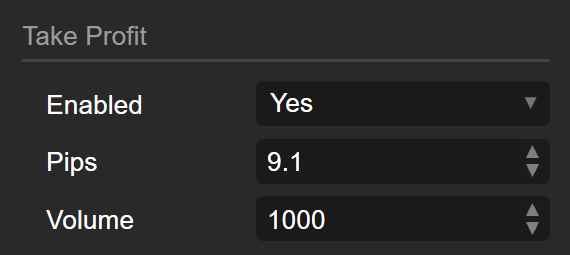
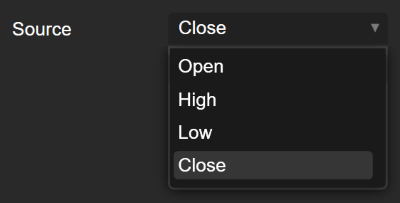
Image title