Ponieważ wskaźniki i cBoty cTradera stanowią aplikacje .NET, możesz używać wszystkich technologii .NET podczas ich tworzenia, w tym rozwiązań związanych z interfejsem użytkownika, takich jak WinForms i WPF. cTrader obsługuje wszystkie funkcje oferowane przez WinForms i WPF, w tym okna dialogowe, formularze, projektant WinForms Visual Studio, kontrolki i komponenty interfejsu użytkownika innych firm.
Uwaga
Algorytmy używające WinForms lub WPF mogą być uruchamiane tylko na komputerach z systemem Windows.
Aby używać WinForms, zmień swój kompilator cTrader na kompilator .NET SDK.
Pokażemy, jak można używać WinForms, tworząc niestandardowe okno dialogowe WinForms. Są one przydatne do wyświetlania alertów lub proszenia o dane wejściowe użytkownika.
Konfiguracja projektu
Zanim będziesz mógł używać WinForms w swoich cBotach i wskaźnikach, będziesz musiał wprowadzić kilka zmian w pliku(ach) projektu cBota lub wskaźnika. Ponieważ WinForms działa tylko w systemie Windows, będziesz musiał zmienić cel frameworka wskaźnika lub cBota swojego projektu na wariant .NET dla systemu Windows.
Aby to zrobić, otwórz plik projektu w Visual Studio i zastąp jego zawartość następującą:
Dodaliśmy tag UseWindowsForms i zmieniliśmy wartość TargetFramework na net6.0-windows.
Następnie zmień wartość parametru klasy AccessRights na FullAccess. Jeśli ta zmiana nie zostanie wprowadzona, Twoje rozszerzenie nie będzie miało wystarczających praw dostępu do otwarcia okna WinForms.
Przebuduj swój projekt po wprowadzeniu powyższych zmian.
Używanie okien dialogowych
Na szczęście WinForms zawiera kilka gotowych do użycia okien dialogowych, które są przydatne w wielu różnych przypadkach, w szczególności do wyświetlania komunikatów o błędach, uzyskiwania potwierdzenia od użytkownika lub wybierania pliku lub folderu.
Poniższy przykład używa klasy MessageBox oraz okien dialogowych otwierania i zapisywania plików.
MessageBox
Możesz używać klasy System.Windows.Forms.MessageBox w taki sam sposób, jak jest używana w każdej innej aplikacji .NET.
Poniższy kod dołącza standardowe okno potwierdzenia do wskaźnika:
usingcAlgo.API;usingSystem.Windows.Forms;namespaceWinFormsTest{[Indicator(IsOverlay = true, AccessRights = AccessRights.FullAccess)]publicclassWinFormsTest:Indicator{protectedoverridevoidInitialize(){varresult=System.Windows.Forms.MessageBox.Show("Are you sure you want confirm?","Confirmation",MessageBoxButtons.OKCancel,MessageBoxIcon.Information);if(result==DialogResult.OK){Print("OK");}else{Print("Cancel");}}publicoverridevoidCalculate(intindex){}}}
Po uruchomieniu instancji tego wskaźnika powinieneś natychmiast zobaczyć okno potwierdzenia z tekstem, który określiłeś powyżej.
Okna dialogowe otwierania lub zapisywania plików
Okno dialogowe otwierania lub zapisywania pliku może być używane, aby umożliwić cBotom i wskaźnikom przeglądanie i wybieranie plików przechowywanych lokalnie.
W przykładach użyliśmy oddzielnego wątku do uruchomienia kodu związanego z naszymi oknami dialogowymi. Zostało to zrobione, aby uwzględnić fakt, że główny wątek cBota lub wskaźnika nie jest wątkiem STA. Więcej szczegółów na temat tego problemu omawiamy w następnej sekcji.
Używanie dedykowanego wątku dla interfejsu użytkownika
Podczas uruchamiania kodu odwołującego się do WinForms musisz użyć wątku oznaczonego jako STA, w przeciwnym razie mogą wystąpić błędy podczas wykonywania. Więcej informacji można znaleźć w oficjalnej dokumentacji.
Nie możesz zmienić właściwości ApartmentState już działającego wątku. Ponieważ główny wątek cBota lub wskaźnika nie jest oznaczony jako STA, musisz użyć nowego wątku oznaczonego jako STA dla WinForms i WPF.
Kod w poprzedniej sekcji wywołuje również metodę thread.Join(). Blokuje ona wykonanie głównego wątku cBota lub wskaźnika do momentu zwolnienia wątku związanego z interfejsem użytkownika (na przykład przez kliknięcie przez użytkownika OK w oknie dialogowym potwierdzenia).
Za każdym razem, gdy chcesz wyświetlić formularz Windows lub element WPF, musisz uruchomić swój kod w oddzielnym wątku oznaczonym jako STA.
Tworzenie nowego niestandardowego formularza
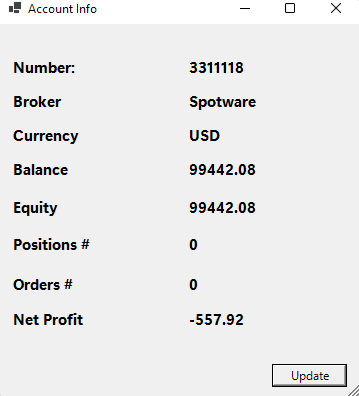
Do tej pory używaliśmy wbudowanych klas WinForms. Jednak możliwe jest również tworzenie klas niestandardowych. W tej sekcji utworzymy formularz pokazujący informacje o aktualnie aktywnym koncie handlowym, takie jak jego saldo i depozyt zabezpieczający.
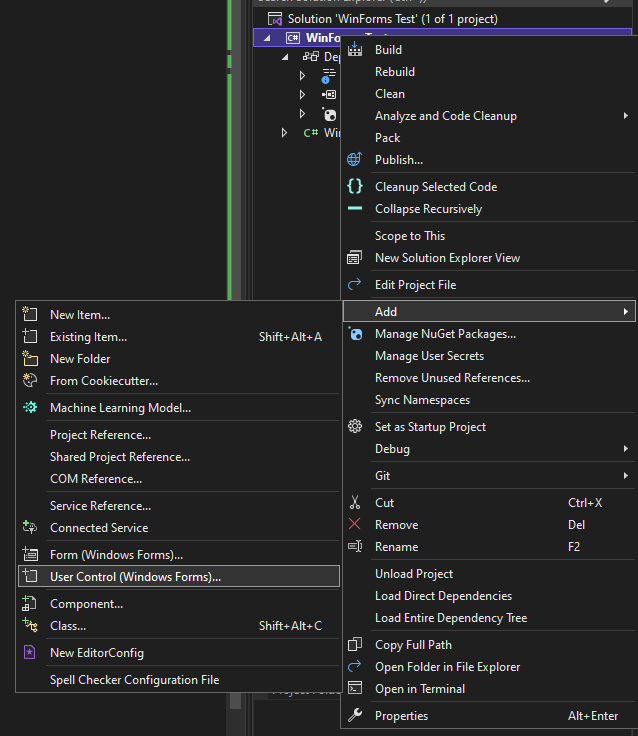
Aby utworzyć nowy formularz, kliknij prawym przyciskiem myszy swój cBot lub wskaźnik w Visual Studio, kliknij Dodaj i wybierz Kontrolka użytkownika (Windows Forms) ...'
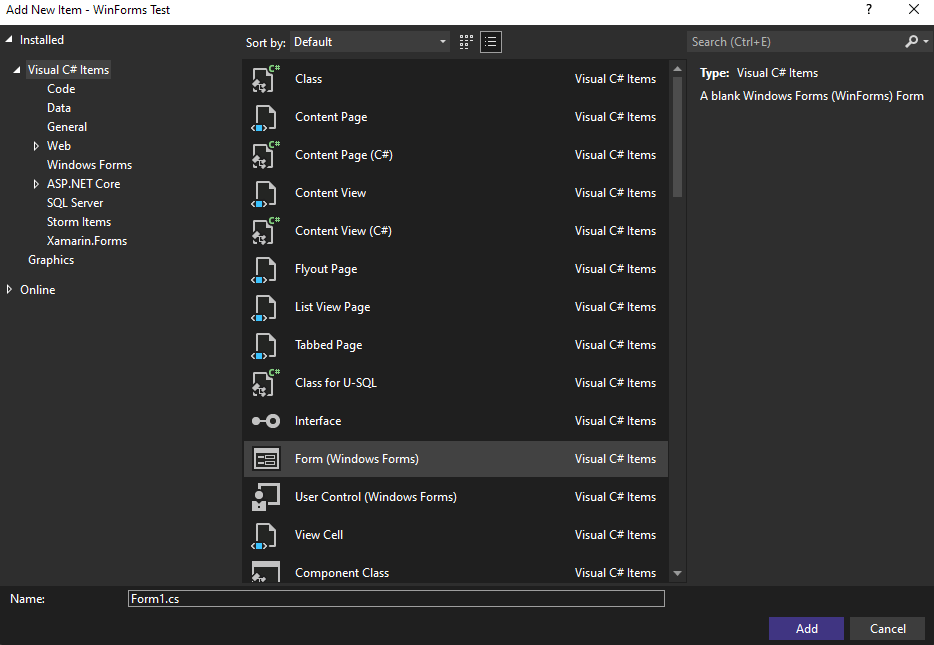
Visual Studio otworzy okno dialogowe, w którym możesz wybrać typ elementu, który chcesz dodać do swojego projektu. Wybierz Formularz (Windows Forms) (Visual Studio powinno wybrać go automatycznie).
Następnie zmień nazwę formularza z Form1.cs na AccountInfoForm.cs. Kliknij przycisk Dodaj.
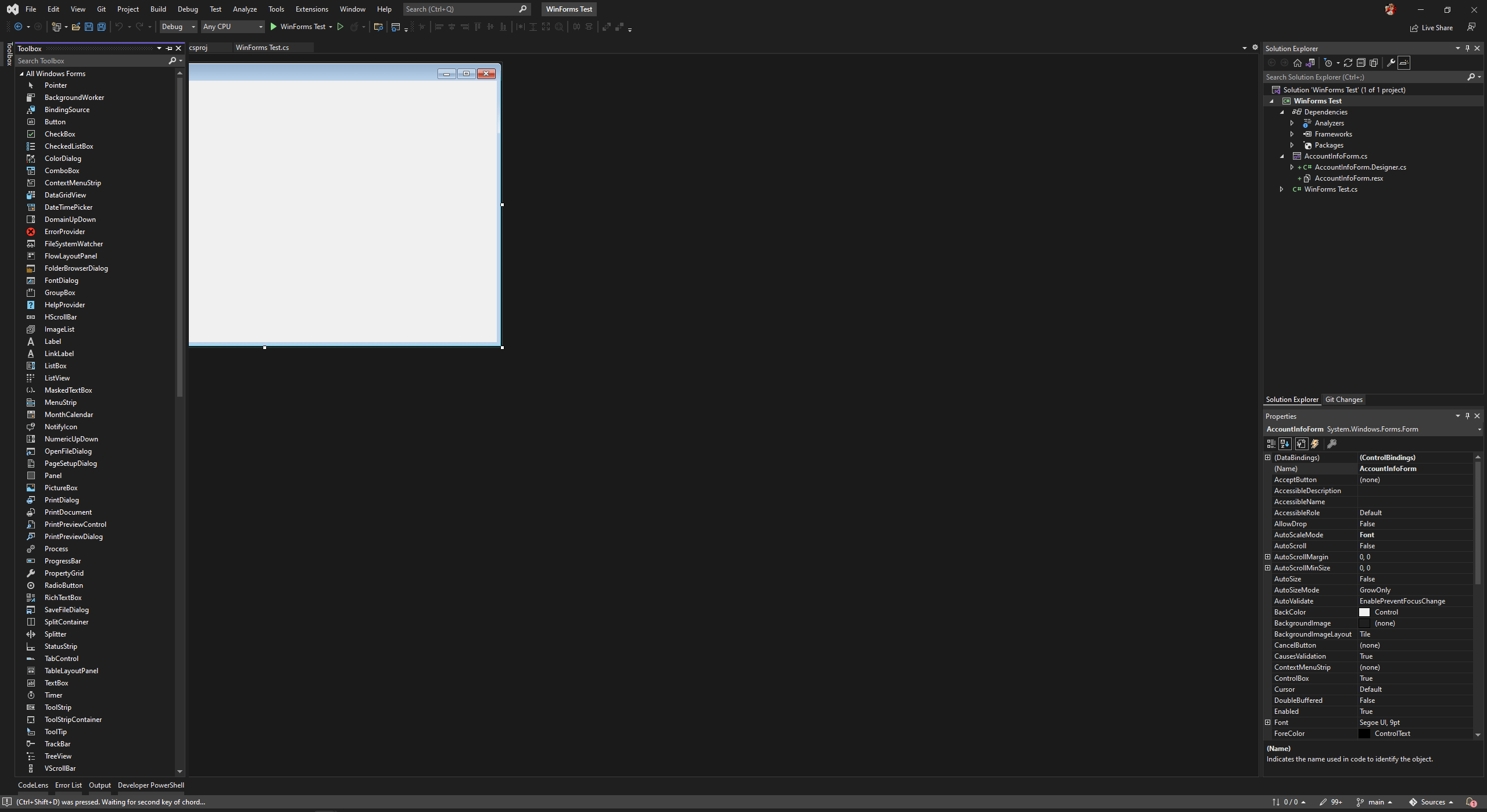
Nowy formularz zostanie utworzony w Twoim projekcie; IDE wyświetli projektanta WinForms Visual Studio. W rezultacie będziesz mógł korzystać ze wszystkich jego funkcji, w tym dodawania kontrolek za pomocą przybornika.
W tym przykładzie już utworzyliśmy formularz. Skopiuj i wklej poniższy kod do pliku AccountIntoForm.Designer.cs:
namespaceWinForms_Test{partialclassAccountInfoForm{/// <summary>/// Required designer variable./// </summary>privateSystem.ComponentModel.IContainercomponents=null;/// <summary>/// Clean up any resources being used./// </summary>/// <param name="disposing">true if managed resources should be disposed; otherwise, false.</param>protectedoverridevoidDispose(booldisposing){if(disposing&&(components!=null)){components.Dispose();}base.Dispose(disposing);}#region Windows Form Designer generated code/// <summary>/// Required method for Designer support - do not modify/// the contents of this method with the code editor./// </summary>privatevoidInitializeComponent(){this.label1=newSystem.Windows.Forms.Label();this.NumberLabel=newSystem.Windows.Forms.Label();this.BrokerLabel=newSystem.Windows.Forms.Label();this.label3=newSystem.Windows.Forms.Label();this.CurrencyLabel=newSystem.Windows.Forms.Label();this.label5=newSystem.Windows.Forms.Label();this.BalanceLabel=newSystem.Windows.Forms.Label();this.label7=newSystem.Windows.Forms.Label();this.EquityLabel=newSystem.Windows.Forms.Label();this.label9=newSystem.Windows.Forms.Label();this.PositionsNumberLabel=newSystem.Windows.Forms.Label();this.label11=newSystem.Windows.Forms.Label();this.OrdersNumberLabel=newSystem.Windows.Forms.Label();this.label13=newSystem.Windows.Forms.Label();this.NetProfitLabel=newSystem.Windows.Forms.Label();this.label15=newSystem.Windows.Forms.Label();this.UpdateButton=newSystem.Windows.Forms.Button();this.SuspendLayout();// // label1// this.label1.AutoSize=true;this.label1.Font=newSystem.Drawing.Font("Segoe UI Variable Display",11.25F,System.Drawing.FontStyle.Bold,System.Drawing.GraphicsUnit.Point);this.label1.Location=newSystem.Drawing.Point(12,33);this.label1.Name="label1";this.label1.Size=newSystem.Drawing.Size(72,20);this.label1.TabIndex=0;this.label1.Text="Number:";// // NumberLabel// this.NumberLabel.AutoSize=true;this.NumberLabel.Font=newSystem.Drawing.Font("Segoe UI Variable Display",11.25F,System.Drawing.FontStyle.Bold,System.Drawing.GraphicsUnit.Point);this.NumberLabel.Location=newSystem.Drawing.Point(188,33);this.NumberLabel.Name="NumberLabel";this.NumberLabel.Size=newSystem.Drawing.Size(0,20);this.NumberLabel.TabIndex=1;// // BrokerLabel// this.BrokerLabel.AutoSize=true;this.BrokerLabel.Font=newSystem.Drawing.Font("Segoe UI Variable Display",11.25F,System.Drawing.FontStyle.Bold,System.Drawing.GraphicsUnit.Point);this.BrokerLabel.Location=newSystem.Drawing.Point(188,67);this.BrokerLabel.Name="BrokerLabel";this.BrokerLabel.Size=newSystem.Drawing.Size(0,20);this.BrokerLabel.TabIndex=3;// // label3// this.label3.AutoSize=true;this.label3.Font=newSystem.Drawing.Font("Segoe UI Variable Display",11.25F,System.Drawing.FontStyle.Bold,System.Drawing.GraphicsUnit.Point);this.label3.Location=newSystem.Drawing.Point(12,67);this.label3.Name="label3";this.label3.Size=newSystem.Drawing.Size(56,20);this.label3.TabIndex=2;this.label3.Text="Broker";// // CurrencyLabel// this.CurrencyLabel.AutoSize=true;this.CurrencyLabel.Font=newSystem.Drawing.Font("Segoe UI Variable Display",11.25F,System.Drawing.FontStyle.Bold,System.Drawing.GraphicsUnit.Point);this.CurrencyLabel.Location=newSystem.Drawing.Point(188,101);this.CurrencyLabel.Name="CurrencyLabel";this.CurrencyLabel.Size=newSystem.Drawing.Size(0,20);this.CurrencyLabel.TabIndex=5;// // label5// this.label5.AutoSize=true;this.label5.Font=newSystem.Drawing.Font("Segoe UI Variable Display",11.25F,System.Drawing.FontStyle.Bold,System.Drawing.GraphicsUnit.Point);this.label5.Location=newSystem.Drawing.Point(12,101);this.label5.Name="label5";this.label5.Size=newSystem.Drawing.Size(75,20);this.label5.TabIndex=4;this.label5.Text="Currency";// // BalanceLabel// this.BalanceLabel.AutoSize=true;this.BalanceLabel.Font=newSystem.Drawing.Font("Segoe UI Variable Display",11.25F,System.Drawing.FontStyle.Bold,System.Drawing.GraphicsUnit.Point);this.BalanceLabel.Location=newSystem.Drawing.Point(188,135);this.BalanceLabel.Name="BalanceLabel";this.BalanceLabel.Size=newSystem.Drawing.Size(0,20);this.BalanceLabel.TabIndex=7;// // label7// this.label7.AutoSize=true;this.label7.Font=newSystem.Drawing.Font("Segoe UI Variable Display",11.25F,System.Drawing.FontStyle.Bold,System.Drawing.GraphicsUnit.Point);this.label7.Location=newSystem.Drawing.Point(12,135);this.label7.Name="label7";this.label7.Size=newSystem.Drawing.Size(63,20);this.label7.TabIndex=6;this.label7.Text="Balance";// // EquityLabel// this.EquityLabel.AutoSize=true;this.EquityLabel.Font=newSystem.Drawing.Font("Segoe UI Variable Display",11.25F,System.Drawing.FontStyle.Bold,System.Drawing.GraphicsUnit.Point);this.EquityLabel.Location=newSystem.Drawing.Point(188,173);this.EquityLabel.Name="EquityLabel";this.EquityLabel.Size=newSystem.Drawing.Size(0,20);this.EquityLabel.TabIndex=9;// // label9// this.label9.AutoSize=true;this.label9.Font=newSystem.Drawing.Font("Segoe UI Variable Display",11.25F,System.Drawing.FontStyle.Bold,System.Drawing.GraphicsUnit.Point);this.label9.Location=newSystem.Drawing.Point(12,173);this.label9.Name="label9";this.label9.Size=newSystem.Drawing.Size(54,20);this.label9.TabIndex=8;this.label9.Text="Equity";// // PositionsNumberLabel// this.PositionsNumberLabel.AutoSize=true;this.PositionsNumberLabel.Font=newSystem.Drawing.Font("Segoe UI Variable Display",11.25F,System.Drawing.FontStyle.Bold,System.Drawing.GraphicsUnit.Point);this.PositionsNumberLabel.Location=newSystem.Drawing.Point(188,210);this.PositionsNumberLabel.Name="PositionsNumberLabel";this.PositionsNumberLabel.Size=newSystem.Drawing.Size(0,20);this.PositionsNumberLabel.TabIndex=11;// // label11// this.label11.AutoSize=true;this.label11.Font=newSystem.Drawing.Font("Segoe UI Variable Display",11.25F,System.Drawing.FontStyle.Bold,System.Drawing.GraphicsUnit.Point);this.label11.Location=newSystem.Drawing.Point(12,210);this.label11.Name="label11";this.label11.Size=newSystem.Drawing.Size(85,20);this.label11.TabIndex=10;this.label11.Text="Positions #";// // OrdersNumberLabel// this.OrdersNumberLabel.AutoSize=true;this.OrdersNumberLabel.Font=newSystem.Drawing.Font("Segoe UI Variable Display",11.25F,System.Drawing.FontStyle.Bold,System.Drawing.GraphicsUnit.Point);this.OrdersNumberLabel.Location=newSystem.Drawing.Point(188,250);this.OrdersNumberLabel.Name="OrdersNumberLabel";this.OrdersNumberLabel.Size=newSystem.Drawing.Size(0,20);this.OrdersNumberLabel.TabIndex=13;// // label13// this.label13.AutoSize=true;this.label13.Font=newSystem.Drawing.Font("Segoe UI Variable Display",11.25F,System.Drawing.FontStyle.Bold,System.Drawing.GraphicsUnit.Point);this.label13.Location=newSystem.Drawing.Point(12,250);this.label13.Name="label13";this.label13.Size=newSystem.Drawing.Size(69,20);this.label13.TabIndex=12;this.label13.Text="Orders #";// // NetProfitLabel// this.NetProfitLabel.AutoSize=true;this.NetProfitLabel.Font=newSystem.Drawing.Font("Segoe UI Variable Display",11.25F,System.Drawing.FontStyle.Bold,System.Drawing.GraphicsUnit.Point);this.NetProfitLabel.Location=newSystem.Drawing.Point(188,285);this.NetProfitLabel.Name="NetProfitLabel";this.NetProfitLabel.Size=newSystem.Drawing.Size(0,20);this.NetProfitLabel.TabIndex=15;// // label15// this.label15.AutoSize=true;this.label15.Font=newSystem.Drawing.Font("Segoe UI Variable Display",11.25F,System.Drawing.FontStyle.Bold,System.Drawing.GraphicsUnit.Point);this.label15.Location=newSystem.Drawing.Point(12,285);this.label15.Name="label15";this.label15.Size=newSystem.Drawing.Size(79,20);this.label15.TabIndex=14;this.label15.Text="Net Profit";// // UpdateButton// this.UpdateButton.Location=newSystem.Drawing.Point(273,340);this.UpdateButton.Name="UpdateButton";this.UpdateButton.Size=newSystem.Drawing.Size(75,23);this.UpdateButton.TabIndex=16;this.UpdateButton.Text="Update";this.UpdateButton.UseVisualStyleBackColor=true;this.UpdateButton.Click+=newSystem.EventHandler(this.UpdateButton_Click);// // AccountInfoForm// this.AutoScaleDimensions=newSystem.Drawing.SizeF(7F,15F);this.AutoScaleMode=System.Windows.Forms.AutoScaleMode.Font;this.ClientSize=newSystem.Drawing.Size(360,375);this.Controls.Add(this.UpdateButton);this.Controls.Add(this.NetProfitLabel);this.Controls.Add(this.label15);this.Controls.Add(this.OrdersNumberLabel);this.Controls.Add(this.label13);this.Controls.Add(this.PositionsNumberLabel);this.Controls.Add(this.label11);this.Controls.Add(this.EquityLabel);this.Controls.Add(this.label9);this.Controls.Add(this.BalanceLabel);this.Controls.Add(this.label7);this.Controls.Add(this.CurrencyLabel);this.Controls.Add(this.label5);this.Controls.Add(this.BrokerLabel);this.Controls.Add(this.label3);this.Controls.Add(this.NumberLabel);this.Controls.Add(this.label1);this.Name="AccountInfoForm";this.Text="Account Info";this.Load+=newSystem.EventHandler(this.AccountInfoForm_Load);this.ResumeLayout(false);this.PerformLayout();}#endregionprivateSystem.Windows.Forms.Labellabel1;privateSystem.Windows.Forms.LabelNumberLabel;privateSystem.Windows.Forms.LabelBrokerLabel;privateSystem.Windows.Forms.Labellabel3;privateSystem.Windows.Forms.LabelCurrencyLabel;privateSystem.Windows.Forms.Labellabel5;privateSystem.Windows.Forms.LabelBalanceLabel;privateSystem.Windows.Forms.Labellabel7;privateSystem.Windows.Forms.LabelEquityLabel;privateSystem.Windows.Forms.Labellabel9;privateSystem.Windows.Forms.LabelPositionsNumberLabel;privateSystem.Windows.Forms.Labellabel11;privateSystem.Windows.Forms.LabelOrdersNumberLabel;privateSystem.Windows.Forms.Labellabel13;privateSystem.Windows.Forms.LabelNetProfitLabel;privateSystem.Windows.Forms.Labellabel15;privateSystem.Windows.Forms.ButtonUpdateButton;}}
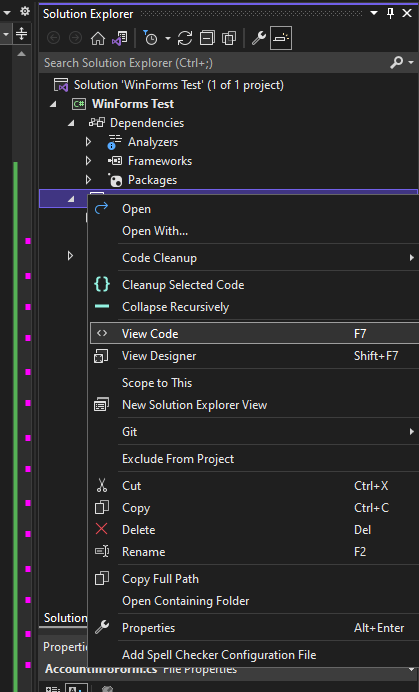
Powyższy kod jest generowany przez projektanta WinForms. Teraz napiszemy kod backendu dla nowego formularza. Aby to zrobić, kliknij prawym przyciskiem myszy formularz i wybierz Wyświetl kod.
Warto zauważyć, że nasz kod używa metod BeginInvokeOnMainThread() i BeginInvoke(). Wyjaśniamy nasze uzasadnienie dla tego w następnej sekcji.
Na razie użyjemy naszego niestandardowego formularza, wywołując jego metodę ShowDialog() z naszego wskaźnika. Skopiuj i wklej poniższy kod do pliku źródłowego swojego wskaźnika:
Gdy dodasz nowy formularz, automatycznie użyje on przestrzeni nazw Twojego wskaźnika lub cBota (cAlgo). Aby uniknąć błędów, zmień przestrzeń nazw dodanego formularza, a następnie dodaj go do pliku kodu źródłowego swojego wskaźnika lub cBota. W naszym przypadku WinForms_Test jest oznaczeniem przestrzeni nazw.
Po zbudowaniu wskaźnika i utworzeniu instancji powinieneś zobaczyć pojawienie się następującego formularza.
Dostęp do członków API z wątku dedykowanego dla UI
Jak wyjaśniliśmy wcześniej, musisz użyć oddzielnego dedykowanego wątku do uruchamiania swoich WinForms. Tylko kod wykonywany w tym wątku będzie mógł uzyskać dostęp do kontrolek i właściwości formularza.
To samo dotyczy wszystkich elementów API algorytmów. Ponieważ API nie jest bezpieczne wątkowo, nie możesz uzyskać dostępu do członków API z wątku Form. Zamiast tego musisz wysłać to zadanie, używając metody BeginInvokeOnMainThread() w kodzie swojego wskaźnika lub cBota.
Może to stworzyć komplikacje, jeśli chcesz wymieniać dane między swoim wskaźnikiem lub cBotem a WinForm. Aby rozwiązać ten problem, możesz utworzyć klasę proxy do zarządzania interakcjami między wątkami Twojego cBota lub wskaźnika a Form.