Skip to content

Publish a product

How cTrader secures your product

  • Creation. Building an algorithm in cTrader Windows or Mac ensures that the .algo file is generated locally, and no source code is uploaded to cTrader or any third-party server.

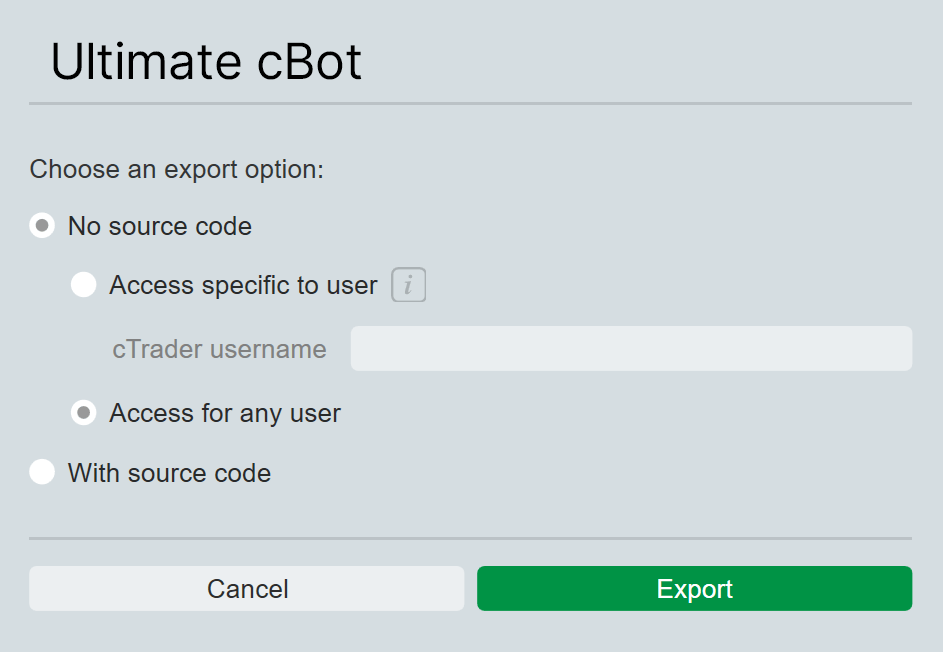
  • Export. Even when you export your algorithm with source code as a file, the source code is never transmitted to cTrader Store. Product uploads from Cloud never contain source code.

  • Distribution. The .algo file is encrypted. For each purchase, cTrader Store issues a unique protected copy tied to the buyer’s cTrader ID, preventing unauthorised sharing.

  • Execution. Locally, the .algo file runs inside cTrader and is never in a readable form. In Cloud, a cBot runs in an isolated environment where only outputs are exposed. The file itself is never accessible, downloadable or viewable.

Learn more about algo protection measures in cTrader.

Open Your products in the Store account and click Publish new.

Note

Only verified accounts can publish products as sellers.

Fill in the form and provide the required details on the Publish new product page.
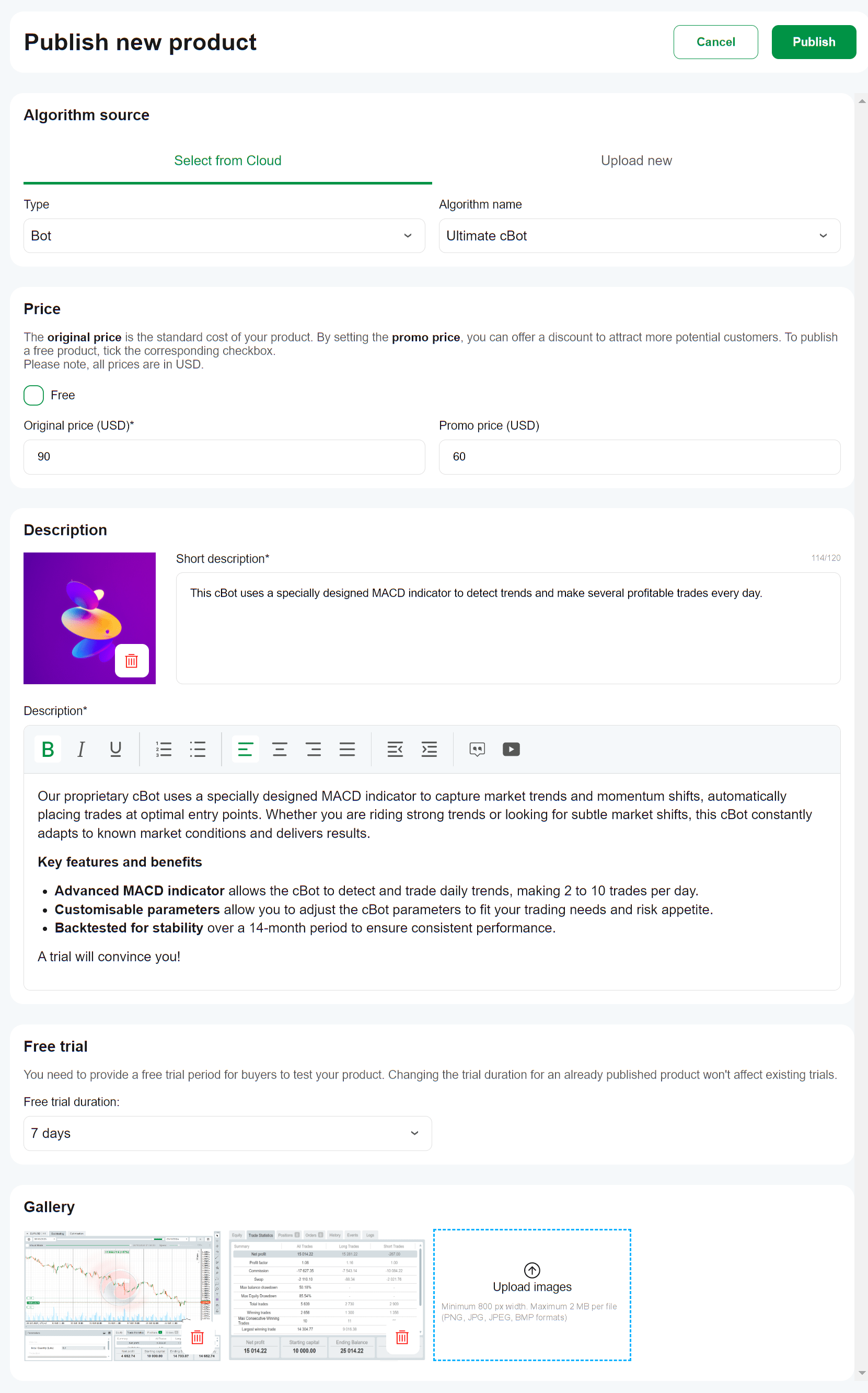
  • Select from Cloud – pick an existing product from your cloud storage.
  • Type – choose the product type (cBot, indicator, plugin or WebView plugin).
  • Algorithm name – select the product by name from the list.
  • Upload new – upload an algo file from your local device (maximum 10 MB).
  • Free – tick to offer the product at no charge. After the product is published and activated, you cannot switch between free and paid versions.
  • Original price – enter the standard selling price in USD.
  • Promo price – set the promotional selling price in USD.
  • Main image – upload a unique logo for your product (minimum 300×300 px, maximum 1 MB; PNG, JPG, JPEG, or BMP format)
  • Short description – enter a brief description that will appear on the product card.
  • Description – add product details, features and benefits that will appear on the product page.
  • Free trial – set a free trial period for buyers to test your product. Changing the trial duration for an already published product will not affect existing trials.
  • Gallery – upload supporting images and screenshots (minimum 800 px width, maximum 2 MB per file; PNG, JPG, JPEG, or BMP format).

Click the Publish button once you are finished.

Note

cTrader charges a 30% commission on all paid algorithms sold through cTrader Store.
After you receive income as a seller, you are required to pay taxes in accordance with your jurisdiction.

Publishing rules

To maintain quality and clarity across cTrader Store, products must meet these rules for approval.

Warning

Products that do not comply with the required rules will be rejected and not published.

General

  • Never publish copied, pirated or resold products without original rights.
  • Do not publish algorithms with full access rights.
  • Do not upload .algo files that are locked to a specific user.
  • Provide accurate, clear and complete product information, with no misleading descriptions or images.
  • Ensure product names and prices are identical in cTrader Store and any other distribution channels you use.

Title

  • Use 6-40 (ideally under 22) characters with only Latin letters, numbers, hyphens, colons, semicolons or parentheses. Special characters like @, %, #, &, etc. are not allowed in product titles.
  • Product titles must not include "with source code" or "without source code", since source code is automatically removed when products are uploaded to Store.
  • For demo and full versions, use the same product name with a tag like "Demo" or "Full".

Example

SmartTrend Demo
SmartTrend Full

Product description

  • Write a maximum of 120 characters for the short description.
  • Write a minimum of 300 characters for the full description.
  • Use English as the primary language, adding translations to the full description if needed.
  • Do not include links to other stores and social media.
  • Use the visual text editor to apply bold, lists, headings and other formatting options to improve readability and presentation.
  • Add the following disclaimer if the description mentions results or performance.

Disclaimer

Trading involves risk. Past performance does not guarantee future results.

Your product description must include:

  • Strategy type (scalping, grid, trend-following, etc.)
  • Target symbols and periods
  • Trading use case
  • Suggested leverage, account size and any broker/prop requirements

Use the following description templates:

Short description template

SmartTrend is a trend-following cBot for EURUSD h1, entering on pullbacks with a trailing stop loss.

Description template

This is a trend-following cBot optimised for EURUSD on the h1 period. It is designed for traders seeking consistent entries during established trends on high-liquidity pairs. The strategy enters on pullbacks using two EMA filters combined with RSI confirmation, and manages exits with a trailing stop loss.

    Strategy type: Trend-following
    Target symbols & periods: EURUSD, h1
    Suggested leverage: 1:30 or higher
    Suggested account size: $1,000+ (or equivalent in other currencies)
    Default settings: Optimised for EURUSD/h1 (see default parameters screenshot)
    Backtesting: Includes full results for the last 3 years (see backtesting screenshot)              

Your product description must include:

  • Indicator type (trend, oscillator, volume, etc.)
  • Preferred periods and instruments
  • Trading use cases

Use the following description template:

Short description template

RSI Heatmap is a multi-timeframe oscillator designed to spot momentum reversals.

Description templates

The RSI Heatmap scans Relative Strength Index values across five different periods and displays them in a clear, colour-coded heatmap. It helps traders quickly identify overbought or oversold market conditions for timely decision-making.

    Best suited for popular forex symbols
    Optimised for m15 to h4 periods
    Compatible with existing trend-following systems
    Effective as a standalone technical analysis tool

Your product description must include:

  • Clear explanation of functionality
  • Trading use cases

Use the following description template:

Short description template

SmartTrend is a trend-following cBot for EURUSD h1, entering on pullbacks with a trailing stop loss.

Description templates

The LiveFX News plugin integrates directly into cTrader Mobile and other apps, providing traders with up-to-the-minute market headlines, sentiment scores and key economic event updates. It helps users stay informed without leaving the trading platform, supporting faster and more informed trading decisions.

    Streams real-time market news and analysis
    Displays sentiment indicators alongside headlines
    Covers major forex symbols, indices, and commodities
    Ideal for intraday and swing traders seeking timely insights

Screenshots

Note

A minimum of 3 screenshots is required for every product.

For cBots, upload images showcasing:

  • Backtesting results with a note specifying the testing period
  • Default parameters

For indicators, provide visualisations on the trading chart and calculations.

For desktop and WebView plugins, upload screenshots showcasing key functionalities.

Warning

Your screenshots must not contain links.

Tips for sellers

These tips will help you succeed as a seller in cTrader Store.

  • Use AI to create engaging product descriptions and unique product logos.
  • Add links in product descriptions to:
    • Demo or full versions in cTrader Store (if applicable)
    • GitHub or other external repositories
    • Expanded descriptions on your website
  • Embed videos in product descriptions.
  • Set reasonable prices and test promo pricing to improve sales.
  • Add a profile picture, personal information and contact details to your cTrader profile page.
  • Optionally, include brief information about the developer in the product description.

Review and moderation

  • Reviews are typically completed within 1-3 business days.
  • If rejected, feedback will outline the required changes.
  • Products not edited within 30 days after rejection may be permanently removed.
  • Keep products updated and functional. Items abandoned or non-functional for an extended period may be deactivated by moderators.