สมัครสมาชิกผลิตภัณฑ์
คุณสามารถสมัครสมาชิกผลิตภัณฑ์บางอย่างใน cTrader Store เช่น cBot อินดิเคเตอร์ และ ปลั๊กอิน การสมัครสมาชิกเป็นวิธีที่ยืดหยุ่นในการใช้งาน: คุณจ่ายเงินจำนวนที่น้อยกว่าเป็นระยะๆ และเข้าถึงได้ตราบเท่าที่คุณยังคงสมัครสมาชิกอยู่ พร้อมความอิสระในการยกเลิกได้ตลอดเวลา
การสมัครสมาชิกที่ปลอดภัยใน cTrader Store
- การชำระเงินใน cTrader Store ได้รับการสนับสนุนโดย Nuvei
- cTrader ไม่เก็บรวบรวมหรือจัดเก็บรายละเอียดวิธีการชำระเงินของคุณ
- ผู้ขายทั้งหมดในสโตร์ต้องผ่านกระบวนการ KYC ผ่าน Sumsub พร้อมกับการตรวจสอบอย่างต่อเนื่อง
เพิ่มการสมัครสมาชิก 
ในหน้าผลิตภัณฑ์ คุณสามารถซื้อผลิตภัณฑ์ทันทีได้ หรือหากผู้ขายเสนอการสมัครสมาชิก ให้เปลี่ยนไปที่**สมัครสมาชิก**และเลือกแผน
หมายเหตุ
ใน Store ผลิตภัณฑ์ที่เป็นการสมัครสมาชิกเท่านั้นจะแสดงราคาเช่น ตั้งแต่ $16/เดือน
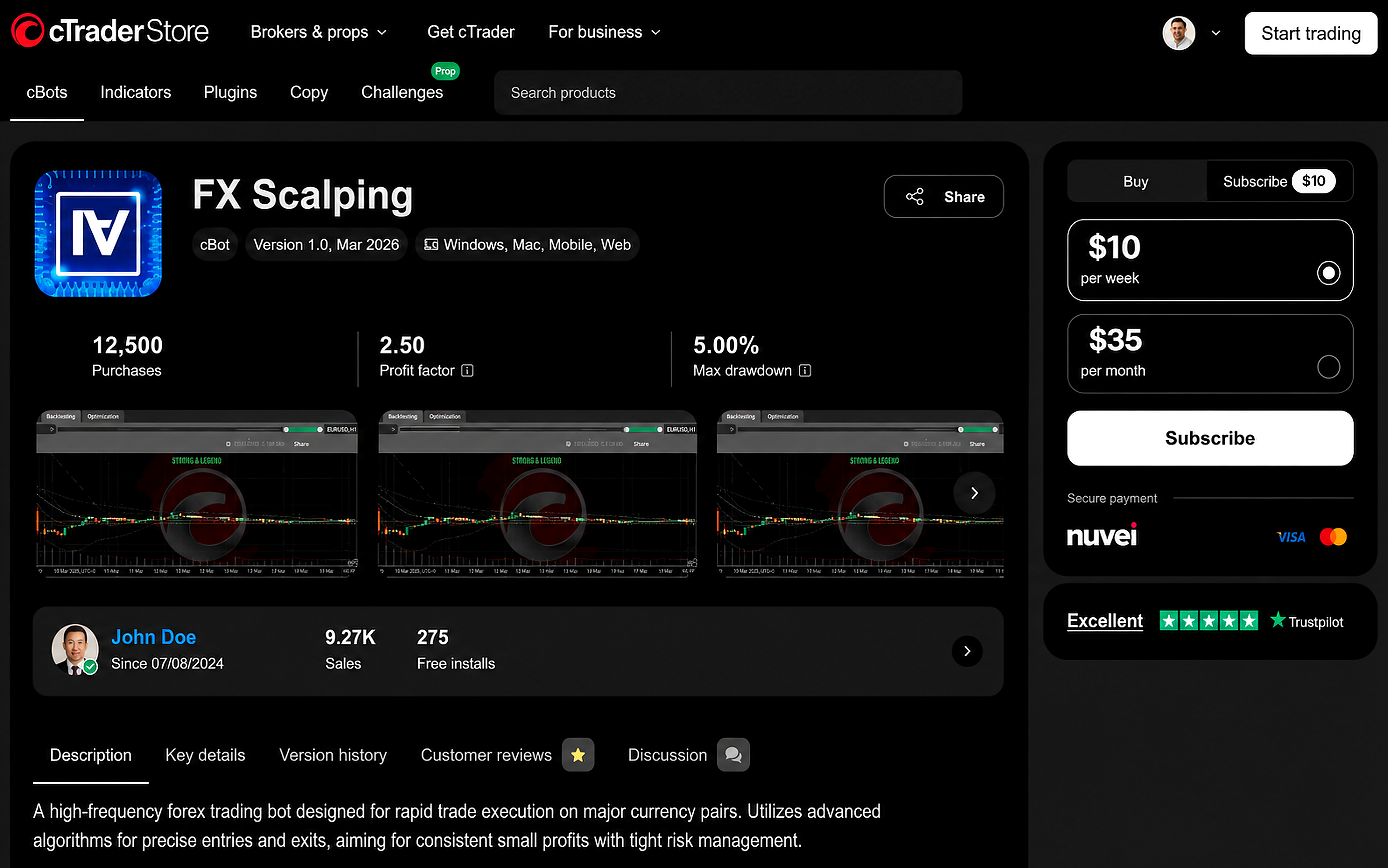
แต่ละแผนจะแสดงรอบการเรียกเก็บเงินและราคา หากมีเพียงแผนเดียวที่พร้อมใช้งาน แผนนั้นจะถูกเลือกให้คุณโดยอัตโนมัติ
คำเตือน
คุณสมัครสมาชิกสำหรับบัญชี cTrader ID ที่คุณกำลังลงชื่อเข้าใช้อยู่ใน cTrader Store
ผู้ใช้ที่มี cTID ต่างกันไม่สามารถเปิดหรือเริ่มต้นผลิตภัณฑ์นี้ใน cTrader ได้
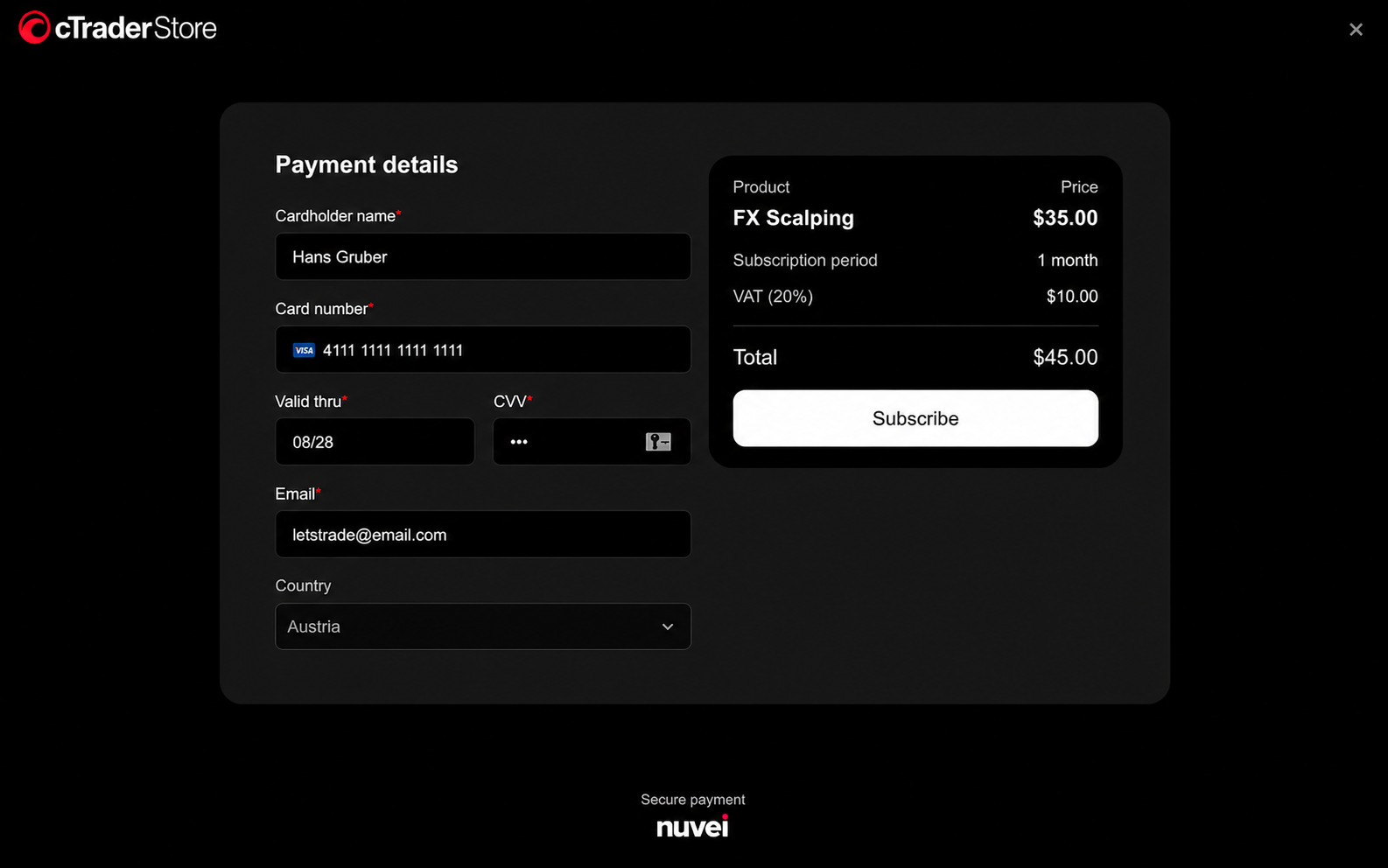
ก่อนการซื้อครั้งแรกใน cTrader สโตร์ ให้เลือกและยืนยันตำแหน่งที่ตั้งของคุณ จากนั้นกรอกแบบฟอร์ม**รายละเอียดการชำระเงิน**ที่ปลอดภัย: ป้อนชื่อผู้ถือบัตรและรายละเอียดบัตร อีเมลของคุณจะถูกกรอกโดยอัตโนมัติตามข้อมูลประจำตัว cTID ของคุณ และคุณสามารถเปลี่ยนแปลงได้
คำเตือน
บัตรเครดิตของคุณต้องออกในประเทศที่คุณเลือก มิฉะนั้น การชำระเงินจะไม่สามารถดำเนินการได้
หลังจากที่คุณคลิก**สมัครสมาชิก** หน้าจอการประมวลผลสั้นๆ จะปรากฏขึ้น อย่าปิดหน้าต่างนี้ในขณะที่เรากำลังตั้งค่าการสมัครสมาชิกของคุณ เมื่อพร้อมแล้ว การสมัครสมาชิกของคุณจะเริ่มใช้งานได้ และคุณสามารถใช้ผลิตภัณฑ์ใน cTrader ได้
การเรียกเก็บเงิน 
วิธีการชำระเงินของคุณจะถูกเรียกเก็บเงินโดยอัตโนมัติเมื่อเริ่มต้นแต่ละรอบการเรียกเก็บเงิน รายสัปดาห์ รายเดือน หรือรายปี จนกว่าคุณจะยกเลิก คุณสามารถตรวจสอบวันที่ชำระเงินครั้งถัดไปและจำนวนเงินสำหรับการสมัครสมาชิกแต่ละรายการได้ในหน้า การสมัครสมาชิก ของคุณ
จัดการการสมัครสมาชิกของคุณ 
จากเมนูใน cTrader Store ให้เลือก**บัญชี** จากนั้นไปที่การสมัครสมาชิก
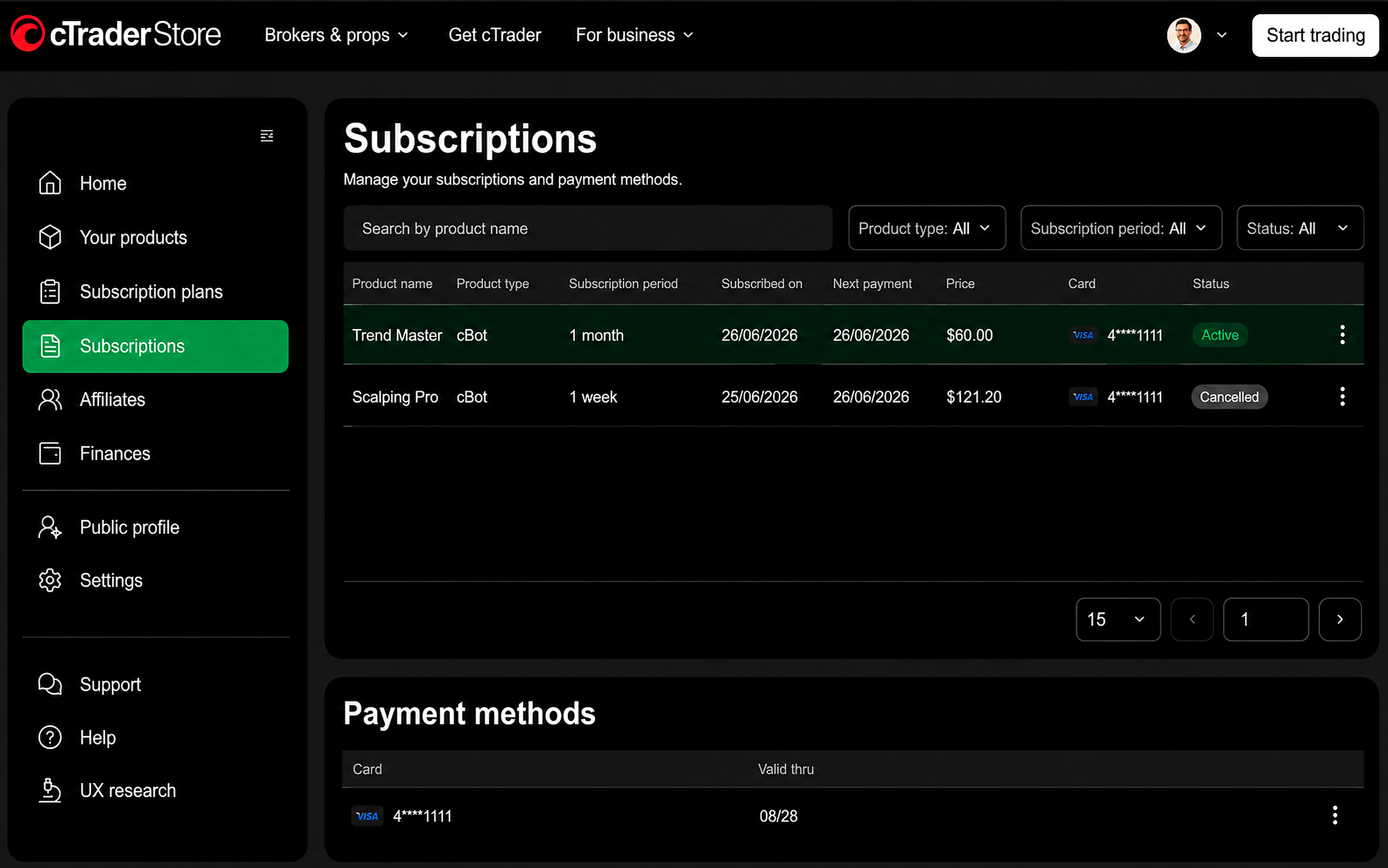
คุณยังสามารถเปิดหน้านี้ได้จากปุ่ม**จัดการการสมัครสมาชิก**ที่แสดงทันทีหลังจากที่คุณสมัครสมาชิก
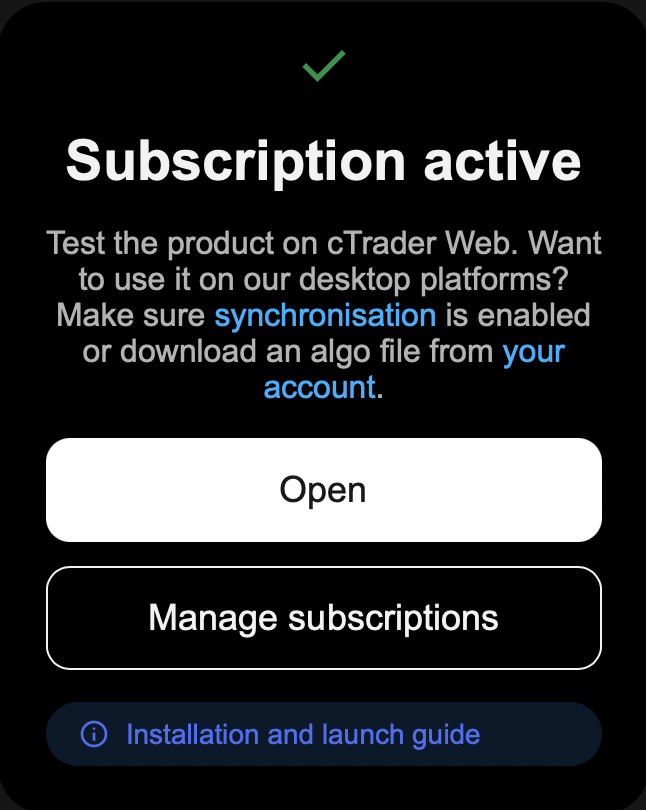
หน้า**การสมัครสมาชิก**จะแสดงรายการการสมัครสมาชิกและวิธีการชำระเงินที่บันทึกไว้ของคุณ สำหรับการสมัครสมาชิกแต่ละรายการ คุณสามารถดูผลิตภัณฑ์ รอบการเรียกเก็บเงิน วันที่ชำระเงินครั้งถัดไป ราคา บัตร และสถานะ ซึ่งอาจเป็น:
- ใช้งานอยู่ - การสมัครสมาชิกของคุณได้รับการชำระเงินและกำลังดำเนินการอยู่
- ปัญหาการชำระเงิน - ไม่สามารถดำเนินการชำระเงินได้ ดู ปัญหาการชำระเงิน
- ยกเลิกแล้ว - การสมัครสมาชิกถูกยกเลิกแล้วและจะไม่ต่ออายุ
คุณสามารถค้นหาการสมัครสมาชิกของคุณตามชื่อผลิตภัณฑ์และกรองตามประเภทผลิตภัณฑ์ รอบการสมัครสมาชิก หรือสถานะ
วิธีการชำระเงิน 
วิธีการชำระเงินของคุณจะถูกบันทึกไว้อย่างปลอดภัยเพื่อให้สามารถดำเนินการชำระเงินแบบเรียกเก็บซ้ำได้โดยอัตโนมัติ รายละเอียดบัตรของคุณจะได้รับการจัดการโดย Nuvei
ข้อมูล
คุณสามารถชำระเงินด้วย Visa หรือ MasterCard
cTrader ไม่จัดเก็บหมายเลขบัตรเต็มของคุณ
คุณสามารถตรวจสอบหรือลบวิธีการชำระเงินที่บันทึกไว้ได้ในหน้า การสมัครสมาชิก ของคุณ
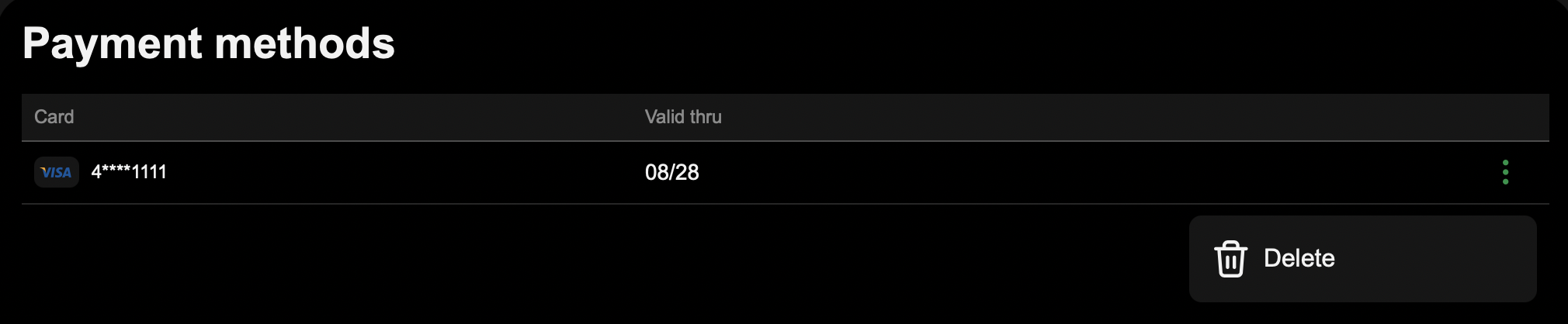
คำเตือน
การลบวิธีการชำระเงินของคุณจะทำให้การสมัครสมาชิกทั้งหมดของคุณเปลี่ยนเป็น ปัญหาการชำระเงิน และจากนั้นจะยกเลิก
ยกเลิกการสมัครสมาชิก 
ในหน้า**การสมัครสมาชิก** ให้เปิดเมนูสำหรับการสมัครสมาชิกที่คุณต้องการหยุดและเลือก**ยกเลิกการสมัครสมาชิก** ยืนยันตัวเลือกของคุณในหน้าต่างที่ปรากฏขึ้น
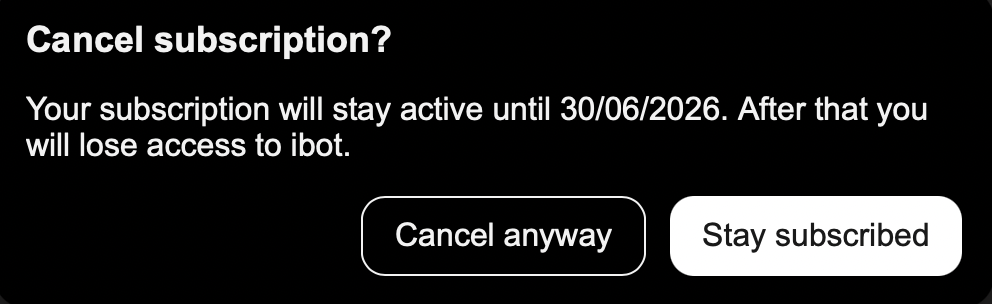
ข้อมูล
หากคุณยกเลิกการสมัครสมาชิก คุณจะยังคงเข้าถึงผลิตภัณฑ์ได้จนถึงสิ้นสุดระยะเวลาที่คุณได้ชำระเงินไปแล้ว และเราจะไม่เรียกเก็บเงินจากคุณอีก
ปัญหาการชำระเงิน 
หากไม่สามารถดำเนินการชำระเงินแบบเรียกเก็บซ้ำได้ (เช่น บัตรของคุณหมดอายุหรือมียอดเงินไม่เพียงพอ) การสมัครสมาชิกของคุณจะถูกทำเครื่องหมายว่า**ปัญหาการชำระเงิน** จากนั้นเราจะลองชำระเงินอีกครั้งเป็นเวลาสูงสุด 3 วัน หากการลองอีกครั้งทั้งหมดไม่สำเร็จ การสมัครสมาชิกจะถูก**ยกเลิก**และการเข้าถึงผลิตภัณฑ์ของคุณจะสิ้นสุดลง
เคล็ดลับ
ตรวจสอบให้แน่ใจว่าบัตรที่บันทึกไว้ของคุณยังใช้งานได้และมียอดเงินเพียงพอเพื่อให้การลองอีกครั้งในครั้งถัดไปสามารถดำเนินการได้
เมื่อชำระเงิน คุณอาจเห็นข้อความใดข้อความหนึ่งต่อไปนี้:
- โปรดตรวจสอบรายละเอียดบัตรของคุณและลองอีกครั้ง - รายละเอียดบัตรที่ป้อนไม่ถูกต้อง
- ไม่สามารถใช้บัตรนี้ได้ โปรดลองใช้บัตรอื่น - บัตรไม่ได้รับการยอมรับ ดังนั้นให้ลองใช้บัตรอื่น