Stats to share
Stats to share is a feature for active traders and partners that creates a public page displaying real-time statistics for your selected trading account. Create a shareable link or embed it in your website to showcase your trading achievements and experience.
Benefits for money managers
- Show prospective clients a live, view-only page with your account statistics to build online trust.
- Showcase your account's ROI, equity, profit factor, open positions and performance history.
- Revoke access at any time and generate a new link if needed.
เคล็ดลับ
After sharing your account performance with stats to share, you can use Shared Access to trade on other traders' behalf securely, without access to their deposits and withdrawals.
Generate and share a link
The link you create shows the statistics of your currently selected trading account. To create a stats to share link for a different account, first switch to that account.
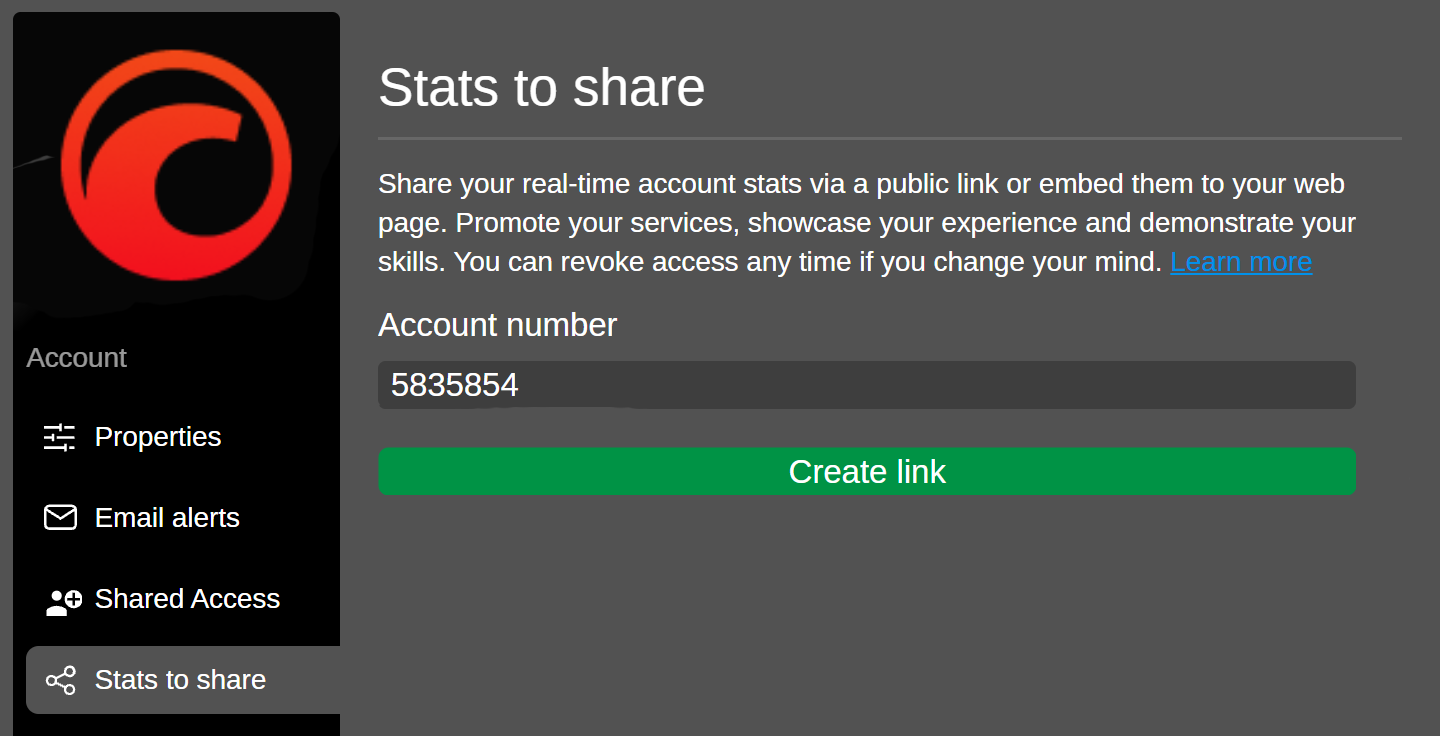
- Open Settings and click the Stats to share tab.
- Click Create link.
- Click Copy link to share, or Copy to embed in your website.
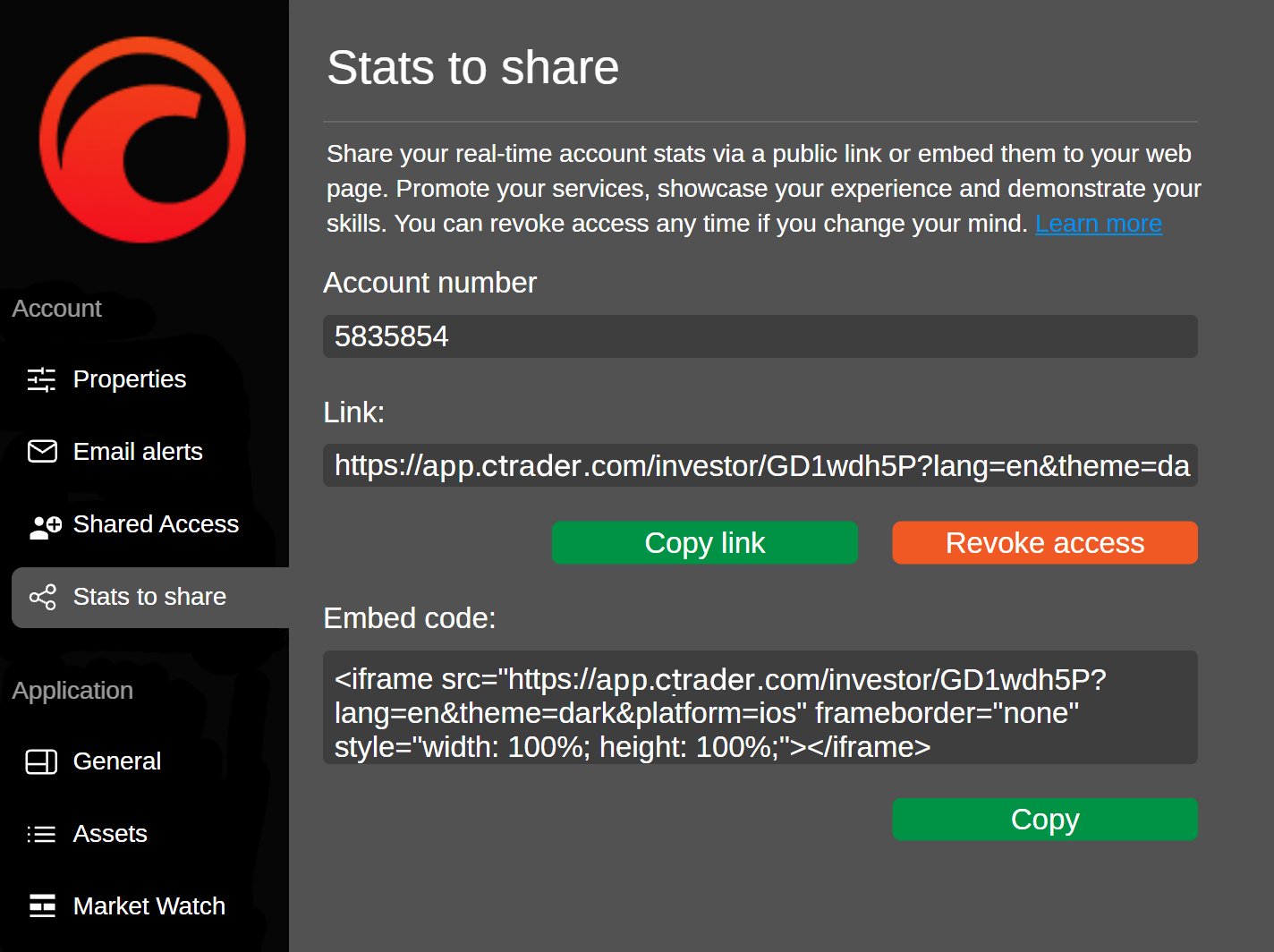
The generated URL and embed code remain available until you revoke access.
Stop sharing
- Open Settings and click the Stats to share tab.
- Click Revoke access.
หมายเหตุ
Revoking access invalidates the link and the embed code. If you click Create link again later, you get a new link and a new embed code.
Account stats
The link opens a single scrolling page that presents the account's statistics in charts, graphs and tables.
ROI (%)
ROI (%) shows the return on the account over 1W, 1M, 3M, 6M, 1Y or All.
Summary
Summary reports the headline result of the account.
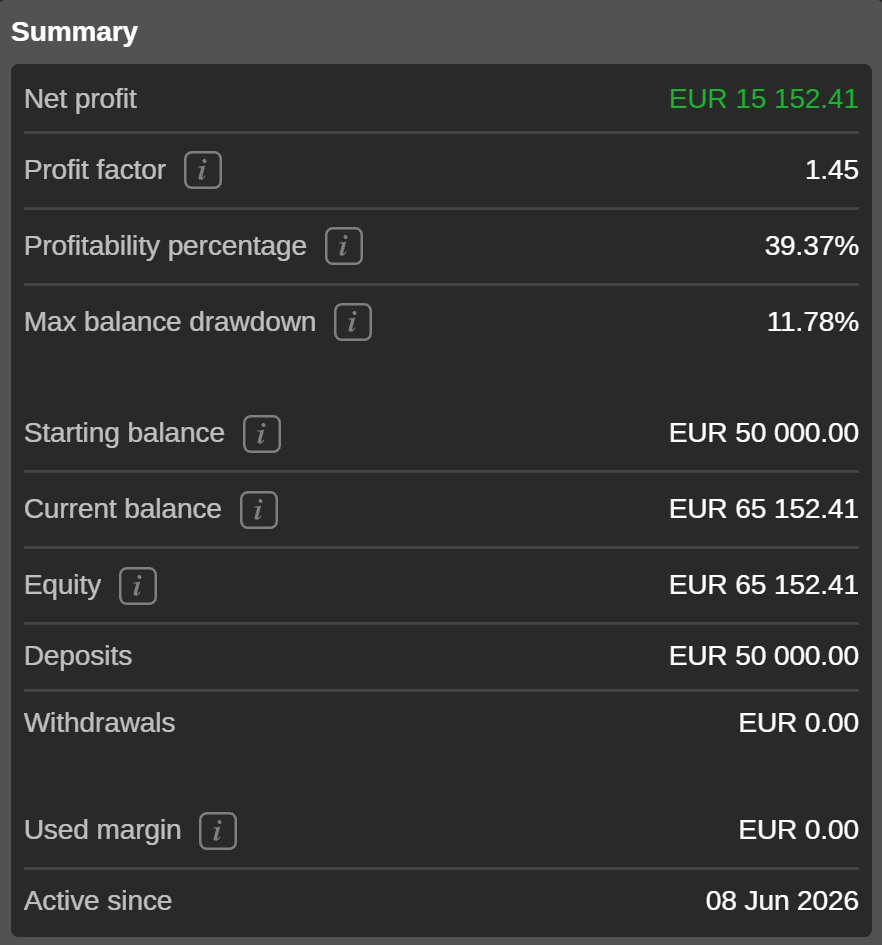
- Net profit – the combined result of all closed deals, after commission and fees.
- Profit factor – the ratio of total net profit to total net loss.
- Profitability percentage – the share of closed deals that ended in profit.
- Max balance drawdown – the largest fall in balance from a peak to the trough that followed it, as a percentage.
- Starting balance – the balance the account opened with.
- Current balance – the balance after all closed deals, deposits and withdrawals.
- Equity – the current balance plus the unrealised result of any open positions.
- Deposits and Withdrawals – the totals paid into and out of the account since it opened.
- Used margin – the amount currently committed to open positions.
- Active since – the date the account was opened.
Equity
Equity plots Balance, Equity and Min / Max Equity over 1W, 1M, 3M, 6M, 1Y or All, with every deposit and withdrawal marked.
ROI (monthly)
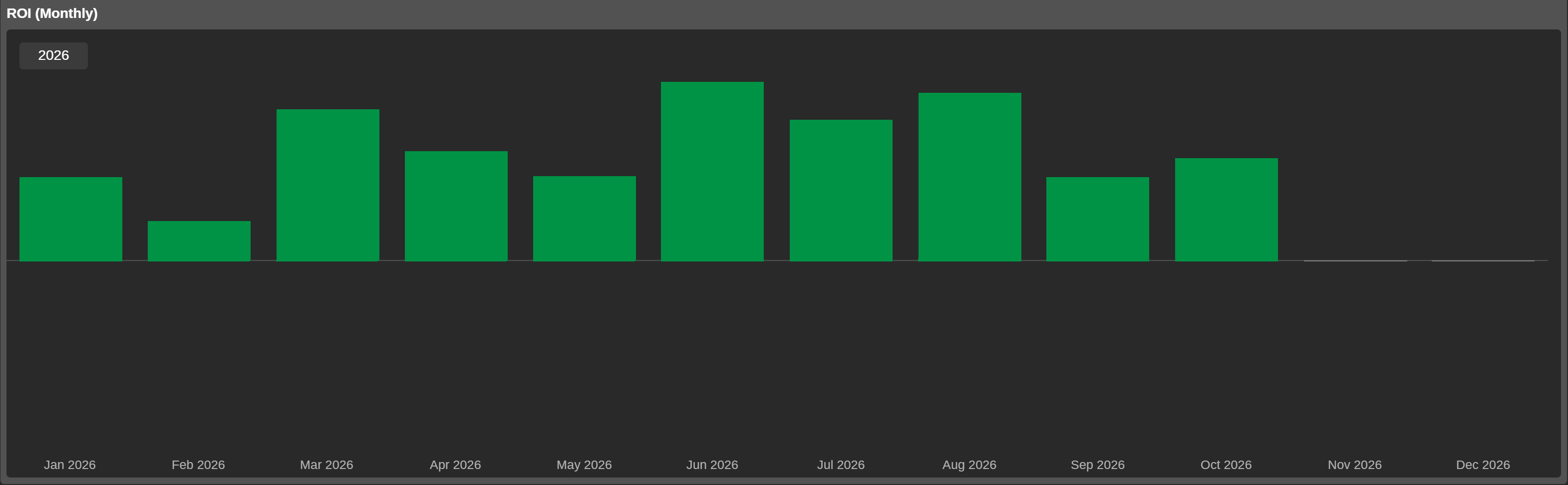
ROI (monthly) shows the return month by month, for the year you select.
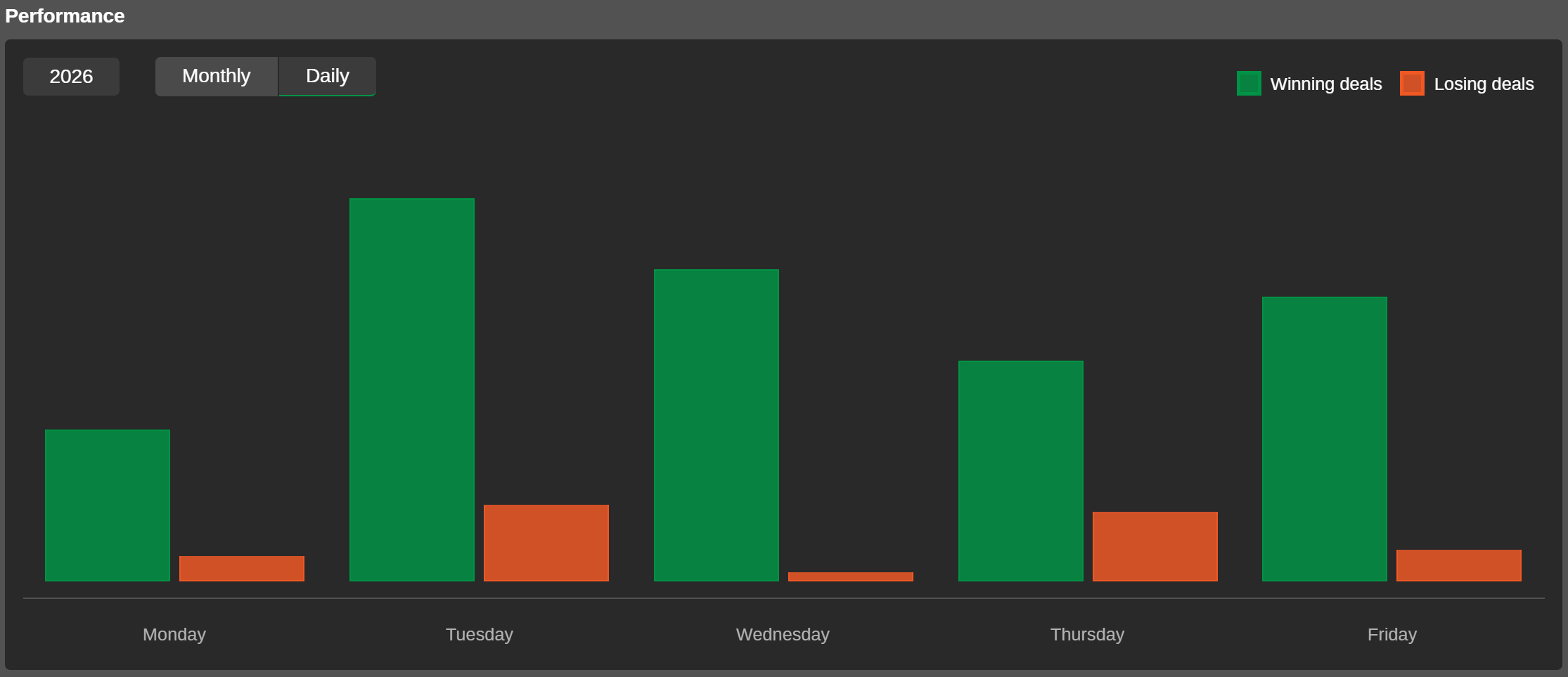
Performance
Performance shows winning and losing deals by month or day for the period you select.
Performance stats
Performance stats summarises deal outcomes.
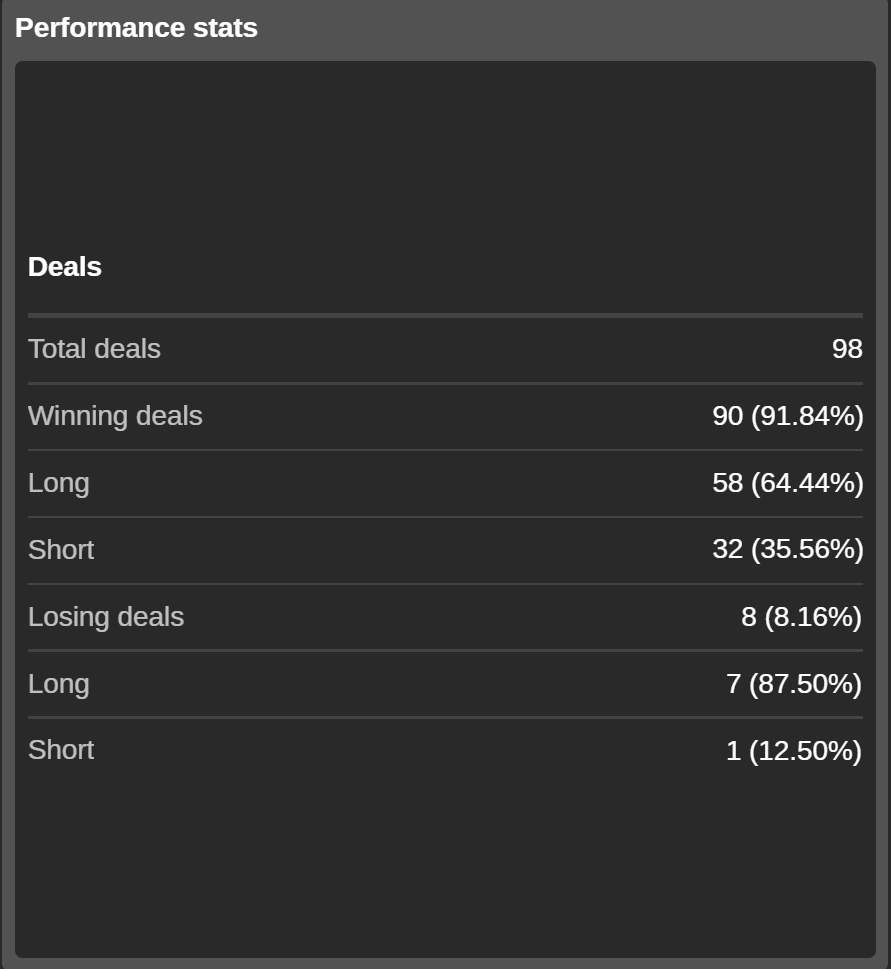
- Total deals – the number of deals on the account.
- Winning deals and Losing deals – how many closed each way, as a count and a percentage.
- Long and Short – the rows underneath each result, splitting it by direction.
Volume breakdown
Volume Breakdown splits traded volume by symbol over 1W, 1M, 3M, 6M, 1Y or All. Each segment of the donut is one symbol. The table beside it lists the largest symbols individually.
- Symbol – the traded instrument.
- Volume – the value traded.
- Volume % – the share of the total traded volume.
- Average deal size – the volume divided by the number of deals.
- Deals – the number of deals making up that volume.
- Winning deals – the number of winning deals.
- Winning deals (%) – the same as a share.
- Losing Deals – the number of losing deals.
- Losing deals (%) – the same as a share.
Deals
The Deals tab reports trading results for your chosen period, with each statistic shown separately for all trades, long trades and short trades.
- Net profit – the profit of all closed trades after costs.
- Profit factor – the ratio of total net profit to total net loss.
- Commission – the total commission paid.
- Max balance drawdown – the maximum level of balance drawdown based on the end-of-day balance.
- Total trades, Winning trades and Losing trades – the number of trades in total and in each outcome.
- Largest winning trade and Largest losing trade – the best and worst single results.
- Average trade – the average profit for all trades.
- Total pips – the total number of pips gained minus the pips lost.
- Average pips – the total pips divided by the number of trades.
- Average trade duration – the total time trades were open divided by the total number of trades on the account.
- Traded volume – the total volume traded.
Symbols
The Symbols tab breaks down the results by instrument for your chosen period.
- Symbol – the traded instrument.
- Deals – how many deals the symbol holds, for each direction and in total.
- Pips – the pips gained or lost, for each direction and in total.
- Net profit – the result after costs, for each direction and in total.
- Won (%) and Lost (%) – how many deals ended each way, as a count and a percentage.
Positions
The Positions tab shows all currently open trades on the account. Search the list or filter it by channel with the All channels dropdown.
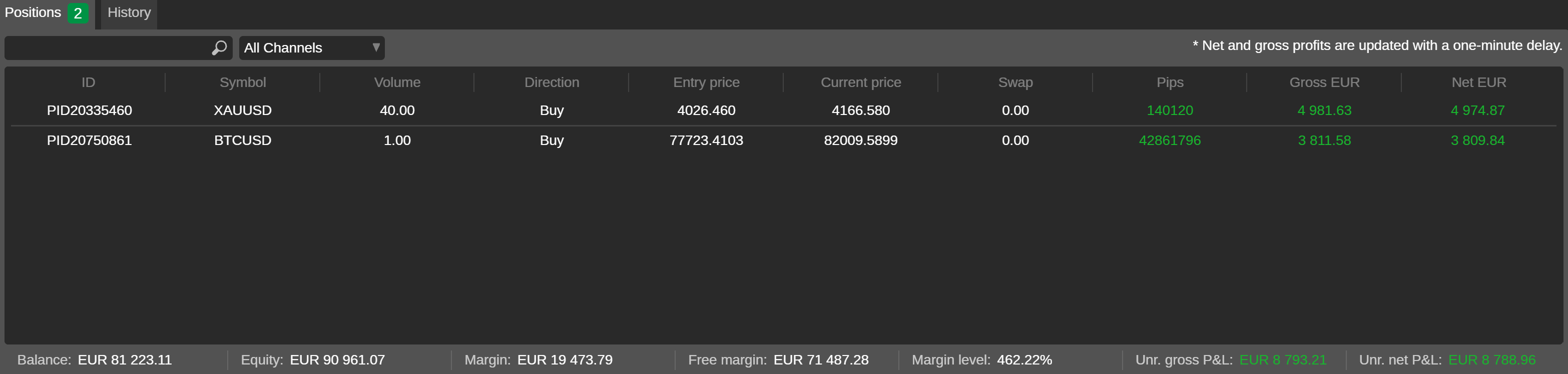
- ID – the position identifier.
- Created – the date and time the position opened.
- Margin – the margin used to open and maintain the position.
- Symbol – the traded instrument.
- Volume – the trade size.
- Direction – buy or sell.
- Entry price and Current price – the price it opened at and the current one.
- Swap – what holding it overnight has cost or paid.
- Commissions and Closing commission – charged so far and due on closing.
- Unrealised volume fee – the volume fee charged by a strategy provider when closing the position.
- Channel – the app the position was opened from.
- Pips – the move so far, in pips.
- Gross and Net – the unrealised result before and after costs, in the account currency.
History
The History tab lists the closed deals for your chosen period. Search the list or filter it by channel with the All channels dropdown.
- ID – the unique deal ID.
- Symbol – the traded instrument.
- Opening direction – the initial trade direction (buy or sell).
- Closing direction – the direction of the closing deal (buy or sell).
- Opening time – the exact time and date when the deal was created.
- Closing time – the exact time and date when the deal was closed.
- Entry price – the executed price of the opening deal.
- TP – the take-profit price.
- SL – the stop-loss price.
- Closing price – the price when the deal was closed.
- Closing volume – the volume of the closed position.
- Commissions – the total commissions paid for the deal.
- Conversion fee – the realised currency conversion fee.
- Volume fee – the volume fee charged for the deal.
- Channel – the platform or method used to create the deal.
- Swap – the swaps collected or paid for the deal.
- Pips – the profit or loss pips.
- Gross (currency) – the gross profit or loss in the account currency.
- Net (currency) – the net profit or loss in the account currency.
- Balance (currency) – the account balance at the moment the deal was closed.