Trade protections in cTrader Web
cTrader offers several risk management tools, such as stop loss, trailing stop loss, break-even and take profit, all accessible when creating an order, modifying a pending order or modifying an open position.
cTrader protections in one minute!
- cTrader provides server-side protections out of the box: trailing stop loss, break-even stop loss and multiple take-profit levels, with no extra tools required.
- All protections work across cTrader apps and remain active after your session ends.
- Advanced take profit supports server-side scaling out, with up to five levels per position to lock in partial profits as the price moves in your favour.
- Trailing stop loss follows the market automatically when it moves in your favour, protecting your trade while keeping it open.
- Break-even sets a stop loss at the entry price once your specified trigger level is reached.
Relative and absolute protection options are available for stop loss and take profit:
- Relative protection — stop loss and take profit are set as values in pips.
- Absolute protection — stop loss and take profit are set as values in price, balance, profit or distance.
Example
If you open a buy position on EURUSD at 1.2500 and set a stop loss, relative protection sets the stop loss 10 pips below the entry price at 1.2490, as the value is defined in pips. With absolute protection, the stop loss is set at a fixed value such as 1.2490, based on price, balance, profit or distance, and it does not adjust with the entry price.
Stop loss
Stop loss is a feature that automatically limits your losses by closing an open position if the market moves unfavourably. When the price of a symbol falls to a specified level, cTrader triggers the stop loss and closes the position at a loss.
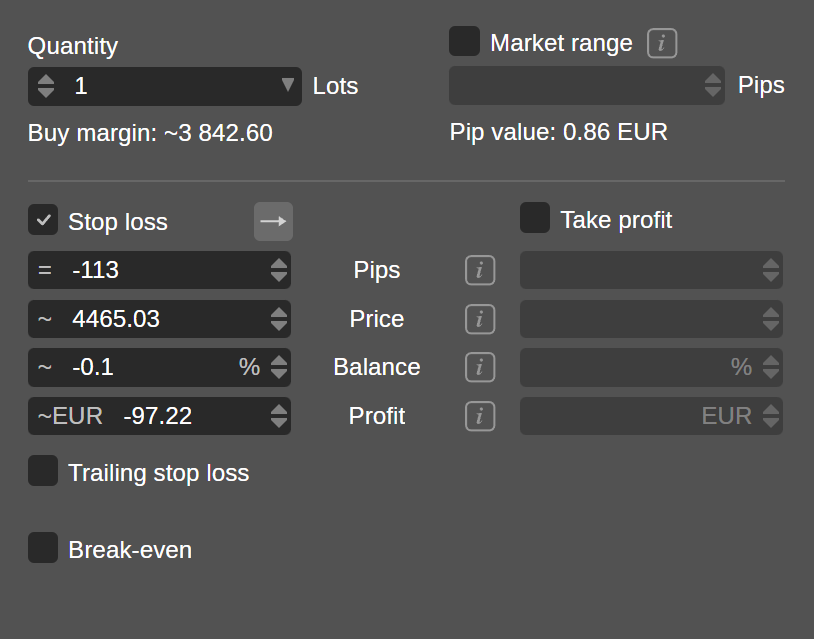
In the new order window, enable the Stop loss option and do the following:
-
Specify a value in pips, price, percentage of your balance or profit amount.
-
Choose a stop-loss trigger. Clicking the Arrow button cycles through the four trigger types.
Note
A stop-loss trigger determines the specific market price conditions that activate a stop loss, allowing you to control the sensitivity of protection levels to price movements. A tick is the smallest possible price movement (one price update).
Trigger type Buy order stop loss triggered by Sell order stop loss triggered by Trigger behaviour Trade side Bid Ask Default behaviour – stop loss based on the execution price of the trade side. Opposite side Ask Bid Uses the opposite price stream from the trade direction. Double trade side 2 × Bid ticks 2 × Ask ticks Triggers stop loss only after 2 consecutive price ticks cross the stop loss level. Double opposite side 2 × Ask ticks 2 × Bid ticks Stricter confirmation – the opposite price stream must cross the stop loss twice.
Note
You can also set a stop loss by dragging the SL or TSL control on a chart.
Trailing stop loss
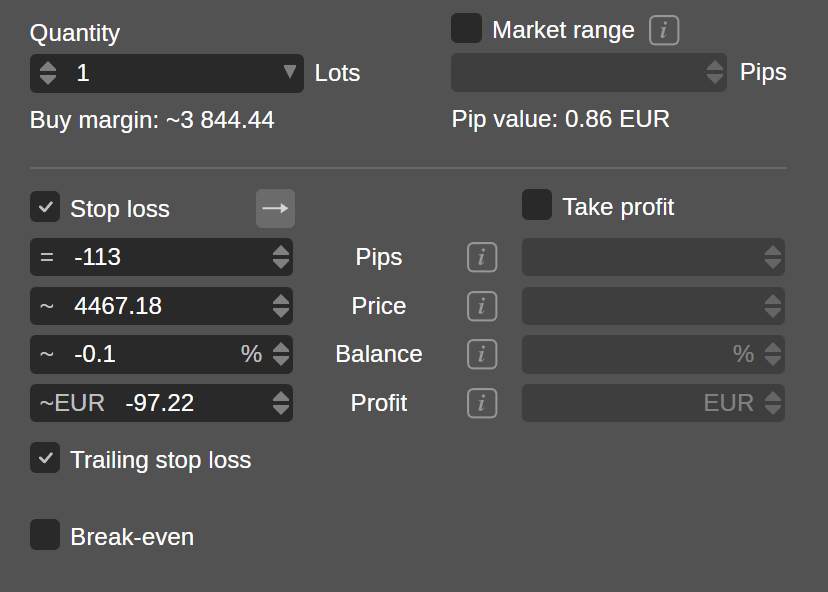
Trailing stop loss automatically adjusts the stop loss as the price moves in your favour. It maintains a fixed distance from the current price and never moves backwards, protecting profits while leaving the trade open to develop.
In the new order window, enable Trailing stop loss below Stop loss.
Break-even
Break-even sets a stop loss at the entry price after a favourable movement. If the market reverses, cTrader closes the position at or close to the original entry price, resulting in zero net loss, excluding spreads, commissions and slippage costs.
Note
Break-even can function independently of the Stop loss option.
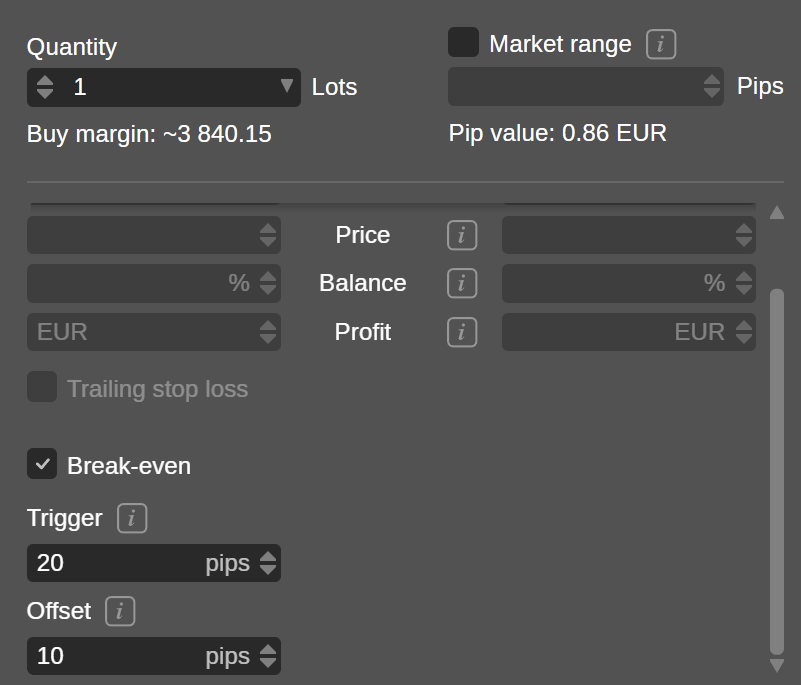
After enabling the Break-even protection in the new order window, the following parameters become available:
- Trigger — specify the amount of favourable price movement that will set a stop loss at the entry price.
- Offset — specify the additional price distance beyond the entry price for setting the stop loss.
Note
A break-even stop loss with a defined trigger but zero offset may result in a small net loss due to spread, commission or slippage. Offset applies after the trigger, aiming to cover those costs by locking in a small profit.
Example
- Entry price: 1.1000
- Break-even trigger: 30 pips
-
Break-even offset: 5 pips
When the price rises favourably to 1.1030 (entry + 30 pips), cTrader sets a stop loss at 1.1005 (entry + 5 pips). If the price reverses, the trade closes with a small profit.
Take profit
Take profit is a feature that automatically closes an open position when the market reaches a specified profit level. If the price of a symbol rises to the target, cTrader triggers the take profit and closes the position at a profit.
In the new order window, enable the Take profit option, then specify a value in pips, price, percentage of your balance or profit amount.
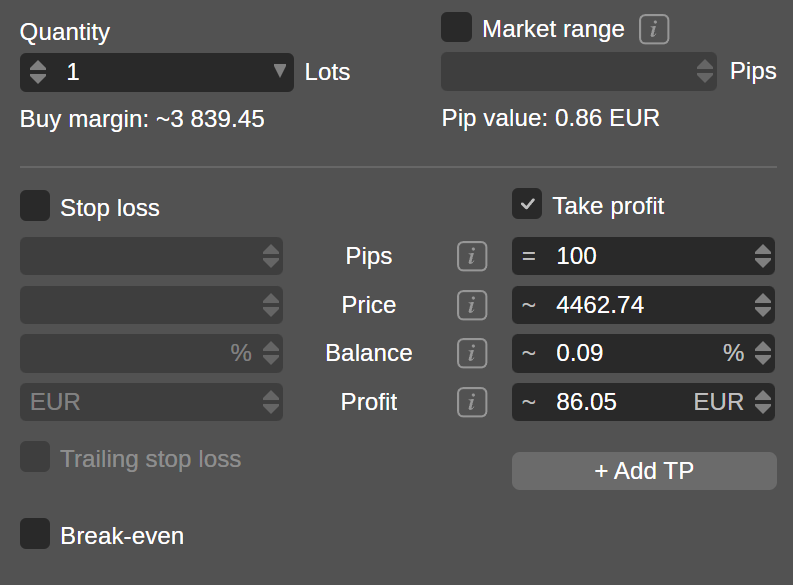
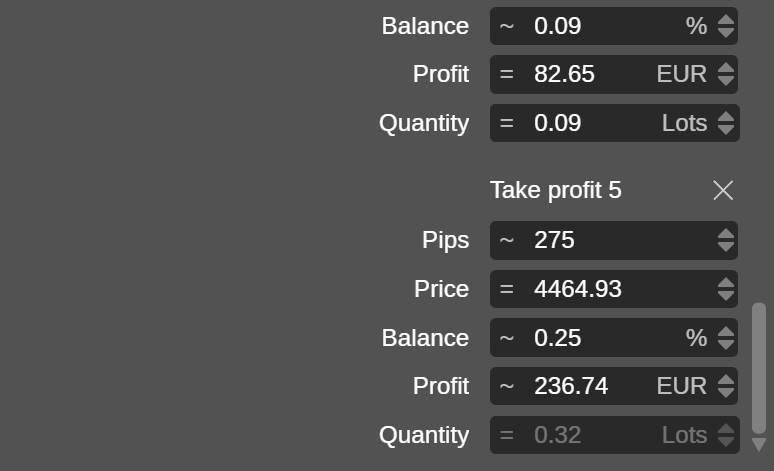
Optionally, click Add TP to set multiple take profits for your trade. This feature enables server-side scaling out as the price moves in your favour, locking in partial gains by closing portions of your trade at different profit levels instead of exiting the entire position at a single target.
When setting multiple take profits, use the Quantity field at each level to specify the portion of the trade for closure. You can set up to five take profit levels, and the last level always uses a fixed quantity to fully close the position.
Note
You can also set a take profit or multiple take profits by dragging the TP control on a chart.