Aller au contenu

TradeWatch Tab Sample

Présentation

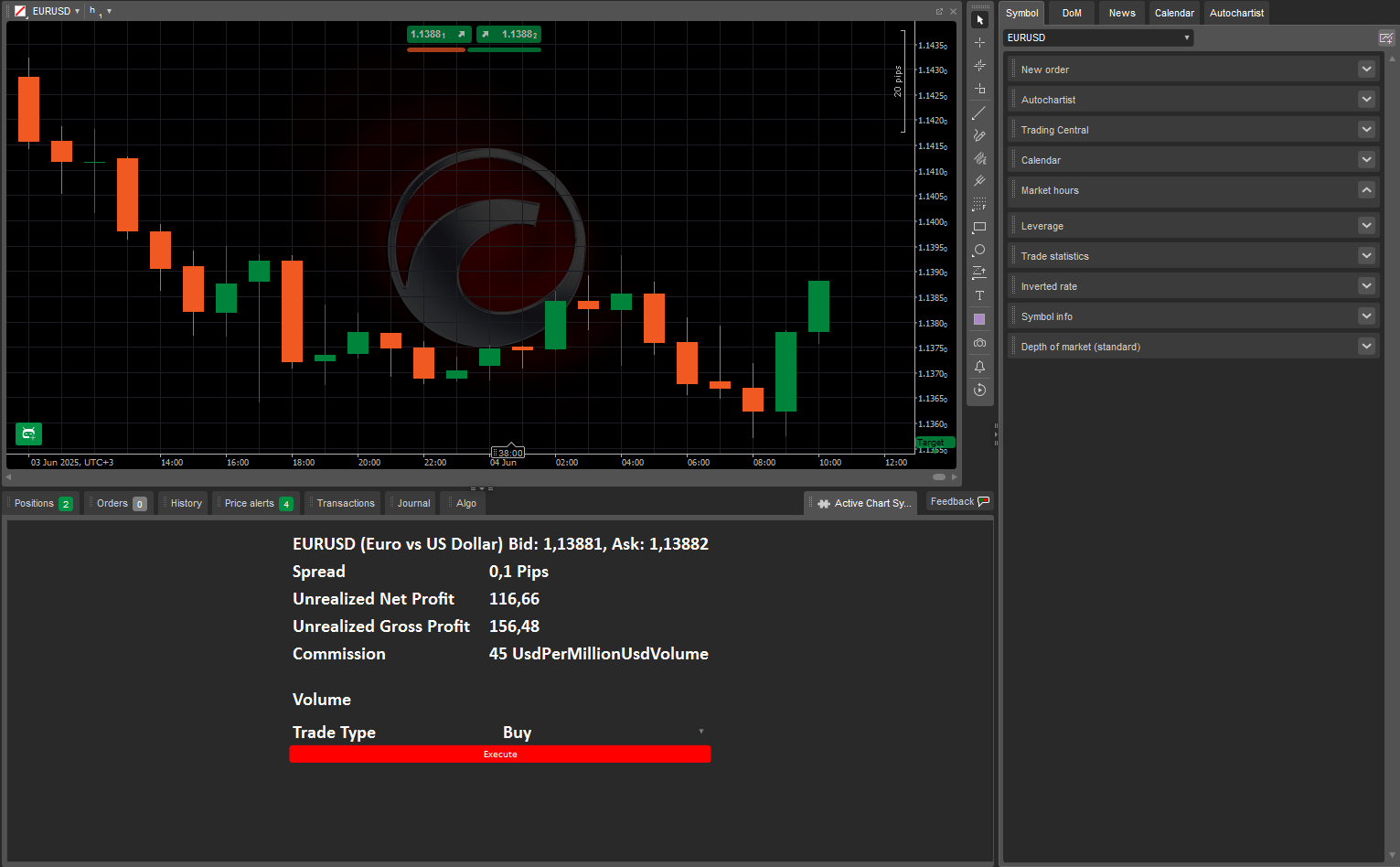
Le plug-in TradeWatch Tab Sample ajoute un nouvel onglet à Visualisation des trades, affichant des statistiques en direct et des actions de trading pour le symbole dans le graphique actif. Il offre les fonctionnalités clés suivantes :

  • Ajoute le plug-in en tant que nouvel onglet dans Visualisation des trades automatiquement.
  • Affiche des statistiques de trading en direct.
  • Permet l'exécution d'ordres de marché pour le symbole du graphique actuel.
  • Se met à jour automatiquement lorsque le symbole du graphique actif change.

Le plug-in s'exécute via l'onglet dédié Visualisation des trades, qui reflète le graphique actif. Il reste actif tant que cTrader Windows ou Mac est en cours d'exécution et libère automatiquement les ressources système lorsqu'il est arrêté.

Création de plug-in

Apprenez à créer des plug-ins, en utilisant C# ou Python, dans nos guides étape par étape.

Le code du plug-in TradeWatch Tab Sample est disponible dans nos dépôts publics C# et Python. Le même code est fourni comme modèle dans l'assistant de création d'algorithme dans cTrader Windows ou Mac, ou vous pouvez simplement copier et utiliser l'extrait ci-dessous :

 1
 2
 3
 4
 5
 6
 7
 8
 9
10
11
12
13
14
15
16
17
18
19
20
21
22
23
24
25
26
27
28
29
30
31
32
33
34
35
36
37
38
39
40
41
42
43
44
45
46
using cAlgo.API;

namespace cAlgo.Plugins
{
    [Plugin(AccessRights = AccessRights.None)]
    public class MyTradeWatchTabSample1 : Plugin
    {
        private SymbolStatsControl _symbolStatsControl;
        private TradeControl _tradeControl;

        protected override void OnStart()
        {
            var tab = TradeWatch.AddTab("Active Chart Symbol Stats");

            var panel = new StackPanel
                {Orientation = Orientation.Vertical, HorizontalAlignment = HorizontalAlignment.Center};

            _symbolStatsControl = new SymbolStatsControl {Margin = 10};
            _tradeControl = new TradeControl {Margin = 10};

            panel.AddChild(_symbolStatsControl);
            panel.AddChild(_tradeControl);

            tab.Child = panel;

            SetSymbolStats();

            _tradeControl.Trade += TradeControlOnTrade;
            ChartManager.ActiveFrameChanged += _ => SetSymbolStats();
        }

        private void TradeControlOnTrade(object sender, TradeEventArgs e)
        {
            ExecuteMarketOrder(e.TradeType, e.SymbolName, e.Volume);
        }

        private void SetSymbolStats()
        {
            if (ChartManager.ActiveFrame is not ChartFrame chartFrame)
                return;

            _tradeControl.Symbol = chartFrame.Symbol;
            _symbolStatsControl.Symbol = chartFrame.Symbol;
        }
    }
}
  1
  2
  3
  4
  5
  6
  7
  8
  9
 10
 11
 12
 13
 14
 15
 16
 17
 18
 19
 20
 21
 22
 23
 24
 25
 26
 27
 28
 29
 30
 31
 32
 33
 34
 35
 36
 37
 38
 39
 40
 41
 42
 43
 44
 45
 46
 47
 48
 49
 50
 51
 52
 53
 54
 55
 56
 57
 58
 59
 60
 61
 62
 63
 64
 65
 66
 67
 68
 69
 70
 71
 72
 73
 74
 75
 76
 77
 78
 79
 80
 81
 82
 83
 84
 85
 86
 87
 88
 89
 90
 91
 92
 93
 94
 95
 96
 97
 98
 99
100
101
102
103
104
105
106
107
108
109
110
111
112
113
114
115
116
117
118
119
120
121
122
123
124
125
126
127
128
129
130
131
132
133
134
135
136
137
138
139
140
141
142
143
144
145
146
147
148
149
150
151
152
153
154
155
156
157
158
159
160
161
162
163
164
165
166
167
168
169
170
171
172
173
174
175
176
177
178
179
180
181
182
183
184
185
186
187
188
189
190
191
192
193
194
195
196
197
198
199
import clr
clr.AddReference("cAlgo.API")

from cAlgo.API import *

class TradeWatchTabSample():
    def on_start(self):
        tab = api.TradeWatch.AddTab("Active Chart Symbol Stats")

        panel = StackPanel()
        panel.Orientation = Orientation.Vertical
        panel.HorizontalAlignment = HorizontalAlignment.Center

        self.symbolStatsControl = SymbolStatsControl()
        self.symbolStatsControl.Margin = Thickness(10)
        self.tradeControl = TradeControl(self.on_trade)
        self.tradeControl.Margin = Thickness(10)

        panel.AddChild(self.symbolStatsControl.content)
        panel.AddChild(self.tradeControl.content)

        tab.Child = panel

        self.set_symbol_stats()

        api.ChartManager.ActiveFrameChanged += lambda _ : self.set_symbol_stats()

    def on_trade(self, args):
        api.ExecuteMarketOrder(args["tradeType"], args["symbolName"], args["volume"])

    def set_symbol_stats(self):
        if api.ChartManager.ActiveFrame is None or isinstance(api.ChartManager.ActiveFrame.__implementation__, ChartFrame) == False:
            return;

        chartFrame = ChartFrame(api.ChartManager.ActiveFrame)
        self.tradeControl.set_symbol(chartFrame.Symbol)
        self.symbolStatsControl.set_symbol(chartFrame.Symbol)


class SymbolStatsControl():
    def __init__(self):
        self.__symbol__ = None
        self.content = StackPanel()
        self.content.Orientation = Orientation.Vertical

        self.symbolNameTextBlock = self.get_text_block()
        self.symbolPriceTextBlock = self.get_text_block()

        self.content.AddChild(self.wrap_in_horizontal_panel(self.symbolNameTextBlock, self.symbolPriceTextBlock))

        grid = Grid(10, 2)

        self.spreadTextBlock = self.get_text_block()

        grid.AddChild(self.get_text_block("Spread"), 0, 0)
        grid.AddChild(self.spreadTextBlock, 0, 1)

        self.unrealizedNetProfitTextBlock = self.get_text_block()

        grid.AddChild(self.get_text_block("Unrealized Net Profit"), 1, 0)
        grid.AddChild(self.unrealizedNetProfitTextBlock, 1, 1)

        self.unrealizedGrossProfitTextBlock = self.get_text_block()

        grid.AddChild(self.get_text_block("Unrealized Gross Profit"), 2, 0)
        grid.AddChild(self.unrealizedGrossProfitTextBlock, 2, 1)

        self.commissionTextBlock = self.get_text_block()

        grid.AddChild(self.get_text_block("Commission"), 3, 0)
        grid.AddChild(self.commissionTextBlock, 3, 1)

        self.content.AddChild(grid);

    def get_text_block(self, text = None):
        textBlock = TextBlock()
        textBlock.Margin = Thickness(3)
        textBlock.FontSize = 20
        textBlock.FontWeight = FontWeight.Bold
        textBlock.FontFamily = "Calibri"
        textBlock.Text = text
        return textBlock

    def wrap_in_horizontal_panel(self, *args):
        panel = StackPanel()
        panel.Orientation = Orientation.Horizontal

        for control in args:
            if control.Margin == Thickness(0):
                control.Margin = 3
            panel.AddChild(control)

        return panel

    def get_symbol(self):
        return self.__symbol__

    def set_symbol(self, symbol):
        if symbol is None or symbol == self.__symbol__:
            return

        self.update(symbol)

    def update(self, newSymbol):
        previousSymbol = self.__symbol__;
        self.__symbol__ = newSymbol;

        self.symbolNameTextBlock.Text = f"{newSymbol.Name} ({newSymbol.Description})"
        self.symbolPriceTextBlock.Text = f"Bid: {newSymbol.Bid}, Ask: {newSymbol.Ask}"
        self.spreadTextBlock.Text = f"{self.get_spread_in_pips(newSymbol)} Pips"
        self.unrealizedNetProfitTextBlock.Text = str(newSymbol.UnrealizedNetProfit)
        self.unrealizedGrossProfitTextBlock.Text = str(newSymbol.UnrealizedGrossProfit)
        self.commissionTextBlock.Text = f"{newSymbol.Commission} {newSymbol.CommissionType}"

        if previousSymbol is not None: 
            previousSymbol.Tick -= self.on_symbol_tick

        newSymbol.Tick += self.on_symbol_tick

    def get_spread_in_pips(self, symbol):
        return (symbol.Spread * pow(10, symbol.Digits)) / (symbol.PipSize / symbol.TickSize);

    def on_symbol_tick(self, args):
        self.symbolPriceTextBlock.Text = f"Bid: {args.Bid}, Ask: {args.Ask}"
        self.spreadTextBlock.Text = f"{self.get_spread_in_pips(args.Symbol)} Pips"
        self.unrealizedNetProfitTextBlock.Text = str(args.Symbol.UnrealizedNetProfit)
        self.unrealizedGrossProfitTextBlock.Text = str(args.Symbol.UnrealizedGrossProfit)

class TradeControl():
    def __init__(self, on_trade):
        self.__symbol__ = None
        self.__on_trade__ = on_trade
        self.content = Grid(10, 2)

        self.volumeTextBox = TextBox()
        self.volumeTextBox.MinWidth = 200
        self.volumeTextBox.FontFamily = "Calibri"
        self.volumeTextBox.FontSize = 20
        self.volumeTextBox.FontWeight = FontWeight.Bold
        self.volumeTextBox.Margin = Thickness(3)

        self.content.AddChild(self.get_text_block("Volume"), 0, 0)
        self.content.AddChild(self.volumeTextBox, 0, 1);

        self.tradeTypeComboBox = ComboBox()
        self.tradeTypeComboBox.MinWidth = 200
        self.tradeTypeComboBox.FontFamily = "Calibri"
        self.tradeTypeComboBox.FontSize = 20
        self.tradeTypeComboBox.FontWeight = FontWeight.Bold
        self.tradeTypeComboBox.Margin = Thickness(3)

        self.tradeTypeComboBox.AddItem("Buy")
        self.tradeTypeComboBox.AddItem("Sell")

        self.tradeTypeComboBox.SelectedItem = "Buy"

        tradeTypeTextBlock = self.get_text_block("Trade Type")

        tradeTypeTextBlock.VerticalAlignment = VerticalAlignment.Center

        self.content.AddChild(tradeTypeTextBlock, 1, 0)
        self.content.AddChild(self.tradeTypeComboBox, 1, 1)

        executeButton = Button()
        executeButton.Text = "Execute"
        executeButton.FontFamily = "Calibri"
        executeButton.BackgroundColor = Color.Red

        executeButton.Click += self.on_execute_button_click

        self.content.AddChild(executeButton, 2, 0, 1, 2);

    def get_text_block(self, text = None):
        textBlock = TextBlock()
        textBlock.Margin = Thickness(3)
        textBlock.FontSize = 20
        textBlock.FontWeight = FontWeight.Bold
        textBlock.FontFamily = "Calibri"
        textBlock.Text = text
        return textBlock

    def get_symbol(self):
        return self.__symbol__

    def set_symbol(self, symbol):
        if symbol is None or symbol == self.__symbol__:
            return

        self.__symbol__ = symbol
        self.volumeTextBox.Text = str(self.__symbol__.VolumeInUnitsMin)

    def on_execute_button_click(self, args):
        if self.__symbol__ is None:
            return;

        volume = float(self.volumeTextBox.Text)
        tradeType = TradeType.Buy if self.tradeTypeComboBox.SelectedItem == "Buy" else TradeType.Sell

        self.__on_trade__({"volume": volume, "tradeType": tradeType, "symbolName": self.__symbol__.Name});

Options de personnalisation

Ce plug-in relie le contexte graphique en temps réel à l'exécution des trades via le panneau Visualisation des trades. Le tableau ci-dessous décrit ses composants clés et leurs fonctions :

Paramètre Description Valeurs possibles
TradeWatch.AddTab Configuration des onglets pour le panneau Visualisation des trades. Active chart symbol stats
StackPanel.Orientation Définit la direction d'empilement des éléments de l'interface utilisateur. Vertical ou horizontal
HorizontalAlignment Définit l'alignement horizontal du panneau dans l'onglet. Center, left, right, etc.
SymbolStatsControl.Margin Définit la marge autour de l'élément de contrôle des statistiques de symbole. 10, 12, 14, etc.
TradeControl.Margin Définit la marge autour de l'élément de contrôle de trade. 10, 12, 14, etc.
SymbolStatsControl.Symbol Lie l'élément de contrôle des statistiques de symbole à un symbole graphique spécifique. chartframe.symbol, eurusd, gbpjpy, etc.
TradeControl.Symbol Lie TradeControl à un symbole pour les actions de trade. chartframe.symbol, eurusd, gbpjpy, etc.
ChartManager.ActiveFrameChanged Événement qui déclenche les mises à jour des statistiques de symbole lorsque le cadre graphique change. _ => setsymbolstats()
TradeControl.Trade Événement déclenché lorsqu'une action de trade est effectuée à partir du panneau de contrôle. tradecontrolontrade ou null
ExecuteMarketOrder Exécute un trade lorsqu'il est appelé. e.tradetype, e.symbolname, e.volume

Cas d'usage

Le plug-in TradeWatch Tab Sample offre un moyen simple d'améliorer cTrader en reliant le contexte graphique en temps réel à l'exécution des trades. Il prend en charge des applications pratiques qui rationalisent les flux de travail de trading. Vous trouverez ci-dessous des cas d'utilisation pratiques qui démontrent comment le plug-in peut améliorer l'expérience de trading.

Cas d'utilisation Scénario Valeur
Verrouillage de symbole Configurez l'onglet du plug-in pour toujours afficher un symbole fixe comme EURUSD au lieu de se mettre à jour à chaque changement de graphique. Vous aide à suivre et à trader un instrument de manière cohérente, quel que soit le contexte graphique.
Panneau de trading lié au graphique Maintenez le plug-in synchronisé avec le symbole graphique actif pour toujours afficher les statistiques et les options de trading pertinentes. Vous permet de réagir rapidement à l'analyse graphique sans changer d'outils ou de panneaux.
Trade à volume fixe Ajustez le volume par défaut dans le gestionnaire d'ordres à une taille de lot fixe ou préférée. Simplifie l'exécution en éliminant le besoin d'ajuster le volume à chaque fois.
Terminal d'action rapide Repositionnez les contrôles horizontalement et alignez-les au centre pour un panneau de trading rationalisé. Permet un accès plus rapide aux statistiques et aux boutons de trade dans des configurations compactes.

Résumé

TradeWatch Tab Sample simplifie les flux de travail de trading en combinant des statistiques en temps réel et des contrôles de trading dans un onglet dédié au sein de Visualisation des trades. Il se met à jour automatiquement avec le graphique actif, et sa disposition, son comportement de symbole et ses paramètres de trade peuvent être personnalisés pour s'adapter à différents styles de trading ou domaines d'intérêt.
Pour plus de détails sur le développement, consultez notre documentation sur les plug-ins.