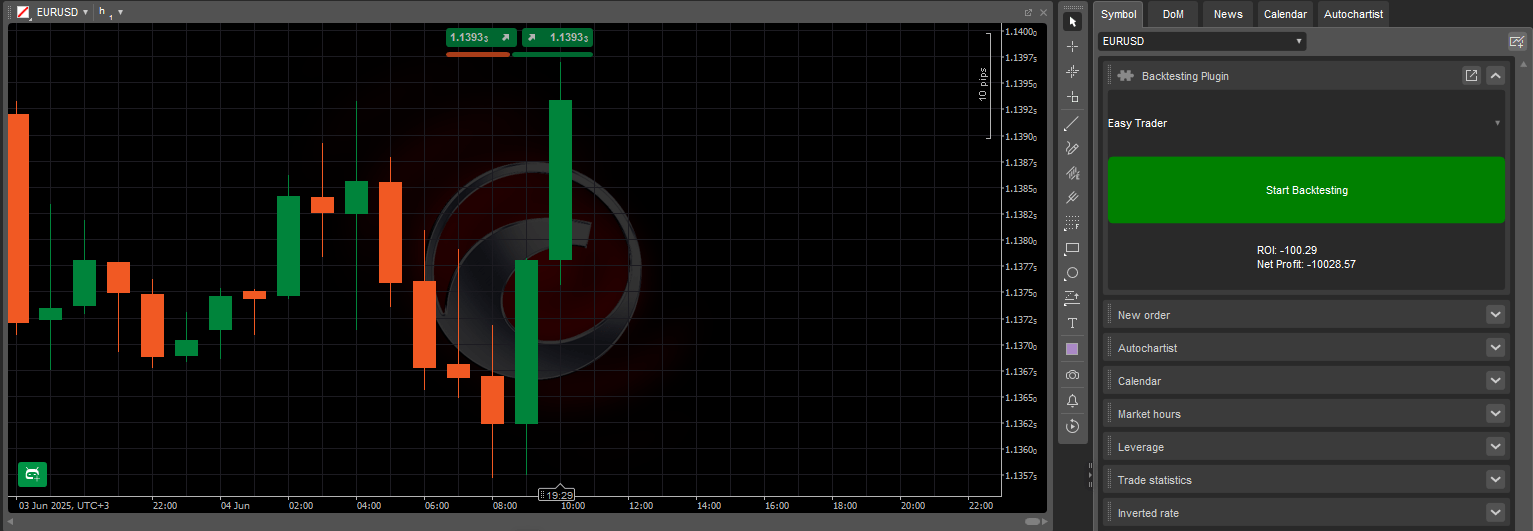
Il plugin BacktestingInPlugins Sample consente di eseguire test di strategie storiche direttamente dall'interfaccia della piattaforma cTrader utilizzando le seguenti funzionalità chiave:
Crea un layout di pannello strutturato con un menu a discesa, un pulsante di azione e un campo di visualizzazione dei risultati.
Elenca tutti i cBot installati nel menu a discesa per una selezione facile.
Esegue un backtest sul simbolo impostato utilizzando dati storici quando attivato.
Visualizza la redditività del capitale investito (ROI) e il profitto netto dai risultati del backtest.
Questo plugin viene eseguito in un pannello personalizzato all'interno del Pannello del simbolo attivo e rimane attivo mentre cTrader Windows o Mac è aperto. Si arresta automaticamente quando la piattaforma viene chiusa o riavviata.
Scopri come creare plugin, utilizzando C# o Python, nelle nostre guide passo dopo passo.
Il codice del plugin BacktestingInPlugins Sample è disponibile nei nostri repository pubblici C# e Python. Lo stesso codice è fornito come modello nella procedura guidata di creazione dell'algoritmo in cTrader Windows o Mac, oppure puoi semplicemente copiare e utilizzare lo snippet qui sotto:
usingSystem;usingcAlgo.API;usingcAlgo.API.Collections;usingcAlgo.API.Indicators;usingcAlgo.API.Internals;usingSystem.Linq;usingSystem.Text.Json;usingSystem.Text.Json.Nodes;namespacecAlgo.Plugins{[Plugin(AccessRights = AccessRights.None)]publicclassBacktestingInPluginsSample:Plugin{// Declaring the necessary UI elements// and the cBot (RobotType) selected in the ComboBoxprivateGrid_grid;privateComboBox_cBotsComboBox;privateButton_startBacktestingButton;privateTextBlock_resultsTextBlock;privateRobotType_selectedRobotType;protectedoverridevoidOnStart(){// Initialising and structuring the UI elements_grid=newGrid(3,1);_cBotsComboBox=newComboBox();_startBacktestingButton=newButton{BackgroundColor=Color.Green,CornerRadius=newCornerRadius(5),Text="Start Backtesting",};_resultsTextBlock=newTextBlock{HorizontalAlignment=HorizontalAlignment.Center,VerticalAlignment=VerticalAlignment.Center,Text="Select a cBot...",};_grid.AddChild(_cBotsComboBox,0,0);_grid.AddChild(_startBacktestingButton,1,0);_grid.AddChild(_resultsTextBlock,2,0);varblock=Asp.SymbolTab.AddBlock("Backtesting Plugin");block.Child=_grid;// Populating the ComboBox with existing cBotsPopulateCBotsComboBox();// Assigning event handlers to the Button.Click,// ComboBox.SelectedItemChanged, and Backtesting.Completed events_startBacktestingButton.Click+=StartBacktestingButton_Click;_cBotsComboBox.SelectedItemChanged+=CBotsComboBox_SelectedItemChanged;Backtesting.Completed+=Backtesting_Completed;}protectedvoidStartBacktestingButton_Click(ButtonClickEventArgsobj){// Initialising and configuring the backtesting settingsvarbacktestingSettings=newBacktestingSettings{DataMode=BacktestingDataMode.M1,StartTimeUtc=newDateTime(2023,6,1),EndTimeUtc=DateTime.UtcNow,Balance=10000,};// Starting backtesting on EURUSD h1Backtesting.Start(_selectedRobotType,"EURUSD",TimeFrame.Hour,backtestingSettings);// Disabling other controls and changing// the text inside the TextBlock_cBotsComboBox.IsEnabled=false;_startBacktestingButton.IsEnabled=false;_resultsTextBlock.Text="Backtesting in progress...";}protectedvoidPopulateCBotsComboBox(){// Iterating over the AlgoRegistry and// getting the names of all installed cBotsforeach(varrobotTypeinAlgoRegistry.OfType<RobotType>()){_cBotsComboBox.AddItem(robotType.Name);}}protectedvoidBacktesting_Completed(BacktestingCompletedEventArgsobj){// Attaining the JSON results of backtestingstringjsonResults=obj.JsonReport;// Converting the JSON string into a JsonNodeJsonNoderesultsNode=JsonNode.Parse(jsonResults);// Attaining the ROI and net profit from backtesting results_resultsTextBlock.Text=$"ROI: {resultsNode["main"]["roi"]}\nNet Profit: {resultsNode["main"]["netProfit"]}";// Re-enabling controls after backtesting is finished_cBotsComboBox.IsEnabled=true;_startBacktestingButton.IsEnabled=true;}protectedvoidCBotsComboBox_SelectedItemChanged(ComboBoxSelectedItemChangedEventArgsobj){// Updating the variable to always contain// the cBot selected in the ComboBox_selectedRobotType=AlgoRegistry.Get(obj.SelectedItem)asRobotType;}}}
importclrclr.AddReference("cAlgo.API")fromcAlgo.APIimport*fromSystemimportDateTimefromSystem.Text.Json.NodesimportJsonNodefromSystem.Text.JsonimportJsonDocumentOptionsimportjsonclassBacktestingInPluginsSample():defon_start(self):self.grid=Grid(3,1)self.cBotsComboBox=ComboBox()self.startBacktestingButton=Button()self.startBacktestingButton.BackgroundColor=Color.Greenself.startBacktestingButton.CornerRadius=CornerRadius(5)self.startBacktestingButton.Text="Start Backtesting"self.resultsTextBlock=TextBlock()self.resultsTextBlock.HorizontalAlignment=HorizontalAlignment.Centerself.resultsTextBlock.VerticalAlignment=VerticalAlignment.Centerself.resultsTextBlock.Text="Select a cBot..."self.grid.AddChild(self.cBotsComboBox,0,0)self.grid.AddChild(self.startBacktestingButton,1,0)self.grid.AddChild(self.resultsTextBlock,2,0)block=api.Asp.SymbolTab.AddBlock("Backtesting Plugin")block.Child=self.grid# Populating the ComboBox with existing cBotsself.populate_cbots_combobox();self.startBacktestingButton.Click+=self.on_start_backtesting_button_click;self.cBotsComboBox.SelectedItemChanged+=self.on_cbots_combobox_selected_item_changed;api.Backtesting.Completed+=self.on_backtesting_completed;defpopulate_cbots_combobox(self):# Iterating over the AlgoRegistry and getting the names of all installed cBotsforrobotTypeinapi.AlgoRegistry.Robots:self.cBotsComboBox.AddItem(robotType.Name)defon_start_backtesting_button_click(self,args):backtestingSettings=BacktestingSettings()backtestingSettings.DataMode=BacktestingDataMode.M1backtestingSettings.StartTimeUtc=DateTime(DateTime.UtcNow.Year-2,DateTime.UtcNow.Month,DateTime.UtcNow.Day)backtestingSettings.EndTimeUtc=DateTime.UtcNowbacktestingSettings.Balance=10000# Starting backtesting on EURUSD h1self.backtestingProcess=api.Backtesting.Start(self.selectedRobotType,"EURUSD",TimeFrame.Hour,backtestingSettings)# Disabling other controls and changing the text inside the TextBlockself.cBotsComboBox.IsEnabled=Falseself.startBacktestingButton.IsEnabled=Falseself.resultsTextBlock.Text="Backtesting in progress..."defon_cbots_combobox_selected_item_changed(self,args):self.selectedRobotType=RobotType(api.AlgoRegistry.Get(args.SelectedItem))defon_backtesting_completed(self,args):ifint(args.Process.BacktestingError)>0:api.Print(f"Backtesting failed with error {args.Process.BacktestingError}")returnjsonResults=json.loads(args.JsonReport)# # Attaining the ROI and net profit from backtesting resultsself.resultsTextBlock.Text=f"ROI: {jsonResults["main"]["roi"]}\nNet Profit: {jsonResults["main"]["netProfit"]}"# Re-enabling controls after backteting is finishedself.cBotsComboBox.IsEnabled=True;self.startBacktestingButton.IsEnabled=True;
Questo plugin fornisce un'interfaccia diretta per avviare backtest e visualizzare i risultati di base. La tabella seguente illustra i suoi componenti chiave e le relative funzioni:
Parametro
Descrizione
Valori possibili
_grid
Definisce il layout dell'interfaccia del plugin.
(3, 1), (2, 2), ecc.
_startBacktestingButton
Personalizza l'aspetto e l'etichetta del pulsante di avvio.
Start Backtesting, Color.Green, new CornerRadius(5)
_cBotsComboBox.AddItem
Popola il ComboBox con i cBot dal registro.
robottype.name
_resultsTextBlock.Text
Visualizza messaggi durante il ciclo di backtesting.
Seleziona un cBot..., Backtesting in corso..., Riepilogo risultati backtesting, ecc.
CBotsComboBox_SelectedItemChanged
Aggiorna il cBot selezionato per il test.
obj.selecteditem
StartTimeUtc
Data e ora di inizio del backtesting in UTC.
new datetime(2023, 6, 1)
EndTimeUtc
Data e ora di fine del backtesting in UTC.
datetime.utcnow
DataMode
Definisce cosa rappresenta ogni movimento del punto dati (1 minuto, 1 ora o 1 giorno).
backtestingdatamode.m1
Balance
Saldo iniziale del conto virtuale.
10000, 20000, ecc.
Backtesting.Start
Definisce su quale simbolo e periodo di tempo eseguire i backtesting.
eurusd, timeframe.hour
Backtesting_Completed
Estrae e mostra i risultati del test nell'interfaccia.
resultsnode[main][roi], resultsnode[main][netprofit], ecc.
Nota
Assicurati che almeno un cBot sia installato in cTrader affinché il menu a discesa si popoli correttamente.
Questo plugin fornisce un modo per eseguire test di strategia storici nel Pannello del simbolo attivo. Semplifica la selezione e il test dei cBot, rendendolo ideale per la valutazione delle strategie. Di seguito sono riportati casi d'uso pratici che mostrano come il plugin può essere applicato a scenari di trading reali.
Caso d'uso
Scenario
Valore
Confronto di strategie
Esegui backtesting su più cBot utilizzando condizioni di test identiche.
Consente il confronto diretto delle prestazioni all'interno di una singola sessione.
Revisione rapida delle prestazioni
Testa qualsiasi cBot installato su una configurazione di mercato standard.
Ti aiuta a valutare le prestazioni di un cBot prima di eseguirlo su un conto reale.
Backtesting con regole fisse
Convalida le modifiche dell'algoritmo avviando un backtesting predefinito.
Garantisce coerenza nelle condizioni di test durante il debug o il test di versione delle strategie.
Strumento per informazioni rapide
Visualizza il feedback su ROI e profitto immediatamente dopo aver testato i cBot installati.
Fa risparmiare tempo rispetto all'avvio di sessioni di test separate.
Questo plugin fornisce un'interfaccia semplificata per selezionare un cBot ed eseguire un backtesting storico utilizzando impostazioni predefinite. Esegue il test su un simbolo e un periodo di tempo scelti, quindi visualizza metriche di prestazione chiave come ROI e profitto netto. La struttura supporta una rapida convalida della strategia ed è adattabile a vari scenari di trading.