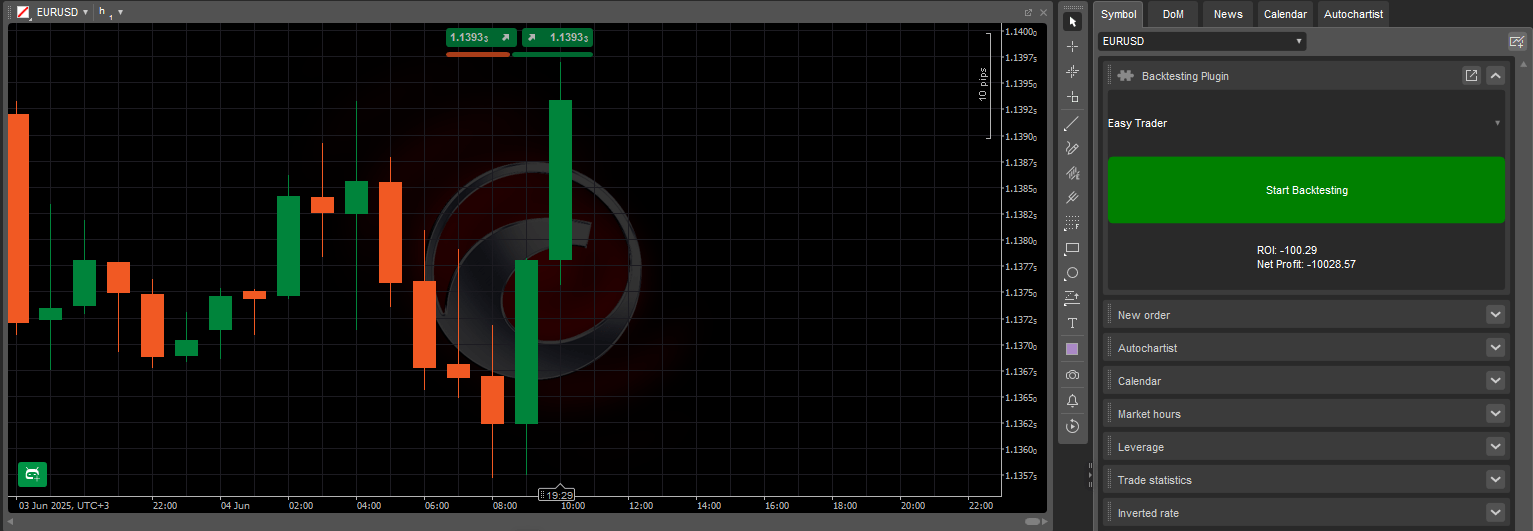
Wtyczka BacktestingInPlugins Sample umożliwia uruchamianie testów strategii historycznych bezpośrednio z interfejsu platformy cTrader przy użyciu następujących kluczowych funkcji:
Tworzy ustrukturyzowany układ panelu z menu rozwijanym, przyciskiem akcji i polem wyświetlania wyników.
Wyświetla wszystkie zainstalowane cBoty w menu rozwijanym w celu łatwego wyboru.
Uruchamia backtest na ustawionym symbolu przy użyciu danych historycznych po uruchomieniu.
Wyświetla zwrot z inwestycji (ROI) i zysk netto z wyników backtestingu.
Ta wtyczka działa w niestandardowym panelu w Panelu aktywnego symbolu i pozostaje aktywna, gdy cTrader Windows lub Mac jest otwarty. Zatrzymuje się automatycznie, gdy platforma jest zamknięta lub uruchomiona ponownie.
Kod wtyczki BacktestingInPlugins Sample jest dostępny w naszych publicznych repozytoriach C# i Python. Ten sam kod jest dostarczany jako szablon w kreatorze tworzenia algorytmu w cTrader Windows lub Mac, lub możesz po prostu skopiować i użyć poniższego fragmentu:
usingSystem;usingcAlgo.API;usingcAlgo.API.Collections;usingcAlgo.API.Indicators;usingcAlgo.API.Internals;usingSystem.Linq;usingSystem.Text.Json;usingSystem.Text.Json.Nodes;namespacecAlgo.Plugins{[Plugin(AccessRights = AccessRights.None)]publicclassBacktestingInPluginsSample:Plugin{// Declaring the necessary UI elements// and the cBot (RobotType) selected in the ComboBoxprivateGrid_grid;privateComboBox_cBotsComboBox;privateButton_startBacktestingButton;privateTextBlock_resultsTextBlock;privateRobotType_selectedRobotType;protectedoverridevoidOnStart(){// Initialising and structuring the UI elements_grid=newGrid(3,1);_cBotsComboBox=newComboBox();_startBacktestingButton=newButton{BackgroundColor=Color.Green,CornerRadius=newCornerRadius(5),Text="Start Backtesting",};_resultsTextBlock=newTextBlock{HorizontalAlignment=HorizontalAlignment.Center,VerticalAlignment=VerticalAlignment.Center,Text="Select a cBot...",};_grid.AddChild(_cBotsComboBox,0,0);_grid.AddChild(_startBacktestingButton,1,0);_grid.AddChild(_resultsTextBlock,2,0);varblock=Asp.SymbolTab.AddBlock("Backtesting Plugin");block.Child=_grid;// Populating the ComboBox with existing cBotsPopulateCBotsComboBox();// Assigning event handlers to the Button.Click,// ComboBox.SelectedItemChanged, and Backtesting.Completed events_startBacktestingButton.Click+=StartBacktestingButton_Click;_cBotsComboBox.SelectedItemChanged+=CBotsComboBox_SelectedItemChanged;Backtesting.Completed+=Backtesting_Completed;}protectedvoidStartBacktestingButton_Click(ButtonClickEventArgsobj){// Initialising and configuring the backtesting settingsvarbacktestingSettings=newBacktestingSettings{DataMode=BacktestingDataMode.M1,StartTimeUtc=newDateTime(2023,6,1),EndTimeUtc=DateTime.UtcNow,Balance=10000,};// Starting backtesting on EURUSD h1Backtesting.Start(_selectedRobotType,"EURUSD",TimeFrame.Hour,backtestingSettings);// Disabling other controls and changing// the text inside the TextBlock_cBotsComboBox.IsEnabled=false;_startBacktestingButton.IsEnabled=false;_resultsTextBlock.Text="Backtesting in progress...";}protectedvoidPopulateCBotsComboBox(){// Iterating over the AlgoRegistry and// getting the names of all installed cBotsforeach(varrobotTypeinAlgoRegistry.OfType<RobotType>()){_cBotsComboBox.AddItem(robotType.Name);}}protectedvoidBacktesting_Completed(BacktestingCompletedEventArgsobj){// Attaining the JSON results of backtestingstringjsonResults=obj.JsonReport;// Converting the JSON string into a JsonNodeJsonNoderesultsNode=JsonNode.Parse(jsonResults);// Attaining the ROI and net profit from backtesting results_resultsTextBlock.Text=$"ROI: {resultsNode["main"]["roi"]}\nNet Profit: {resultsNode["main"]["netProfit"]}";// Re-enabling controls after backtesting is finished_cBotsComboBox.IsEnabled=true;_startBacktestingButton.IsEnabled=true;}protectedvoidCBotsComboBox_SelectedItemChanged(ComboBoxSelectedItemChangedEventArgsobj){// Updating the variable to always contain// the cBot selected in the ComboBox_selectedRobotType=AlgoRegistry.Get(obj.SelectedItem)asRobotType;}}}
importclrclr.AddReference("cAlgo.API")fromcAlgo.APIimport*fromSystemimportDateTimefromSystem.Text.Json.NodesimportJsonNodefromSystem.Text.JsonimportJsonDocumentOptionsimportjsonclassBacktestingInPluginsSample():defon_start(self):self.grid=Grid(3,1)self.cBotsComboBox=ComboBox()self.startBacktestingButton=Button()self.startBacktestingButton.BackgroundColor=Color.Greenself.startBacktestingButton.CornerRadius=CornerRadius(5)self.startBacktestingButton.Text="Start Backtesting"self.resultsTextBlock=TextBlock()self.resultsTextBlock.HorizontalAlignment=HorizontalAlignment.Centerself.resultsTextBlock.VerticalAlignment=VerticalAlignment.Centerself.resultsTextBlock.Text="Select a cBot..."self.grid.AddChild(self.cBotsComboBox,0,0)self.grid.AddChild(self.startBacktestingButton,1,0)self.grid.AddChild(self.resultsTextBlock,2,0)block=api.Asp.SymbolTab.AddBlock("Backtesting Plugin")block.Child=self.grid# Populating the ComboBox with existing cBotsself.populate_cbots_combobox();self.startBacktestingButton.Click+=self.on_start_backtesting_button_click;self.cBotsComboBox.SelectedItemChanged+=self.on_cbots_combobox_selected_item_changed;api.Backtesting.Completed+=self.on_backtesting_completed;defpopulate_cbots_combobox(self):# Iterating over the AlgoRegistry and getting the names of all installed cBotsforrobotTypeinapi.AlgoRegistry.Robots:self.cBotsComboBox.AddItem(robotType.Name)defon_start_backtesting_button_click(self,args):backtestingSettings=BacktestingSettings()backtestingSettings.DataMode=BacktestingDataMode.M1backtestingSettings.StartTimeUtc=DateTime(DateTime.UtcNow.Year-2,DateTime.UtcNow.Month,DateTime.UtcNow.Day)backtestingSettings.EndTimeUtc=DateTime.UtcNowbacktestingSettings.Balance=10000# Starting backtesting on EURUSD h1self.backtestingProcess=api.Backtesting.Start(self.selectedRobotType,"EURUSD",TimeFrame.Hour,backtestingSettings)# Disabling other controls and changing the text inside the TextBlockself.cBotsComboBox.IsEnabled=Falseself.startBacktestingButton.IsEnabled=Falseself.resultsTextBlock.Text="Backtesting in progress..."defon_cbots_combobox_selected_item_changed(self,args):self.selectedRobotType=RobotType(api.AlgoRegistry.Get(args.SelectedItem))defon_backtesting_completed(self,args):ifint(args.Process.BacktestingError)>0:api.Print(f"Backtesting failed with error {args.Process.BacktestingError}")returnjsonResults=json.loads(args.JsonReport)# # Attaining the ROI and net profit from backtesting resultsself.resultsTextBlock.Text=f"ROI: {jsonResults["main"]["roi"]}\nNet Profit: {jsonResults["main"]["netProfit"]}"# Re-enabling controls after backteting is finishedself.cBotsComboBox.IsEnabled=True;self.startBacktestingButton.IsEnabled=True;
Ta wtyczka zapewnia bezpośredni interfejs do inicjowania backtestów i przeglądania podstawowych wyników. Poniższa tabela przedstawia jej kluczowe komponenty i ich funkcje:
Parametr
Opis
Możliwe wartości
_grid
Definiuje układ interfejsu wtyczki.
(3, 1), (2, 2), itd.
_startBacktestingButton
Dostosowuje wygląd i etykietę przycisku startu.
Start Backtesting, Color.Green, new CornerRadius(5)
_cBotsComboBox.AddItem
Wypełnia ComboBox cBotami z rejestru.
robottype.name
_resultsTextBlock.Text
Wyświetla komunikaty podczas cyklu backtestingu.
Wybierz cBota..., Backtesting w toku..., Podsumowanie wyników backtestingu, itd.
CBotsComboBox_SelectedItemChanged
Aktualizuje wybranego cBota do testowania.
obj.selecteditem
StartTimeUtc
Data i godzina rozpoczęcia backtestingu w UTC.
new datetime(2023, 6, 1)
EndTimeUtc
Data i godzina zakończenia backtestingu w UTC.
datetime.utcnow
DataMode
Definiuje, co reprezentuje każdy ruch punktu danych (1 minuta, 1 godzina lub 1 dzień).
backtestingdatamode.m1
Balance
Początkowe saldo konta wirtualnego.
10000, 20000, itd.
Backtesting.Start
Definiuje, na jakim symbolu i ramach czasowych uruchamiać backtesty.
eurusd, timeframe.hour
Backtesting_Completed
Wyodrębnia i pokazuje wyniki testów w interfejsie użytkownika.
resultsnode[main][roi], resultsnode[main][netprofit], itd.
Uwaga
Upewnij się, że w cTrader jest zainstalowany co najmniej jeden cBot, aby menu rozwijane zostało poprawnie wypełnione.
Ta wtyczka zapewnia sposób na uruchamianie testów strategii historycznych w Panelu aktywnego symbolu. Upraszcza wybieranie i testowanie cBotów, co czyni ją idealną do oceny strategii. Poniżej przedstawiono praktyczne przypadki użycia, które pokazują, jak wtyczka może być zastosowana w rzeczywistych scenariuszach handlowych.
Przypadek użycia
Scenariusz
Wartość
Porównanie strategii
Uruchamiaj backtesting na wielu cBotach przy użyciu identycznych warunków testowych.
Umożliwia bezpośrednie porównanie wydajności w ramach jednej sesji.
Szybki przegląd wydajności
Testuj dowolnego zainstalowanego cBota na standardowej konfiguracji rynkowej.
Pomaga ocenić wydajność cBota przed uruchomieniem go na koncie rzeczywistym.
Backtesting ze stałymi regułami
Weryfikuj zmiany w algorytmie, uruchamiając wstępnie zdefiniowany backtesting.
Zapewnia spójność warunków testowych podczas debugowania lub testowania wersji strategii.
Narzędzie szybkiego wglądu
Wyświetlaj ROI i informacje zwrotne dotyczące zysku natychmiast po przetestowaniu zainstalowanych cBotów.
Oszczędza czas w porównaniu z uruchamianiem oddzielnych sesji testowych.
Ta wtyczka zapewnia usprawniony interfejs do wybierania cBota i uruchamiania backtestingu historycznego przy użyciu wstępnie zdefiniowanych ustawień. Uruchamia test na wybranym symbolu i przedziale czasowym, a następnie wyświetla kluczowe wskaźniki wydajności, takie jak ROI i zysk netto. Struktura wspiera szybką walidację strategii i jest adaptowalna do różnych scenariuszy handlowych.
Aby uzyskać więcej szczegółów dotyczących rozwoju, zapoznaj się z naszą dokumentacją wtyczek.