ASP Section Example
Overview
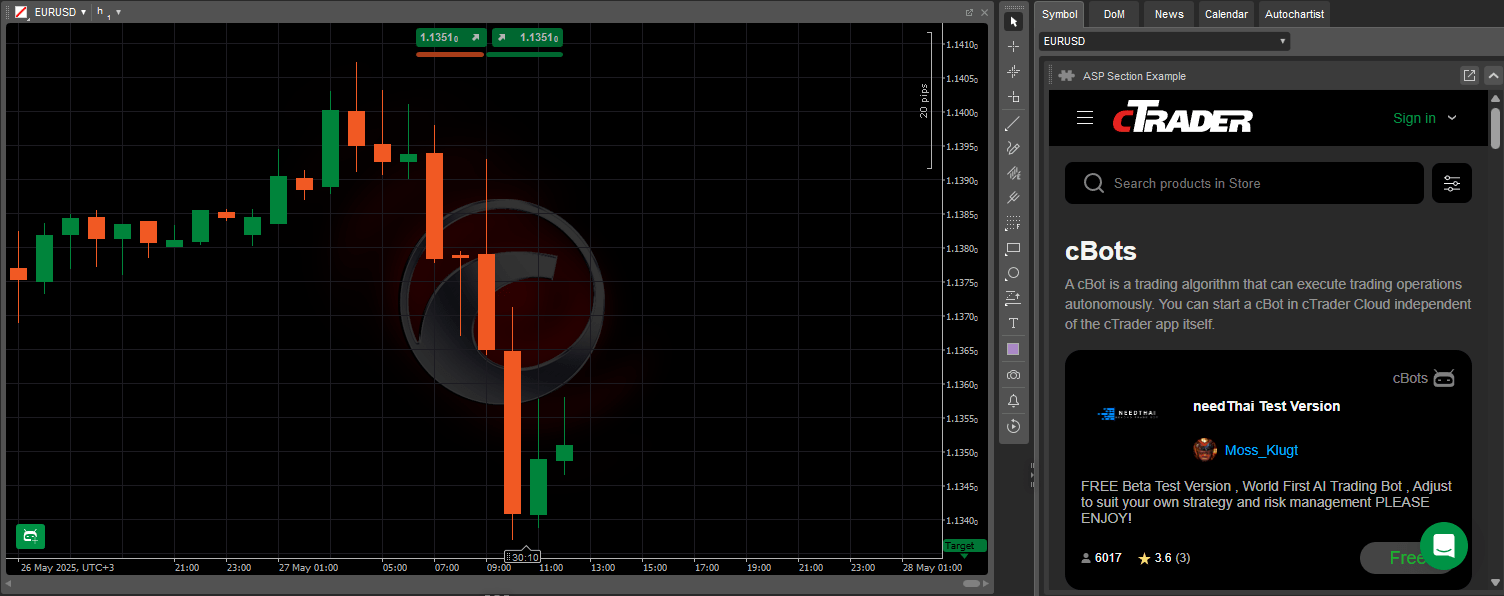
The ASP Section Example plugin creates a dedicated web-based panel directly inside Active Symbol Panel in cTrader through the following key functionalities:
- Embeds a WebView to load and display live content from an external website.
- Launches with default panel size, position and visibility to ensure a clear, organised layout before customisation.
- Opens a specified webpage automatically, making the content instantly available as soon as the plugin runs.
Plugin creation
Learn how to create plugins, using either C# or Python, in our step-by-step guides.
ASP Section Example plugin code is available in our public C# and Python repositories. The same code is provided as a template in the algorithm creation wizard in cTrader Windows or Mac, or you can simply copy and use the snippet below:
1 2 3 4 5 6 7 8 9 10 11 12 13 14 15 16 17 18 19 20 21 | |
1 2 3 4 5 6 7 8 9 10 11 12 13 14 15 | |
Customisation options
The ASP Section Example plugin embeds a web browser window in Active Symbol Panel. The table below outlines its key components and their functions:
| Parameter | Description | Possible values |
|---|---|---|
AddBlock | Identifies the plugin section in the UI. | My title, News tracker, etc. |
block.Index | Determines block position relative to other UI components. | 2, 3, 4, etc. |
block.Height | Sets the height of the plugin block. | 500, 550, 600, etc. |
block.IsExpanded | Controls whether the section is expanded by default. | true or false |
webView.NavigateAsync | URL of the webpage displayed in the WebView control. | https://ctrader.com/ |
Warning
Avoid embedding pages that require login or user interaction.
Tip
Keep the layout clean to avoid visual clutter in Active Symbol Panel.
Use cases
ASP Section Example provides a flexible way to display web-based content alongside your trading symbols. Below are practical use cases that demonstrate how the plugin can enhance the trading experience.
| Use case | Scenario | Value |
|---|---|---|
| Economic calendar | Embed a live economic calendar from a trusted financial site. | Offers visibility into upcoming market events within the platform. |
| Financial news ticker | Embed a scrolling news feed or an RSS-to-HTML display of real-time financial headlines. | Provides access to market-moving news directly within the trading environment. |
| Asset-specific news | Show a webpage filtered to the symbol you are trading | Trading-relevant headlines support more informed decision-making. |
| Trading session timers | Display a live webpage showing global market opening hours or countdowns. | Highlights upcoming session starts, helping to improve trade timing. |
Summary
ASP Section Example shows how to integrate a static web page into cTrader using a WebView in Active Symbol Panel. The page appears in a fixed-height, user-visible section that loads automatically, making it ideal for embedding reference content or update feeds without disrupting the trading interface.
For further development details, refer to our plugin documentation.