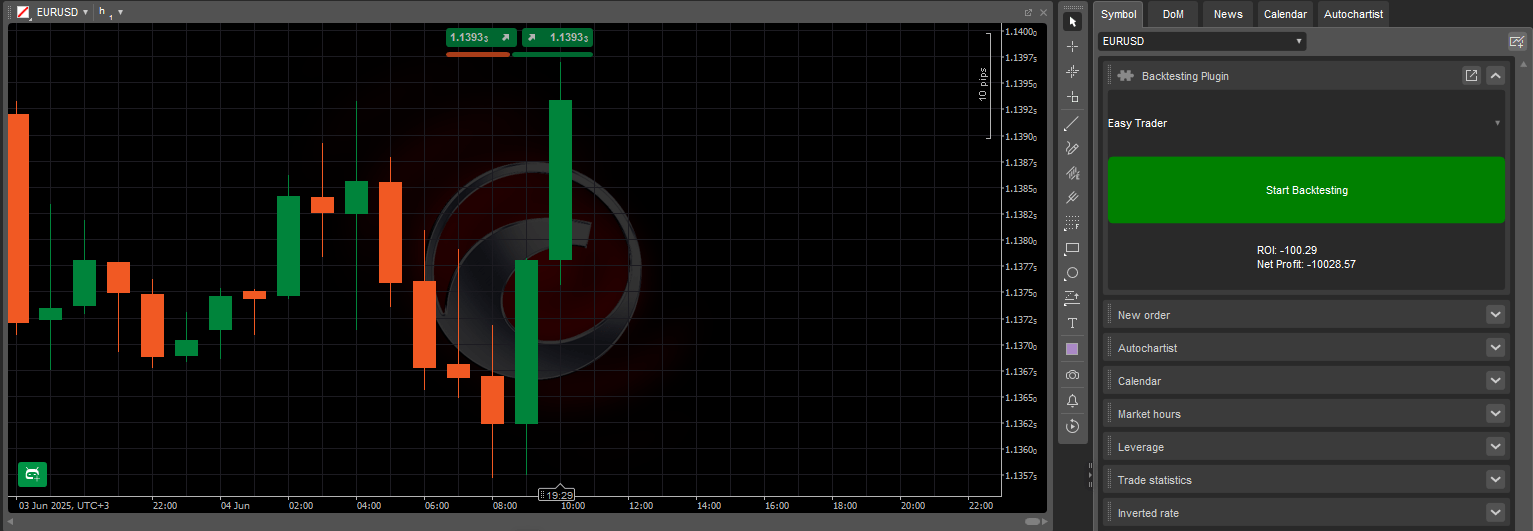
BacktestingInPlugins Sample eklentisi, aşağıdaki temel işlevleri kullanarak geçmiş strateji testini doğrudan cTrader platform arayüzünden çalıştırmayı sağlar:
Açılır menü, eylem düğmesi ve sonuç görüntüleme alanına sahip yapılandırılmış bir panel düzeni oluşturur.
Kolay seçim için yüklü tüm cBot'ları açılır menüde listeler.
Tetiklendiğinde, belirlenen sembol üzerinde geçmiş verileri kullanarak geriye dönük bir test çalıştırır.
Geriye dönük test sonuçlarından yatırım getirisini (ROI) ve net kârı görüntüler.
Bu eklenti, Aktif Sembol Paneli içinde özel bir panelde çalışır ve cTrader Windows veya Mac açıkken aktif kalır. Platform kapatıldığında veya yeniden başlatıldığında otomatik olarak durur.
BacktestingInPlugins Sample eklenti kodu, genel C# ve Python depolarımızda mevcuttur. Aynı kod, cTrader Windows veya Mac'teki algoritma oluşturma sihirbazında bir şablon olarak sağlanmıştır veya aşağıdaki kod parçasını kopyalayıp kullanabilirsiniz:
usingSystem;usingcAlgo.API;usingcAlgo.API.Collections;usingcAlgo.API.Indicators;usingcAlgo.API.Internals;usingSystem.Linq;usingSystem.Text.Json;usingSystem.Text.Json.Nodes;namespacecAlgo.Plugins{[Plugin(AccessRights = AccessRights.None)]publicclassBacktestingInPluginsSample:Plugin{// Declaring the necessary UI elements// and the cBot (RobotType) selected in the ComboBoxprivateGrid_grid;privateComboBox_cBotsComboBox;privateButton_startBacktestingButton;privateTextBlock_resultsTextBlock;privateRobotType_selectedRobotType;protectedoverridevoidOnStart(){// Initialising and structuring the UI elements_grid=newGrid(3,1);_cBotsComboBox=newComboBox();_startBacktestingButton=newButton{BackgroundColor=Color.Green,CornerRadius=newCornerRadius(5),Text="Start Backtesting",};_resultsTextBlock=newTextBlock{HorizontalAlignment=HorizontalAlignment.Center,VerticalAlignment=VerticalAlignment.Center,Text="Select a cBot...",};_grid.AddChild(_cBotsComboBox,0,0);_grid.AddChild(_startBacktestingButton,1,0);_grid.AddChild(_resultsTextBlock,2,0);varblock=Asp.SymbolTab.AddBlock("Backtesting Plugin");block.Child=_grid;// Populating the ComboBox with existing cBotsPopulateCBotsComboBox();// Assigning event handlers to the Button.Click,// ComboBox.SelectedItemChanged, and Backtesting.Completed events_startBacktestingButton.Click+=StartBacktestingButton_Click;_cBotsComboBox.SelectedItemChanged+=CBotsComboBox_SelectedItemChanged;Backtesting.Completed+=Backtesting_Completed;}protectedvoidStartBacktestingButton_Click(ButtonClickEventArgsobj){// Initialising and configuring the backtesting settingsvarbacktestingSettings=newBacktestingSettings{DataMode=BacktestingDataMode.M1,StartTimeUtc=newDateTime(2023,6,1),EndTimeUtc=DateTime.UtcNow,Balance=10000,};// Starting backtesting on EURUSD h1Backtesting.Start(_selectedRobotType,"EURUSD",TimeFrame.Hour,backtestingSettings);// Disabling other controls and changing// the text inside the TextBlock_cBotsComboBox.IsEnabled=false;_startBacktestingButton.IsEnabled=false;_resultsTextBlock.Text="Backtesting in progress...";}protectedvoidPopulateCBotsComboBox(){// Iterating over the AlgoRegistry and// getting the names of all installed cBotsforeach(varrobotTypeinAlgoRegistry.OfType<RobotType>()){_cBotsComboBox.AddItem(robotType.Name);}}protectedvoidBacktesting_Completed(BacktestingCompletedEventArgsobj){// Attaining the JSON results of backtestingstringjsonResults=obj.JsonReport;// Converting the JSON string into a JsonNodeJsonNoderesultsNode=JsonNode.Parse(jsonResults);// Attaining the ROI and net profit from backtesting results_resultsTextBlock.Text=$"ROI: {resultsNode["main"]["roi"]}\nNet Profit: {resultsNode["main"]["netProfit"]}";// Re-enabling controls after backtesting is finished_cBotsComboBox.IsEnabled=true;_startBacktestingButton.IsEnabled=true;}protectedvoidCBotsComboBox_SelectedItemChanged(ComboBoxSelectedItemChangedEventArgsobj){// Updating the variable to always contain// the cBot selected in the ComboBox_selectedRobotType=AlgoRegistry.Get(obj.SelectedItem)asRobotType;}}}
importclrclr.AddReference("cAlgo.API")fromcAlgo.APIimport*fromSystemimportDateTimefromSystem.Text.Json.NodesimportJsonNodefromSystem.Text.JsonimportJsonDocumentOptionsimportjsonclassBacktestingInPluginsSample():defon_start(self):self.grid=Grid(3,1)self.cBotsComboBox=ComboBox()self.startBacktestingButton=Button()self.startBacktestingButton.BackgroundColor=Color.Greenself.startBacktestingButton.CornerRadius=CornerRadius(5)self.startBacktestingButton.Text="Start Backtesting"self.resultsTextBlock=TextBlock()self.resultsTextBlock.HorizontalAlignment=HorizontalAlignment.Centerself.resultsTextBlock.VerticalAlignment=VerticalAlignment.Centerself.resultsTextBlock.Text="Select a cBot..."self.grid.AddChild(self.cBotsComboBox,0,0)self.grid.AddChild(self.startBacktestingButton,1,0)self.grid.AddChild(self.resultsTextBlock,2,0)block=api.Asp.SymbolTab.AddBlock("Backtesting Plugin")block.Child=self.grid# Populating the ComboBox with existing cBotsself.populate_cbots_combobox();self.startBacktestingButton.Click+=self.on_start_backtesting_button_click;self.cBotsComboBox.SelectedItemChanged+=self.on_cbots_combobox_selected_item_changed;api.Backtesting.Completed+=self.on_backtesting_completed;defpopulate_cbots_combobox(self):# Iterating over the AlgoRegistry and getting the names of all installed cBotsforrobotTypeinapi.AlgoRegistry.Robots:self.cBotsComboBox.AddItem(robotType.Name)defon_start_backtesting_button_click(self,args):backtestingSettings=BacktestingSettings()backtestingSettings.DataMode=BacktestingDataMode.M1backtestingSettings.StartTimeUtc=DateTime(DateTime.UtcNow.Year-2,DateTime.UtcNow.Month,DateTime.UtcNow.Day)backtestingSettings.EndTimeUtc=DateTime.UtcNowbacktestingSettings.Balance=10000# Starting backtesting on EURUSD h1self.backtestingProcess=api.Backtesting.Start(self.selectedRobotType,"EURUSD",TimeFrame.Hour,backtestingSettings)# Disabling other controls and changing the text inside the TextBlockself.cBotsComboBox.IsEnabled=Falseself.startBacktestingButton.IsEnabled=Falseself.resultsTextBlock.Text="Backtesting in progress..."defon_cbots_combobox_selected_item_changed(self,args):self.selectedRobotType=RobotType(api.AlgoRegistry.Get(args.SelectedItem))defon_backtesting_completed(self,args):ifint(args.Process.BacktestingError)>0:api.Print(f"Backtesting failed with error {args.Process.BacktestingError}")returnjsonResults=json.loads(args.JsonReport)# # Attaining the ROI and net profit from backtesting resultsself.resultsTextBlock.Text=f"ROI: {jsonResults["main"]["roi"]}\nNet Profit: {jsonResults["main"]["netProfit"]}"# Re-enabling controls after backteting is finishedself.cBotsComboBox.IsEnabled=True;self.startBacktestingButton.IsEnabled=True;
Bu eklenti, geriye dönük testleri başlatmak ve temel sonuçları görüntülemek için doğrudan bir arayüz sağlar. Aşağıdaki tablo, temel bileşenlerini ve işlevlerini özetlemektedir:
Parametre
Açıklama
Olası değerler
_grid
Eklenti arayüzü için düzeni tanımlar.
(3, 1), (2, 2), vb.
_startBacktestingButton
Başlat düğmesinin görünümünü ve etiketini özelleştirir.
Start Backtesting, Color.Green, new CornerRadius(5)
_cBotsComboBox.AddItem
Açılır kutuyu kayıttaki cBot'larla doldurur.
robottype.name
_resultsTextBlock.Text
Geriye dönük test döngüsü sırasında mesajları görüntüler.
Bir cBot seçin..., Geriye dönük test devam ediyor..., Geriye dönük test sonuçları özeti, vb.
CBotsComboBox_SelectedItemChanged
Test için seçilen cBot'u günceller.
obj.selecteditem
StartTimeUtc
Geriye dönük test başlangıç tarihi ve UTC saati.
new datetime(2023, 6, 1)
EndTimeUtc
Geriye dönük test bitiş tarihi ve UTC saati.
datetime.utcnow
DataMode
Her veri noktası hareketini neyin temsil ettiğini tanımlar (1 dakika, 1 saat veya 1 gün).
backtestingdatamode.m1
Balance
Başlangıç sanal hesap bakiyesi.
10000, 20000, vb.
Backtesting.Start
Hangi sembol ve zaman diliminde geriye dönük testlerin çalıştırılacağını tanımlar.
eurusd, timeframe.hour
Backtesting_Completed
Test sonuçlarını çıkarır ve kullanıcı arayüzünde gösterir.
resultsnode[main][roi], resultsnode[main][netprofit], vb.
Not
Açılır menünün doğru şekilde doldurulması için cTrader'da en az bir cBot'un yüklü olduğundan emin olun.
Bu eklenti, Aktif Sembol Panelinde geçmiş strateji testlerini çalıştırmak için bir yol sağlar. cBot'ları seçmeyi ve test etmeyi basitleştirir, bu da onu strateji değerlendirmesi için ideal kılar. Aşağıda, eklentinin gerçek işlem senaryolarına nasıl uygulanabileceğini gösteren pratik kullanım durumları bulunmaktadır.
Kullanım durumu
Senaryo
Değer
Strateji karşılaştırması
Aynı test koşullarını kullanarak birden fazla cBot üzerinde geriye dönük testler çalıştırın.
Tek bir seans içinde doğrudan performans karşılaştırması sağlar.
Hızlı performans incelemesi
Yüklü herhangi bir cBot'u standart bir piyasa kurulumunda test edin.
Canlı bir hesapta çalıştırmadan önce bir cBot'un performansını değerlendirmenize yardımcı olur.
Sabit kurallar geriye dönük testi
Önceden tanımlanmış bir geriye dönük test başlatarak algoritma değişikliklerini doğrulayın.
Stratejileri hata ayıklarken veya sürüm test ederken test koşullarında tutarlılık sağlar.
Hızlı analiz aracı
Yüklü cBot'ları test ettikten hemen sonra ROI ve kâr geri bildirimini görüntüleyin.
Ayrı test oturumları başlatmaya kıyasla zaman kazandırır.
Bu eklenti, bir cBot seçmek ve önceden tanımlanmış ayarları kullanarak geçmişe dönük bir geriye dönük test çalıştırmak için kolaylaştırılmış bir arayüz sağlar. Seçilen bir sembol ve zaman aralığında testi çalıştırır, ardından ROI ve net kâr gibi temel performans metriklerini görüntüler. Yapı, hızlı strateji doğrulamayı destekler ve çeşitli işlem senaryolarına uyarlanabilir.