Custom Window Plugin
概述 
Custom Window Plugin 在 cTrader 中创建了一个简单的界面,用于通过以下关键功能触发基于用户输入的操作:
- 在 cTrader 平台内构建一个窗口界面,以显示自定义视觉组件与交易工作区。
- 添加一个按钮用于用户交互,以手动启动操作。
- 在按钮点击时触发预定义逻辑,实现对交易任务的一致处理。
- 根据设置的条件更新未平仓头寸,仅在满足特定条件时应用更改。
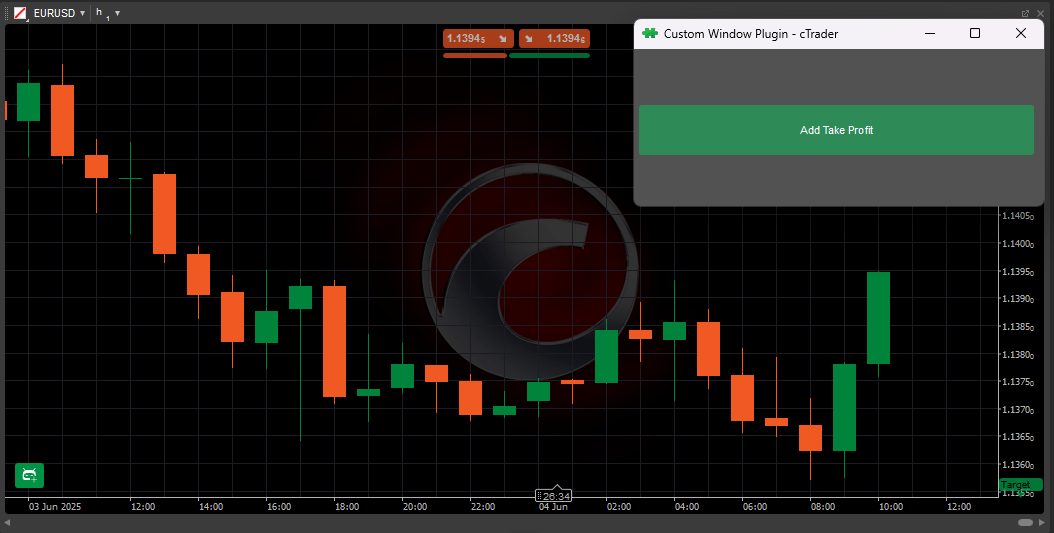
该插件添加了一个窗口,您可以在其中对所有未平仓头寸执行特定操作。 这有助于手动交易,让您一次性将相同规则应用于每个头寸,而无需单独更改每个头寸。
插件创建 
了解如何通过我们的分步指南创建、编辑和构建插件,无论是从模板还是从头开始。
您可以在 GitHub 上找到 Custom Window Plugin 的代码,或直接复制以下内容。
示例代码
using System;
using cAlgo.API;
using cAlgo.API.Collections;
using cAlgo.API.Indicators;
using cAlgo.API.Internals;

namespace cAlgo.Plugins
{
    [Plugin(AccessRights = AccessRights.None)]
    public class CustomWindowPlugin : Plugin
    {
        private Button _buttonAddTakeProfit;
        private Window _window;

        protected override void OnStart()
        {
            _buttonAddTakeProfit = new Button
            {
                BackgroundColor = Color.SeaGreen,
                Height = 50,
                Text = "Add Take Profit"
            };

            _buttonAddTakeProfit.Click += _buttonAddTakeProfit_Click;

            _window = new Window
            {
                Height = 150,
                Width = 150,
                Padding = new Thickness(5, 10, 10, 5)
            };

            _window.Child = _buttonAddTakeProfit;
            _window.Show();
        }

        private void _buttonAddTakeProfit_Click(ButtonClickEventArgs args)
        {
            foreach (var position in Positions)
            {
                if (position.TakeProfit is null)
                {
                    position.ModifyTakeProfitPips(20);
                }
            }
        }

        protected override void OnStop()
        {
            // Handle Plugin stop here
        }
    }
}
自定义选项 
| 参数 | 描述 | 可选值 |
|---|---|---|
_buttonAddTakeProfit.Text | 设置按钮上显示的文本标签。 | Add take profit |
_buttonAddTakeProfit.Height | 指定按钮在窗口中的高度。 | 50, 60, 65, 等。 |
_buttonAddTakeProfit.BackgroundColor | 设置按钮的背景颜色。 | color.seagreen |
_buttonAddTakeProfit.Click | 当按钮被点击时触发事件。 | _buttonaddtakeprofit_click |
_window.Height | 设置窗口的高度。 | 150, 200, 220, 等。 |
_window.Width | 设置窗口的宽度。 | 150, 200, 220, 等。 |
_window.Padding | 定义窗口内围绕其子内容的间距。 | (5, 10, 10, 5), (8, 12, 12, 8), 等。 |
_window.Child | 将按钮指定为窗口内的内容。 | _buttonaddtakeprofit |
position.TakeProfit | 检查头寸是否已设置止盈。 | null |
position.ModifyTakeProfitPips | 通过将其设置为固定的点值来修改止盈。 | 20, 24, 26, 等。 |
用例 
| 使用场景 | 场景 | 值 |
|---|---|---|
| 批量止盈设置器 | 您有多个未设置止盈的未平仓头寸。 | 自动执行添加 20 点止盈水平的重复任务。 |
| 反应式交易管理器 | 市场快速波动,您需要立即保护利润。 | 一键为多个头寸应用止盈。 |
| 批量止损设置器 | 您希望快速为所有未平仓头寸应用 20 点止损。 | 设置一致的风险控制,无需单独编辑每笔交易。 |
总结 
Custom Window Plugin 通过允许您快速为所有未设置止盈的未平仓头寸应用 20 点止盈水平,增强了手动交易。 通过一个简单的浮动界面和单个操作按钮,它为交易管理带来了速度和一致性。
有关进一步的开发细节,请参阅我们的插件文档。