Orders
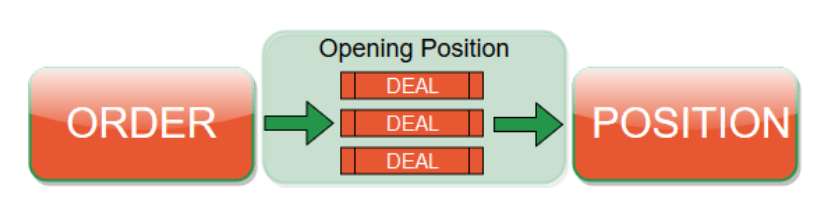
An order is a request sent to your broker to buy or sell an instrument. In cTrader, it instructs the broker to execute a trade under specific conditions by defining the symbol and specific order parameters. Once accepted, the order is executed as a deal.
In cTrader, orders, positions and deals represent different stages of the trade life cycle. Although they are treated as separate entities, understanding how they relate to each other helps clarify how trades are processed.
Tip
Think of trading like a visit to a restaurant. An order is what you pick from the menu and request. A deal is the moment it is actually served – the execution (fill), sometimes in parts. A position is what you currently have at your table.
Order types
In cTrader, there are four order types used to buy or sell instruments: market, limit, stop and stop-limit.
Note
Only market orders are filled immediately. All other order types are considered pending orders in cTrader and are filled only when specific conditions are met.
Market order
A market order is the simplest and fastest way to open a position. It is a request to buy or sell an instrument at the best available price and guarantees entry into the market. Although submitted immediately, execution may be affected by asset liquidity and network latency, which can lead to partial fills or slippage.
Example
Suppose EURUSD is trading at 1.16531 / 1.16535 and you want to enter the market immediately. You place a market buy order, which is filled at the best available ask price (around 1.16535, depending on liquidity and slippage).
Learn how to place market orders and set their parameters in cTrader Mobile, Web, Windows and Mac.
Limit order
A limit order is an instruction to buy or sell at a specific price or better. It ensures that your trade will only be executed at your set price or a more favourable one, but it is not guaranteed to be filled if the market does not reach that price.
Limit orders are commonly used to buy at a lower price during a pullback or to sell at a higher price during a rally. If the specified price is never reached, the order remains unfilled and no trade is executed.
Example
Suppose GBPUSD is trading at 1.33449 / 1.33460 and you expect a bounce. You place a buy limit order with an entry price of 1.33425 to enter only if the ask drops to that level (or lower) – 3.5 pips (0.00035) below the current ask price. If GBPUSD never reaches 1.33425, the order will not be filled.
Learn how to place limit orders and set their parameters in cTrader Mobile, Web, Windows and Mac.
Stop order
A stop order is a trigger to buy or sell that, once the market price reaches a specified stop level, activates a market order. It is often used to enter the market when price breaks a key level and confirms a trend direction.
Stop orders are commonly used to trade breakouts: you set the stop beyond a key support or resistance level, and if price reaches it, the order triggers and is filled at the best available price (which may differ slightly due to slippage).
Example
Suppose EURJPY is trading at 180.508 / 180.510 and you expect a downside move if support breaks. You place a sell stop order with an entry price of 180.480 to enter only if the bid drops to that level (or lower) – 2.8 pips (0.028) below the current bid price. Once triggered, the order becomes a market order and is filled at the best available price, which may be slightly different due to slippage.
Learn how to place stop orders and set their parameters in cTrader Mobile, Web, Windows and Mac.
Stop-limit order
A stop-limit order is a trigger to buy or sell that, once the price reaches a specified stop level, activates a limit order at a defined limit price or better. It provides greater control over execution price, though the order may not fill if the market moves beyond the limit range.
Example
Suppose XAUUSD is trading at 4224.46 / 4224.65 and you want to enter short only if price breaks lower. You place a sell stop-limit order with an entry price of 4224.00 and a limit range of 50 pips. If the bid drops to 4224.00 (or lower), the order is triggered and a limit sell order becomes active with a lowest acceptable price of 4223.50 (50 pips below 4224.00). The trade can be filled at 4223.50 or higher, but if price falls too quickly and trades below 4223.50 before the order is filled, it may not execute.
Learn how to place stop-limit orders and set their parameters in cTrader Mobile, Web, Windows and Mac.
Triggered vs executed
An order is triggered when its activation condition is met, and executed or filled when it is actually opened at a specific price and volume.
| Order type | Triggered | Executed | Comment |
|---|---|---|---|
| Market | Not applicable | Immediately at the best available market price | No price condition |
| Limit | Not applicable | When the market price reaches the entry price or better | Execution only |
| Stop | When the market reaches the entry price | Immediately after the trigger, at the market price | Actions happen nearly simultaneously |
| Stop-limit | When the market reaches the entry price | When the market reaches the price determined by the limit range | Triggered ≠ executed |
Order direction
Based on the order types above, consider the following categorisation by direction: buy or sell.
| Order type | Buy | Sell |
|---|---|---|
| Limit | Opens a buy position below the current market price (buy the dip). | Opens a sell position above the current market price (sell the rally). |
| Stop | Opens a buy position above the current market price (buy a breakout/continuation). | Opens a sell position below the current market price (sell a breakdown/continuation). |
| Stop-limit | Triggers above the current market price, then activates a limit order within the limit range (more control over the worst acceptable fill). | Triggers below the current market price, then activates a limit order within the limit range (more control over the worst acceptable fill). |
Note
When you create a pending order, its size is not limited by your available margin. However, when the order is triggered, it will only be executed if there is sufficient free margin at that moment. If there is not enough margin, the order will be rejected or cancelled by the system.
Order protections
Order protections in cTrader are automatic settings that help manage open trades by defining exit conditions. They reduce the need for manual intervention and ensure that risk and profit targets are handled automatically according to pre-defined rules.
cTrader supports two types of protection for stop loss and take profit:
- Relative protection – values are set in pips, relative to the opening price.
- Absolute protection – values are set as exact price levels.
Stop loss
A stop loss (SL) is a protection setting in cTrader that automatically closes a trade when the market moves against the trader and reaches a specified loss level. When the price hits the chosen stop-loss level, the position is closed at the best available market price, limiting further losses.
Example
Suppose you open a buy position for EURUSD at 1.16530 with a volume of 0.5 lots. You decide to limit your potential loss to 50 pips. In this case, your stop loss will be placed at 1.16030, which is 50 pips (0.00500) below your entry price. The pip value for this position is approximately 4.29 EUR, meaning that if the stop loss is triggered, the trade will close automatically at the best available market price with an estimated loss of around 215 EUR.
A trailing stop loss is a dynamic version of the stop loss available for all order types in cTrader. It automatically adjusts as the market moves in the trader’s favour, maintaining a fixed distance (in pips) from the current price. If the market reverses direction, the trailing stop remains at its last adjusted level, locking in profits or minimising potential losses.
Take profit
A take profit (TP) is a protection setting that automatically closes a trade when the market moves in the trader’s favour and reaches a specified profit level. When triggered, the position is closed at the best available market price, securing the realised profit without manual action.
Example
Suppose you open a sell position for GBPUSD at 1.33379 with a volume of 1 lot. You decide to take profit once the market falls by 100 pips. In this case, your take profit will be placed at 1.32379, which is 100 pips (0.01000) below your entry price. The pip value for this position is approximately 8.59 EUR, meaning that if the take profit level is reached, the trade will close automatically at the best available market price with an estimated profit of around 859 EUR.
Advanced take profit allows traders to set multiple profit targets for a single order. Each level defines a price and the portion of volume to close when that target is reached. As the market moves in the trader’s favour, cTrader automatically locks in profits at each level while keeping the remaining position open for further gains.
Learn how to add stop loss and take profits to your orders in cTrader Mobile, Web, Windows and Mac.